EasyManua.ls Logo

Avision @V6600 - Lcd Does Not Show Message after Command; The Product Is Not Connected to the Network

Avision @V6600
86 pages
Print Icon
To Next Page IconTo Next Page
To Previous Page IconTo Previous Page
Loading...
Service Manual
5-9
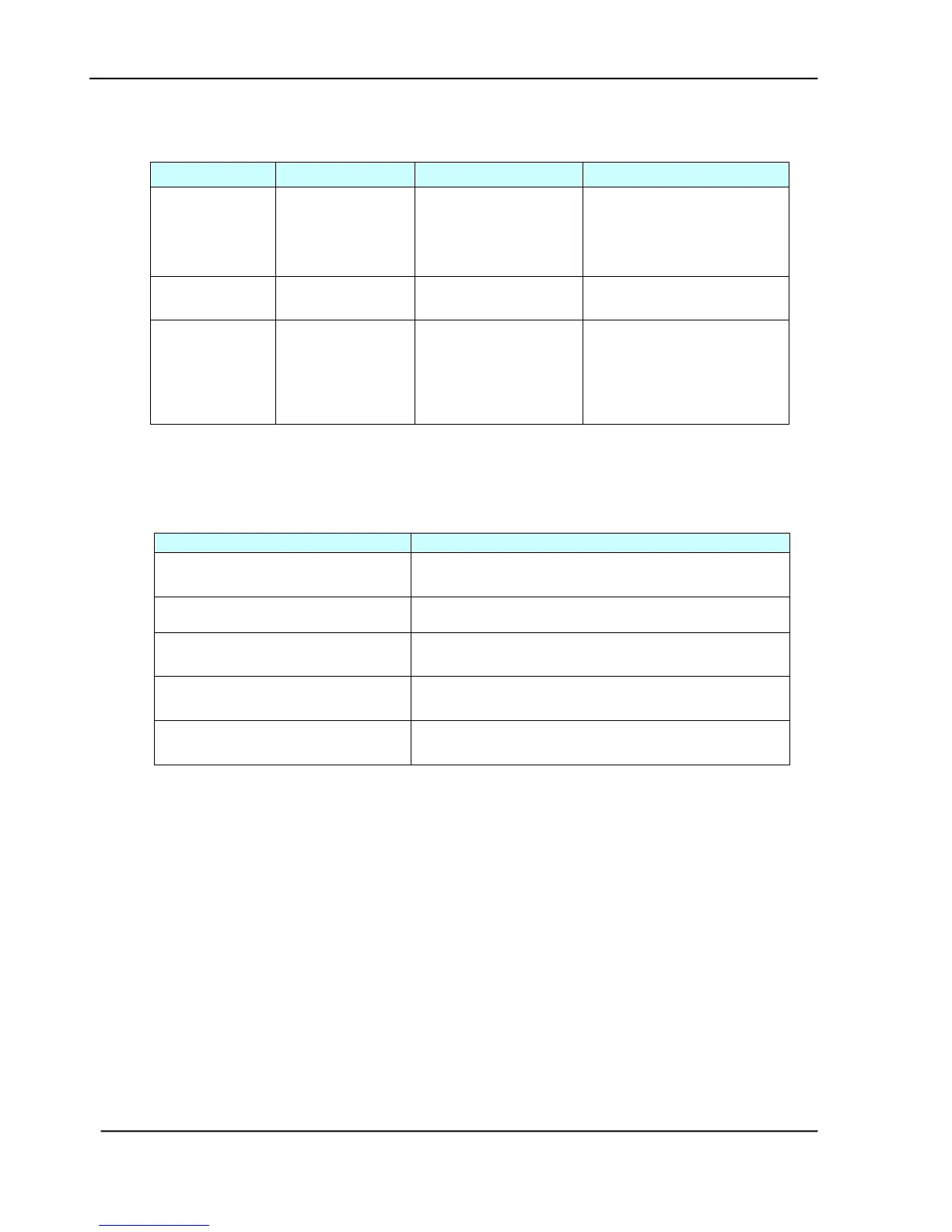
5.2.5 LCD DOES NOT SHOW MESSAGE AFTER COMMAND
Cause
Relevant unit
Check method
Maintenance method
LCD module
cable failure
Panel cable
Visual check
Attach the LCD module
cable and
secure it firmly
LCD problem
LCD PCB
Replace the LCD
PCB
Replace the LCD PCB
Push button
failure
Panel PCB
Replace the panel
PCB
1. Check the panel
cable and secure it
firmly.
2. Replace the panel
PCB.
Table 5.5
5.2.6 THE PRODUCT IS NOT CONNECTED TO THE NETWORK
Cause
Maintenance Method
RJ-45 connector is not plugged
in
Plug the connector in.
Network cable is damaged
Replace a good one
IP address is invalid
Ask your network administrator for a valid
address.
Subnet Mask is invalid
Ask your network administrator for a valid
value.
Gateway IP is invalid
Ask your network administrator for a valid
address.
Table 5.6

Table of Contents

Related product manuals