EasyManua.ls Logo

Avision @V6600 - Image Unclear; Noise Generated

Avision @V6600
86 pages
Print Icon
To Next Page IconTo Next Page
To Previous Page IconTo Previous Page
Loading...
5-8
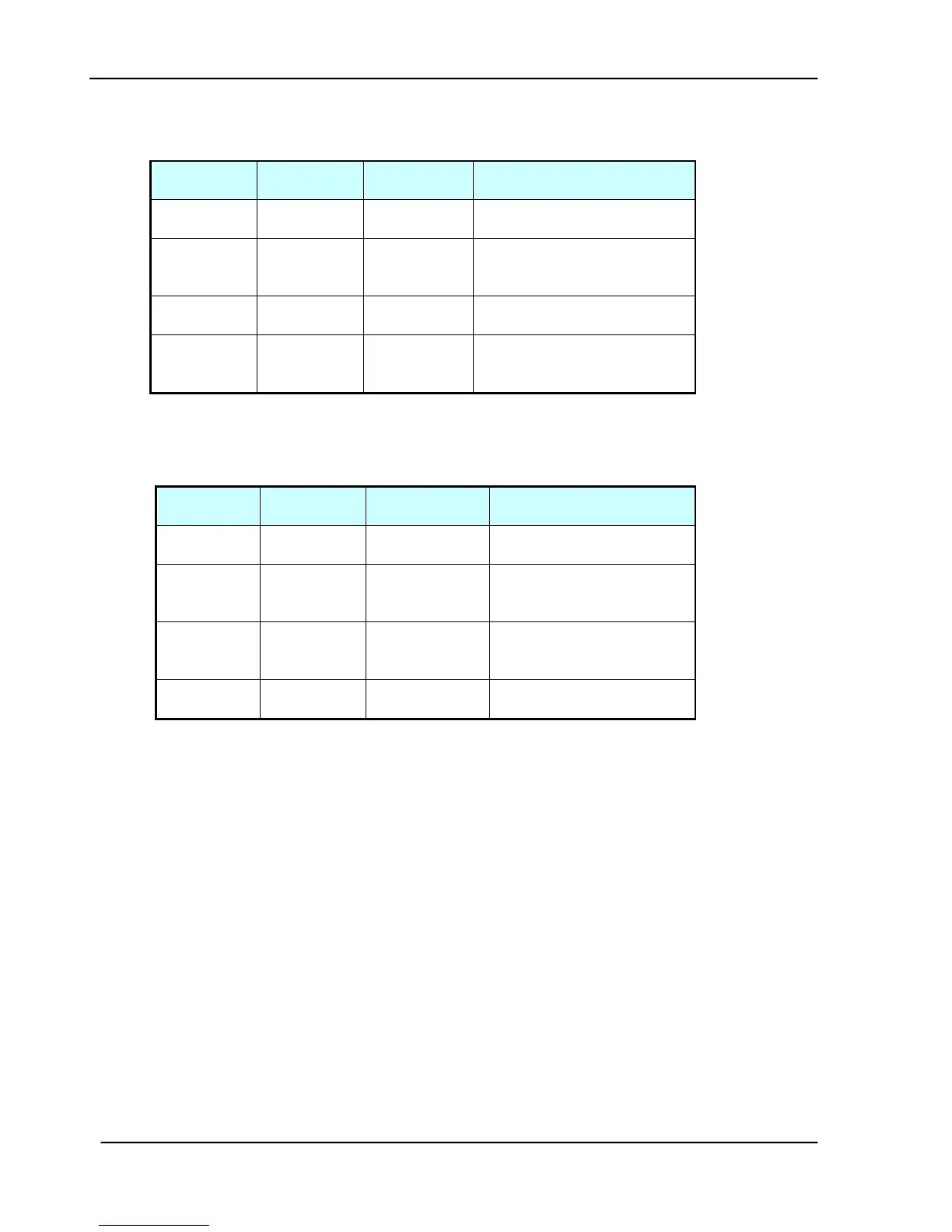
5.2.3 IMAGE UNCLEAR
Cause
Relevant
Unit
Check
Method
Maintenance Method
Lamp too
dark
Lamp
Visual check
Replace the lamp
Dirt on
flatbed glass
Flatbed
glass
Visual check
Clean the
flatbed glass with isopropyl
alcohol
Printer toner
low
Printer toner
Visual check
Check printer toner or
replace the toner
Printer
memory not
enough
Printer
Visual check
Add printer memory
Table 5.3
5.2.4 NOISE GENERATED
Cause
Relevant
Unit
Check
Method
Maintenance Method
Motor unit
failure
Motor unit
Replace the
motor unit
Replace the motor
Main control
PCB failure
Main control
PCB
Replace the
main control
PCB
Replace the main control
PCB
Optical
chassis
failure
Optical
chassis
Check optical
chassis
shakiness
Replace the optical
chassis
Dirt on rail
None
Visual check
Clean the rail
with oil
Table 5.4

Table of Contents

Related product manuals