Service Manual
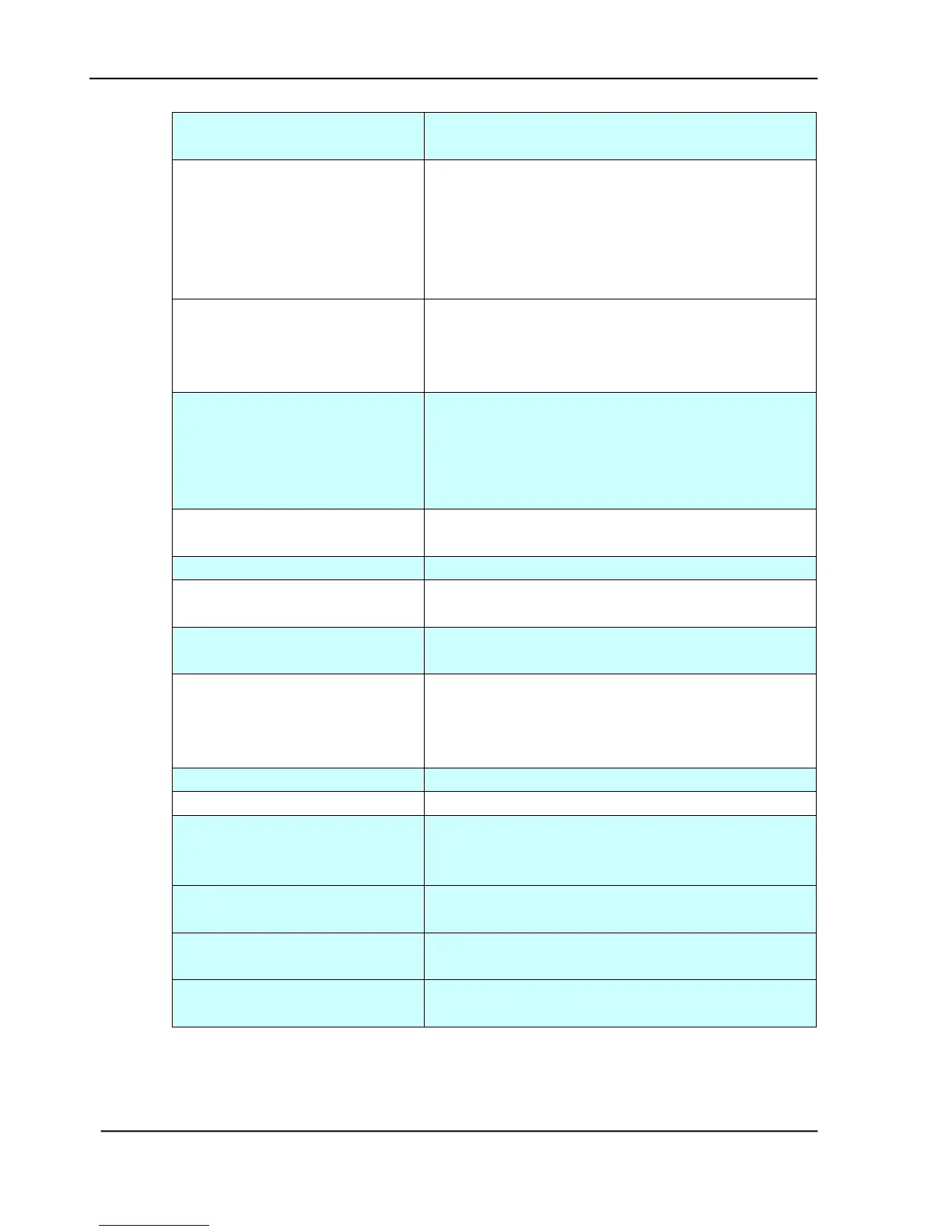
Reboot the machine, and try again. If the error
is still there, contact your network administrator.
Parameters or argument error
1. Check if the Device Name is valid. The Device
Name can be found in User Tools>General.
2. Check “From” address.
3. Check “To” address.
4. Contact your network administrator for
further help.
Command parameters not
implemented
Check if the Device Name is valid. The Device
Name can be found in User Tools>General.
Or you may contact your network administrator
for further help.
Contact your network administrator on mail
server’s authentication mechanism.
Choose SMTP authentication for E-mail security
or turn off the mail server’s authentication and
try again.
Contact your network administrator for further
help.
Contact your network administrator for further
help.
Exceeded storage allocation
1. Check “To” address.
2. Check mailbox storage allocation.
3. Contact your network administrator for
further help.
Mailbox name is not allowed
Mail action has not been taken.
1. Check network environment.
2. Check if email attachment size is larger than
the mailbox quota.
POP3 server address is wrong.
Check IP address of POP3. Or
contact your network administrator for help.
Failed to connect POP3 server.
Contact your network administrator for help.
Failed to login POP3 server.
Check login name and password.
Table 5.9









 To Next Page