2. CS-100 Specifications
Wireless transmission protocol
IEEE 802.11 a/b/g/n
Authentication protoco l
WPA2-PSK in stand alone mode
WPA2-PSK or IEEE 802.1X in network integration mode
2.3 About the Base Unit
Base Unit
The Bas e Unit r eceives the w ireless input from the Bu ttons and controls the content of the mee ting room display and
the sound of the meeting room’s audio s ystem.
The Bas e Unit can be installed in two different way s.
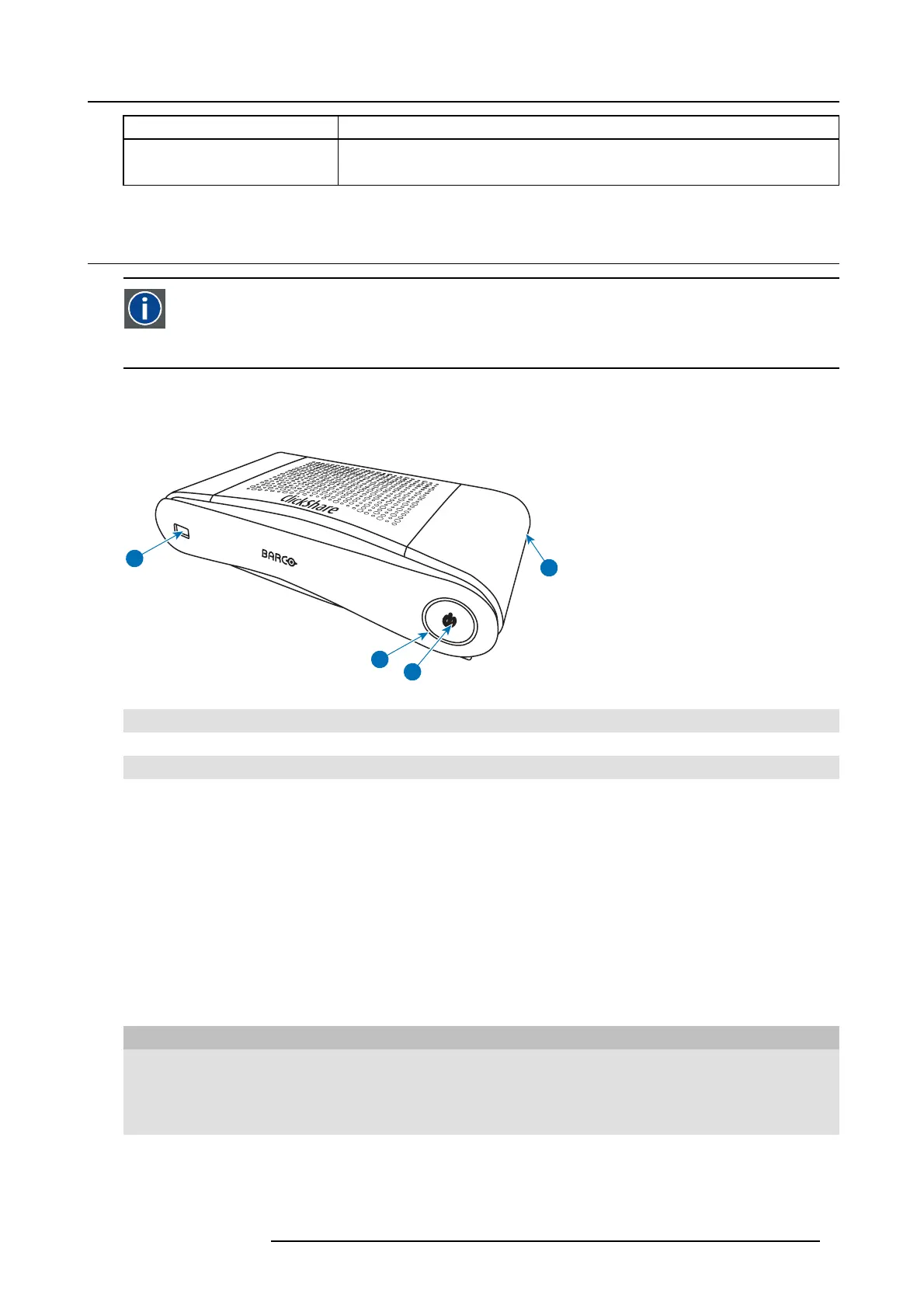
Front and Top layout of the Base Unit
At the f ront of the Base Unit you can find a power button an d a U SB port. S tatus LED ring is mounted around the po wer button of
the Base unit.
2
1
4
3
Image 2-2
1 USB port
2 Status LED ring
3 Power Button
4 Kensington lock
Tabl e 2- 3
USB port
The USB port is us ed to update the soft- and firmware of both the Base Unit and the Buttons. For more information about software
update via USB p ort, see "Software update", page 47.
When plugging in the Button into the Base U n it, the Bu
tton is p aired to the Base Unit. The B ase Unit checks whether the B utton’s
software and fi rmware are up to date. If not, the Base Unit updates the software and/or firmware.
To update the Bas e Unit software, download the latest version of the s oftware from the Barco website. Copy the file on a USB stick
and plug it into the USB port of the Base Unit. F ollow the progress and instructions on the display.
Status LED ring
The c olor of the LED at the front of the Bas e Unit give information on the status of the system.
LEDs behavior Explanation
static red
• receiving content from the Buttons and streaming towards the display.
• pairing and software update o f the Button is done. You can now unplug the
Button from the Base Unit.
• during the first phase of the Base Unit boot process.
blinking whit e
• system is starting up (during the sec ond phase )
• Button pairing is in progress
• software update of the Base Unit
R5900022 CS-100 16/02/2016
7















 To Next Page