8
Display and operation -
8.5 individualisation
The user interface provides numerous opportunities for
individualisation. The various individualisation options can be found in
the following menu:
Device Settings
8.5.1 Menu style
There are several attractive menu styles to choose from: Men
provide consistent and harmonious presentation of all PoolManager
menus in the visualisation style chosen.
Note: The menu styles available may change and further styles may
be added. The menu style setting in the
you with all styles currently available:
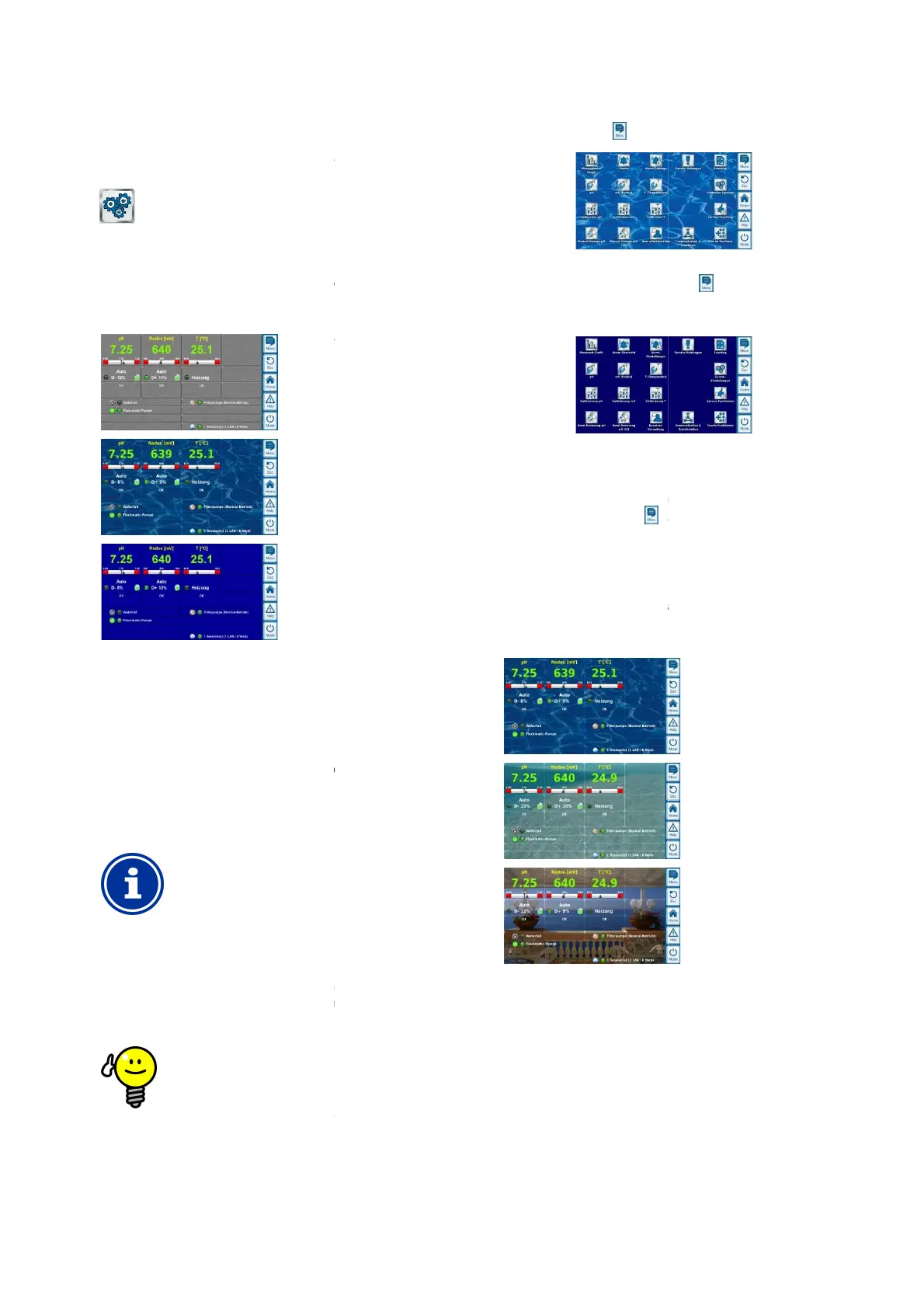
8.5.1.1 Transparent style
The transparent style
offers particularly attractive display
Buttons and other menu elements are designed in a partially
transparent manner. Thus, a freely selectable background image can
be used in transparent style
that shines through the semi
menu elements in all menus.
INFO
Menu set-
Menu set-
up takes a bit longer when using
style
because the extensive transparency calculations
require a great deal of computing power.
This is only noticeable when using the PoolManager
device directly. In remote access, display is realised on
the access device and therefore does not require the
PoolManager's
®
TIP
Turning off the background image
If you would like to ensure menu change occurs as
quickly as possi
ble, then you can change to style other
than transparent style.
If you would like to use
attractive display options, then there is the following
option for optimising menu toggling:
User Manual PoolManager
®
The user interface provides numerous opportunities for
individualisation. The various individualisation options can be found in
There are several attractive menu styles to choose from: Men
u styles
provide consistent and harmonious presentation of all PoolManager
®
Note: The menu styles available may change and further styles may
menu provides
offers particularly attractive display
possibilities.
Buttons and other menu elements are designed in a partially
transparent manner. Thus, a freely selectable background image can
that shines through the semi
-transparent
up takes a bit longer when using
because the extensive transparency calculations
require a great deal of computing power.
This is only noticeable when using the PoolManager
®
device directly. In remote access, display is realised on
the access device and therefore does not require the
Turning off the background image
If you would like to ensure menu change occurs as
ble, then you can change to style other
attractive display options, then there is the following
option for optimising menu toggling:
Toggle into the main menu by pressing the menu
hotkey .
background image temporarily and replaces it with a
mono-
The mono-
colour background provides for faster menu
toggling. You can reactivate the background image
later by toggling to the main menu and pressing the
menu hotkey
It is particularly sensible to use this function if you want
to make extens
ive configurations in the menus.
8.5.2
There are various background images available for
is also possible to upload one's own background images to
PoolManager
®
.
Note: The background images shown are intended as examples only.
The background image
all background images currently available.
8.5.3 Icon style
There are several icon styles to chose from: Icon style determines the
visualisation of icons in the main menu and in the
icon menu.
23
Toggle into the main menu by pressing the menu
again. This deactivates the
background image temporarily and replaces it with a
colour background provides for faster menu
toggling. You can reactivate the background image
later by toggling to the main menu and pressing the
It is particularly sensible to use this function if you want
ive configurations in the menus.
There are various background images available for
transparent style. It
is also possible to upload one's own background images to
Cool Water
Ocean
Sea View
Note: The background images shown are intended as examples only.
device settings menu shows you
all background images currently available.
There are several icon styles to chose from: Icon style determines the
visualisation of icons in the main menu and in the
add-on functions



 To Next Page