24
Universal switch outputs (4x)
24 Universal switch
24.1 Safety information
Requisite user qualification:
TRAINED SPECIALIST or
ELECTRICAL SPECIALIST
Connection, configuration, and start
switch outputs may only be performed by a TRAINED
SPECIALIST or an ELECTRICAL SPECIALIST as
defined in the chapter
HAZARD!
Hazardous applications
Universal switch outputs can fundamentally be used for
the widest variety of functions. Depending upon the
application, switching processes or the switched
function could produce hazards.
Potential consequence: Death or the g
degree of injury, heavy material damage.
•
The use of universal switch outputs is expressly
PROHIBITED for all applications in which the
safety of persons, animals, and property is not
completely guaranteed at all times and under all
circumstances.
• It
is particularly prohibited to connect sauna ovens
without the corresponding safety
hazard!)
•
It is particularly prohibited to open and close
swimming pool covers without the corresponding
safety precautions (danger of drowning!)
• Safety
is exclusively in the system operator's
sphere of responsibility.
•
The system operator must perform
analysis for every application planned.
•
The device manufacturer disclaims all liability.
24.2 Overview
PoolManager
®
provides four universal switch out
intelligent and highly flexible control of water attractions and other
functions in the swimming pool environment.
There is a relay switch with the corresponding connection terminal
assigned to each switch output.
The particular
features of the universal switch outputs are:
•
Operation optionally as potential free switch or as 230V~
• Freely selectable names
• Flexibly programmable timers
for each switch output
•
Interval operation possible (turning on and off periodically)
• Potenti
al block in the event of missing flow
•
Potential block dependent upon the filter pump's operation
• Potential block via an input
• Potential block via another output
• Link with an external switch or
•
Remote access can be individually released or
individual switch output
•
Display in the Mode menu can be individually released or blocked
for each individual switch output
User Manual PoolManager
®
Connection, configuration, and start
-
switch outputs may only be performed by a TRAINED
SPECIALIST or an ELECTRICAL SPECIALIST as
Universal switch outputs can fundamentally be used for
the widest variety of functions. Depending upon the
application, switching processes or the switched
Potential consequence: Death or the g
ravest
degree of injury, heavy material damage.
The use of universal switch outputs is expressly
PROHIBITED for all applications in which the
safety of persons, animals, and property is not
completely guaranteed at all times and under all
is particularly prohibited to connect sauna ovens
without the corresponding safety
It is particularly prohibited to open and close
swimming pool covers without the corresponding
safety precautions (danger of drowning!)
is exclusively in the system operator's
The system operator must perform
analysis for every application planned.
The device manufacturer disclaims all liability.
provides four universal switch out
puts that facilitate
intelligent and highly flexible control of water attractions and other
There is a relay switch with the corresponding connection terminal
features of the universal switch outputs are:
Operation optionally as potential free switch or as 230V~
-output
Interval operation possible (turning on and off periodically)
al block in the event of missing flow
Potential block dependent upon the filter pump's operation
s
Remote access can be individually released or
blocked for each
Display in the Mode menu can be individually released or blocked
24.3 Configuration menu
The configuration menus for each individual switch output are set up
identically.
They are called up via the icons
INFO
Designation of universal switch outputs
In all menus in which the universal switch outputs
appear, the switch output designation you entered will
be indicated (e.g.
The following settings are available:
Configuration menu for universal switch outputs
Name
Entry of the freely selectable name for the switch output.
Mode of operation
Selection of operating mode:
• Inactive (Switch output not used)
•
Off (Switch output used, but turned off)
• On
• Timer
Timer function
Programming timers.
Time function switch on time
Switches on the universal switch output for the programmed time.
Programmable timer
Program switch on and off times for different days of the week.
Basic configuration
Basic settings for the switch output.
Safety settings
Safe
ty settings for the switch output.
INFO
Allocation of a relay switch output
A universal switch output can only be activated if you
have allocated a relay switch output to it beforehand.
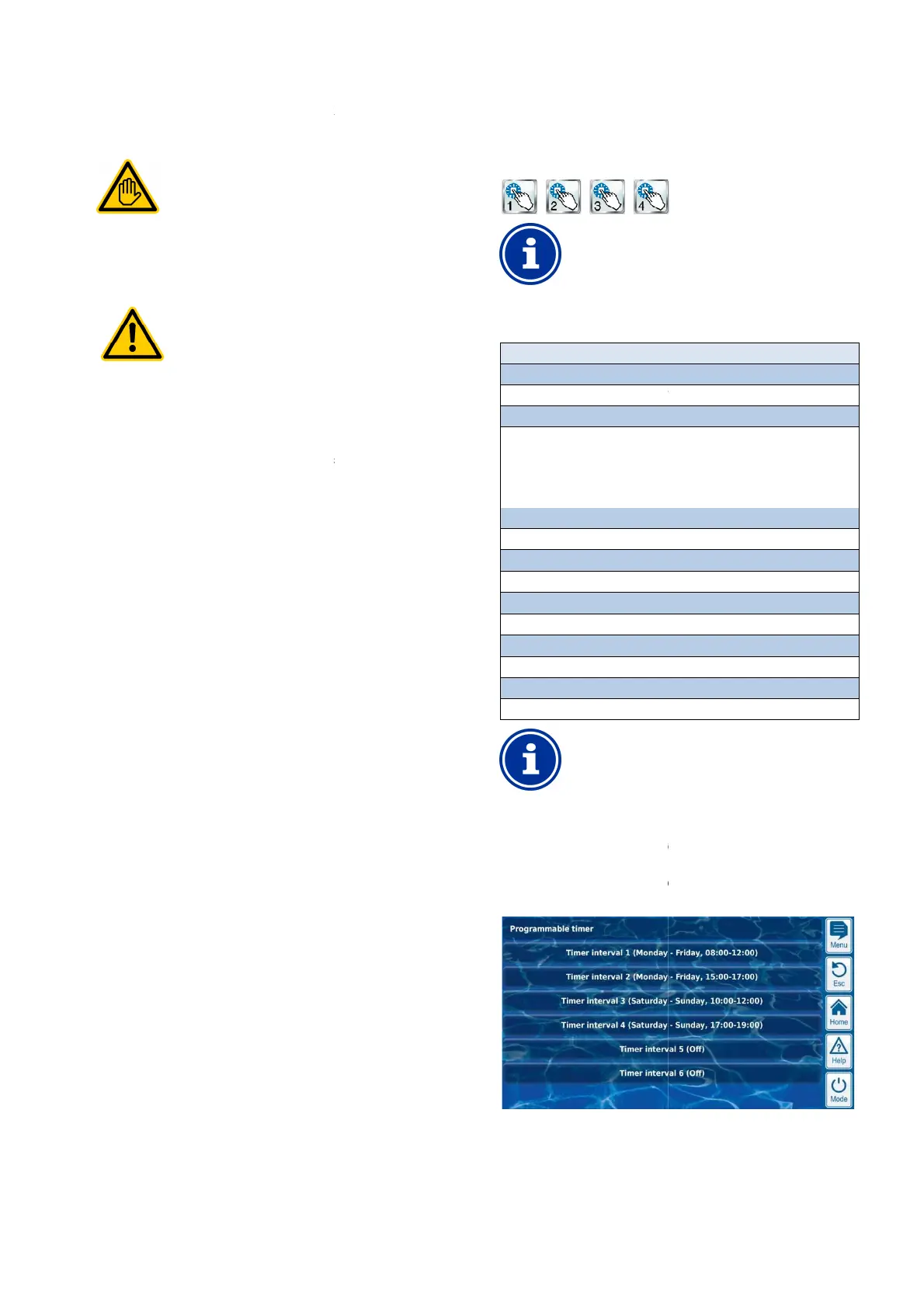
24.3.1 Timer function
This menu
provides 6 freely programmable time intervals for each
switch output.
The time intervals are displayed in the menu in an easy
manner with programmed weekdays and times:
54
The configuration menus for each individual switch output are set up
Designation of universal switch outputs
In all menus in which the universal switch outputs
appear, the switch output designation you entered will
The following settings are available:
Configuration menu for universal switch outputs
Entry of the freely selectable name for the switch output.
Off (Switch output used, but turned off)
Switches on the universal switch output for the programmed time.
Program switch on and off times for different days of the week.
ty settings for the switch output.
Allocation of a relay switch output
A universal switch output can only be activated if you
have allocated a relay switch output to it beforehand.
provides 6 freely programmable time intervals for each
The time intervals are displayed in the menu in an easy
-to-follow
manner with programmed weekdays and times:



 To Next Page