17
Service messages
17 Service messages
The menu Service messages
Menu hotkey
Service Messages
The function Service messages
facilitates targeted planning of certain
service processes:
• Calibration Interval(pH, mV, Cl or Br, T)
Recommended interval: 1 month
• Electrode exchange
Recommended interval: 12 months
• Hose exchange
on the dosage pump (pH, mV, O2, Cl)
Recommended interval: 12 months
A time interval in [months] can be defined for each service process in
the sub-menu Service intervals.
After the configured period of time has
passed, PoolManager
®
will automatically provide a reminder that the
planned service process is due.
The default s
etting for all service intervals is set to 0 months, i.e.
inactive. In order to activate the function, an interval of 1...60 months
has to be set for the service processes desired. Resetting the setting
to 0 months will deactivate the service message again
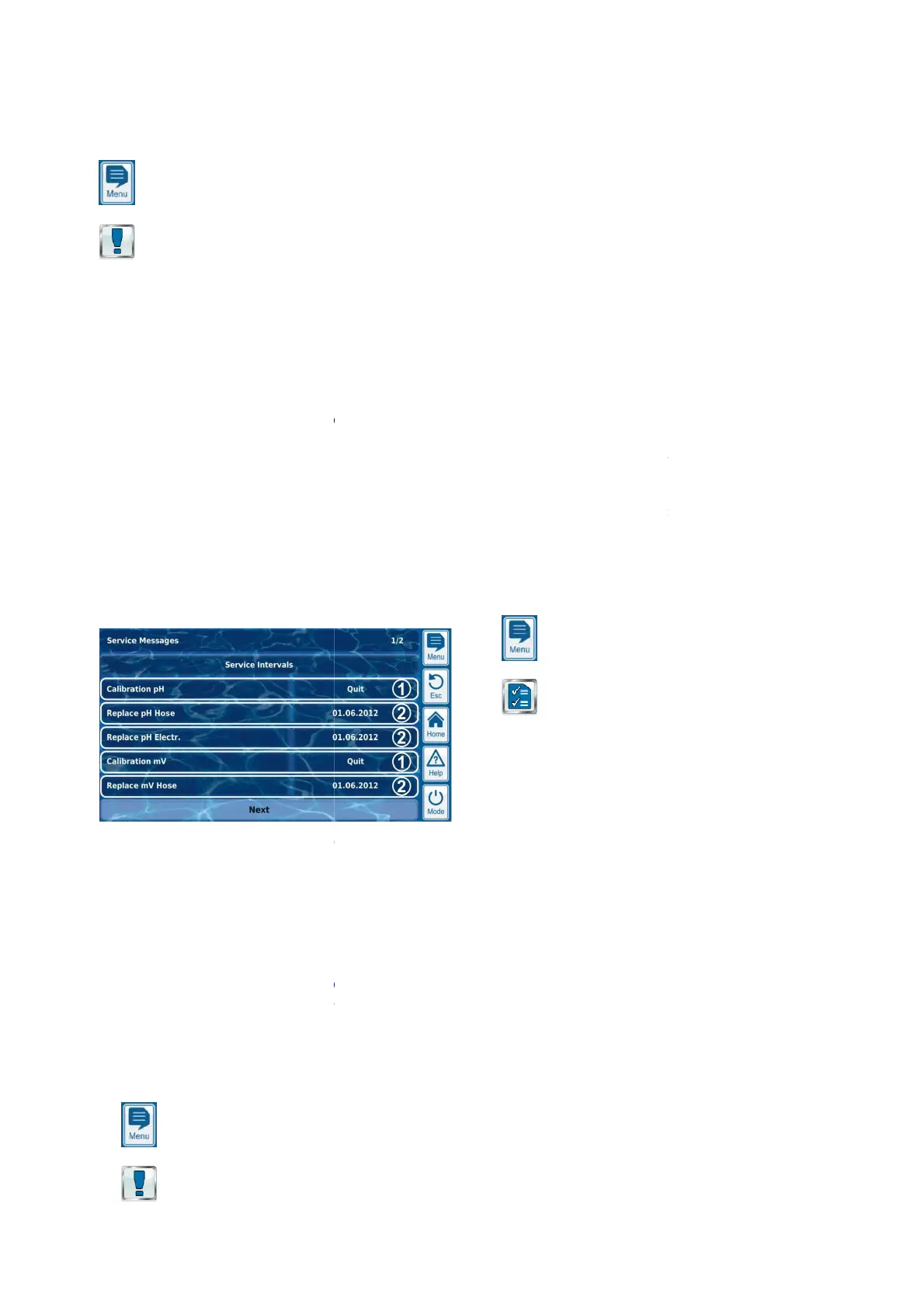
In the menu Service messages
, all planned service processes are
shown along with their due date. If needed, the planned date
calculated by PoolManager
®
can be corrected manually.
The service processes are displayed in the menu as follows:
1
These
service messages are already due. Therefore, an
acknowledgement button is displayed.
Pressing the acknowledgement button will reschedule the
process and the newly calculated due date will be
displayed.
2
These service messages are not yet due.
Therefore,
the due date is displayed.
17.1 S
ignalising due service messages
Due service messages are signalised as follows:
• Striking blinking of the entire display
Blinking ends immediately upon touching the touchscreen.
• Automatic jump to the menu
Note: The menu Service messages
can also be called up at any
time as follows:
Menu hotkey
Service Messages
User Manual PoolManager
®
facilitates targeted planning of certain
on the dosage pump (pH, mV, O2, Cl)
A time interval in [months] can be defined for each service process in
After the configured period of time has
will automatically provide a reminder that the
etting for all service intervals is set to 0 months, i.e.
inactive. In order to activate the function, an interval of 1...60 months
has to be set for the service processes desired. Resetting the setting
to 0 months will deactivate the service message again
.
, all planned service processes are
shown along with their due date. If needed, the planned date
can be corrected manually.
The service processes are displayed in the menu as follows:
service messages are already due. Therefore, an
acknowledgement button is displayed.
Pressing the acknowledgement button will reschedule the
process and the newly calculated due date will be
These service messages are not yet due.
the due date is displayed.
ignalising due service messages
Due service messages are signalised as follows:
Blinking ends immediately upon touching the touchscreen.
can also be called up at any
• Acoustic alarm signal
(Provided the function
corresponding alarms in the menu
The acoustic
alarm signal ends immediately upon touching the
touchscreen.
Note:
Due service processes are signalised at 8:00 a.m. on the
corresponding day.
17.2 Re-
scheduling service messages
When re-
service message by
adding the configured service interval to the
current date.
Example:
•
For pH calibration, a service interval of 3 months is configured.
•
On 6 December 2012, it will be re
The new due date is 6 March 2013.
Service messages are re-
•
Change to the service interval in the menu
•
Acknowledgement of a due service message
•
Successful performance of calibration (for calibration messages
only)
• Calling up the function Re-
schedule service messages
menu Service intervals
18 Event log
The event log
Menu hotkey
Event log
The event log is a record of all important events involving
PoolManager
®
with date and time. PoolManager
to 500 events. When that number is met, the oldest events are
overwritten with new ones.
The event log is an important tool in controlling proper operation of the
swimming pool system and analysing potential problems.
18.1 Events
The followin
g events are logged individually in the event log:
• PoolManager
®
•
Alarm states (beginning and end)
• Calibration with exact data
•
Parameter changes with old and new value
•
O2 dosages and average temperature values
• Manual dosing
• Dosed product volumes
• Remote access
• Software updates
• Access code reset
•
Reset to default values (default reset)
PoolManager
®
displays all entries in the event log in an easy
manner. That is why there is no detailed presentation of the individual
events.
47
is activated for the
corresponding alarms in the menu
Alarm settings)
alarm signal ends immediately upon touching the
Due service processes are signalised at 8:00 a.m. on the
scheduling service messages
®
recalculates the due date of a
adding the configured service interval to the
For pH calibration, a service interval of 3 months is configured.
On 6 December 2012, it will be re
-scheduled.
The new due date is 6 March 2013.
following cases:
Change to the service interval in the menu
Service intervals
Acknowledgement of a due service message
Successful performance of calibration (for calibration messages
schedule service messages
in the
The event log is a record of all important events involving
with date and time. PoolManager
®
has memory for up
to 500 events. When that number is met, the oldest events are
The event log is an important tool in controlling proper operation of the
swimming pool system and analysing potential problems.
g events are logged individually in the event log:
Alarm states (beginning and end)
Parameter changes with old and new value
O2 dosages and average temperature values
Reset to default values (default reset)
displays all entries in the event log in an easy
-to-follow
manner. That is why there is no detailed presentation of the individual



 To Next Page