27
Heating
Example 1
• Temperature setpoint 25.0°C
• Temperature hysteresis 1.0°C
Turn-on temperature 24.5°C
Turn-off temperature 25.5°C
Example 2
• Temperature setpoint 25.0°C
• Temperature hysteresis 0.3°C
Turn-
on temperature 24.9°C (value rounded)
Turn-
off temperature 25.2°C (value rounded)
The hysteresis setting can be used to optimally adjust the control
system to the local circumstances.
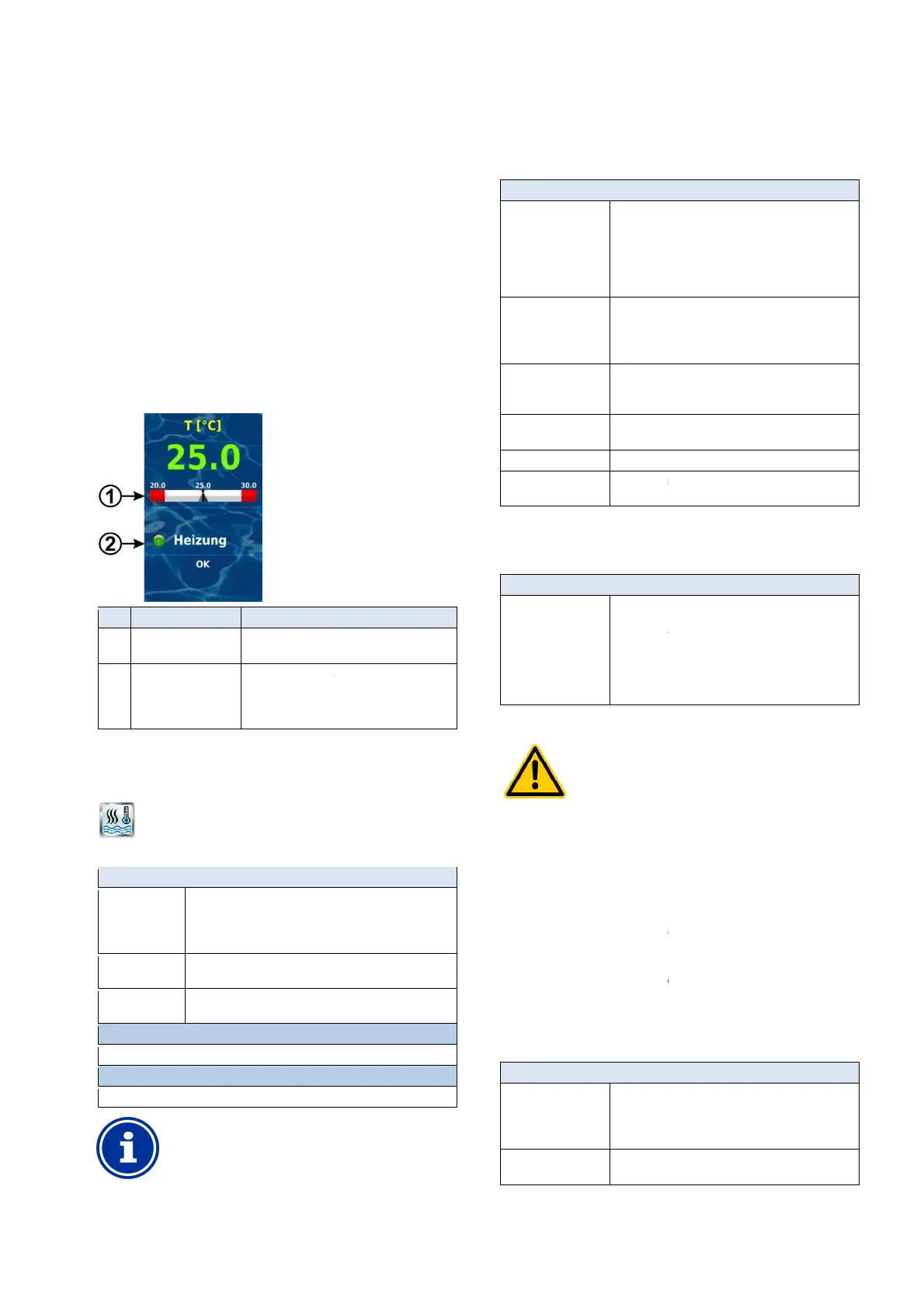
27.4 Display in home view
The operating state of the heating system or solar heating system is
displayed in home view in the temperature module.
Pos. Content Notes
1 Temperature setpoint
Display of temperature setpoint on the
2 Status of heating
and/or solar heating
Status display of
When heating is running, the LED symbol
illuminates.
27.5 Menu Heating
The configuration menu for heating control is called up with the
following icon:
Heating
The following settings are available:
Menu Heating
Operating mode
pool heating
Inactive (heating control not used)
•
Heating off (heating control used, but turned off)
•
Always heat (regardless of temperature!)
•
Automatic (automatic temperature control)
Pool temperature
setpoint
Desired pool temperature in [°C]
Temperature
hysteresis
Permissible tolerance range for temperature control in
[°C]
Basic configuration
Basic settings for heating control.
Safety settings
Safety settings for heating control.
INFO
Allocation of a relay switch output
Heating control can only be activated if you have
allocated a relay switch output to it beforehand.
User Manual PoolManager
®
on temperature 24.9°C (value rounded)
off temperature 25.2°C (value rounded)
The hysteresis setting can be used to optimally adjust the control
The operating state of the heating system or solar heating system is
displayed in home view in the temperature module.
Display of temperature setpoint on the
When heating is running, the LED symbol
The configuration menu for heating control is called up with the
Inactive (heating control not used)
Heating off (heating control used, but turned off)
Always heat (regardless of temperature!)
Automatic (automatic temperature control)
Desired pool temperature in [°C]
Permissible tolerance range for temperature control in
Allocation of a relay switch output
Heating control can only be activated if you have
allocated a relay switch output to it beforehand.
27.5.1
The menu Basic configuration
is used to configure the basic settings
for heating control. This is
generally done once at the start
The following settings are available:
Sub-menu Basic configuration
Pool Temperature
input
Temperature input used for measuring pool
•
•
•
• Temp.
Relay output 'heating'
Relay switch output used for activating heating
(None / OUT 1 [26] / OUT 2 [27] / OUT 3 [30] /
OUT 4 [31] / pH+ [22] / pH
None
Heating control is inactive
Blocked if solar
heating is active
Yes / no
Yes
Heating is not turned on when solar heating
is active (solar priority).
Blocking by input. Yes
The output is turned off if the selected input is
Anti-freeze See anti-
Temperature sensor
configuration
27.5.1.1 Anti-Freeze
The menu anti-freeze
can be used to activate a frost protection
function for heating control.
Sub-menu Anti-freeze
Temperature input
Air
The temperature input used for measuring air
•
•
•
•
27.5.2 Safety settings
HAZARD!
In some circumstances, hazards may be yielded via
remote access to the heating control system, e.g.
scalding.
Potential consequence: Injury,
material damage.
•
Release of remote access to heating control is
expressly PROHIBITED for all applications in which
the safety of persons, animals, and property is not
completely guaranteed at all times and under all
circumst
ances; especially for remote access.
•
Safety is exclusively in the system operator's
sphere of responsibility.
•
The device manufacturer disclaims all liability.
The following security settings are available:
Sub-menu Safety settings
Allow remote access
• Inactive
•
•
Display in
Mode menu
Yes / no
63
is used to configure the basic settings
generally done once at the start
-up.
The following settings are available:
Temperature input used for measuring pool
Relay switch output used for activating heating
(None / OUT 1 [26] / OUT 2 [27] / OUT 3 [30] /
OUT 4 [31] / pH+ [22] / pH
- [21]).
Heating control is inactive
Heating is not turned on when solar heating
is active (solar priority).
The output is turned off if the selected input is
.
of temperature sensors.
can be used to activate a frost protection
The temperature input used for measuring air
protection):
In some circumstances, hazards may be yielded via
remote access to the heating control system, e.g.
Potential consequence: Injury,
Release of remote access to heating control is
expressly PROHIBITED for all applications in which
the safety of persons, animals, and property is not
completely guaranteed at all times and under all
ances; especially for remote access.
Safety is exclusively in the system operator's
sphere of responsibility.
The device manufacturer disclaims all liability.
The following security settings are available:



 To Next Page