16
Safety functions and alarms
User Manual PoolManager
®
45
• Alarm display in home view
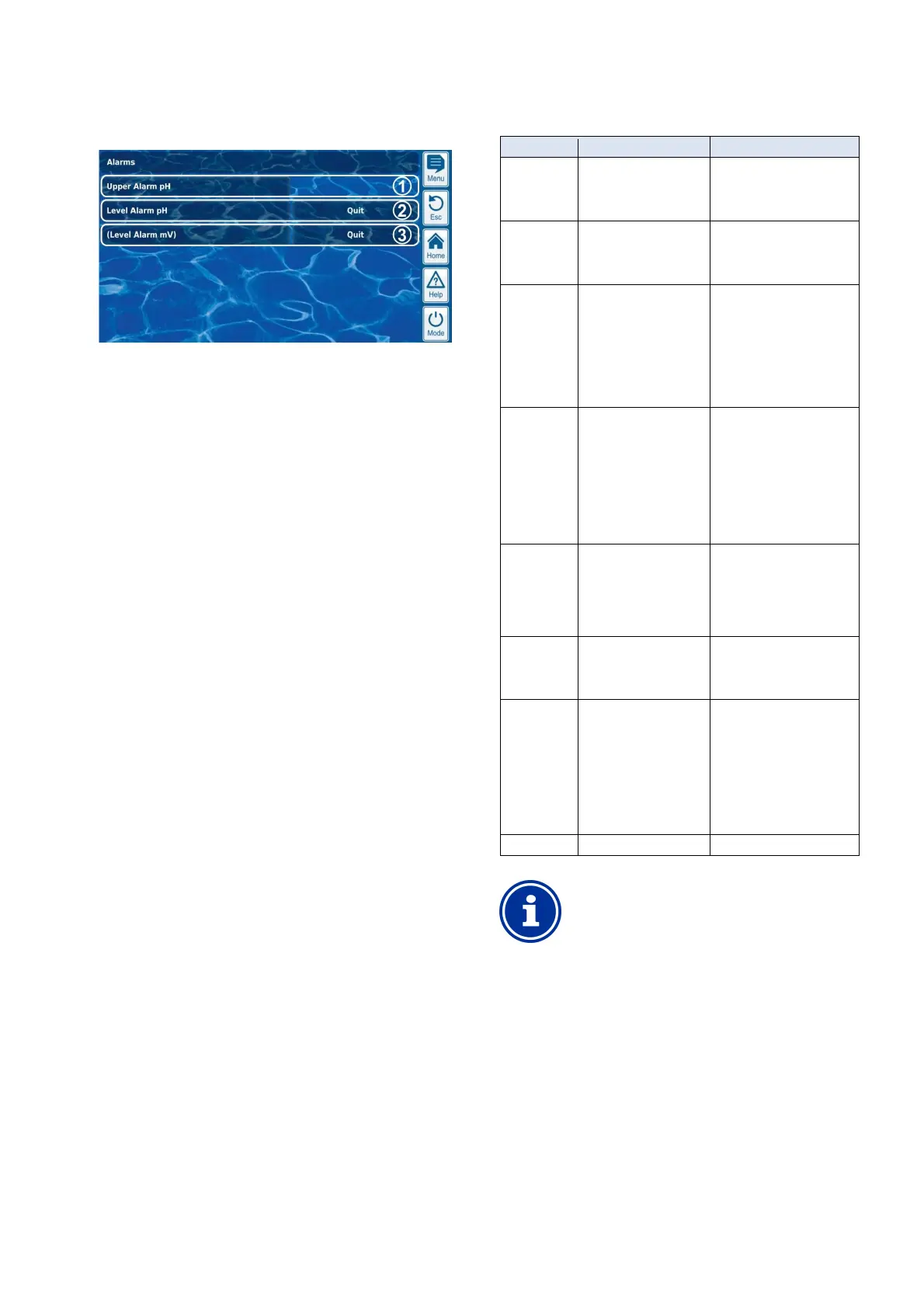
Alarms are shown in the alarm overview as follows:
1 The alarm is active, i.e. the alarm cause has not yet been
remediated. But the alarm has already be acknowledged.
Therefore, the acknowledgement button is no longer displayed.
2 The alarm is active, i.e. the alarm cause has not yet been
remediated. The alarm has not yet been acknowledged.
Therefore, the acknowledgement button is displayed.
3 The alarm is no longer active, i.e. the alarm cause has been
remediated. That is why the alarm appears in brackets.
However, the alarm has not yet been acknowledged.
Therefore, the acknowledgement button is displayed.
If an alarm becomes inactive, i.e. the alarm cause has been
remediated, and the alarm has been acknowledged by the user, then it
will disappear completely from the alarm overview.
No acknowledgement button appears for the flow report if the setting
Alarm for missing flow signal is set to no, as no acknowledgement is
required in that case.
16.4.1 Alarm display in home view
All active alarms are displayed in the Home view; see section Home
view.
16.5 Dosage blocking via alarms
Alarms generally result in dosage blocking. The block is automatically
released as soon as the alarm cause has been remediated.
It is not necessary for a user to acknowledge an alarm in order to end
blocking (however, the alarm continues to be displayed in Alarm
overview until acknowledgement).
The following alarms are handled in deviation to that mechanism:
• If the setting Alarm for missing flow signal is set to yes, then
dosage blocking is not ended until a flow signal is present again
and the flow alarm has been acknowledged by the user. Dosage
will then be released after start delay has passed.
• If the setting Alarm for missing flow signal is set to no, then
dosage blocking is not ended once a flow signal is present again.
Dosage will then be released after start delay has passed.
• The menu Alarm settings can be used to establish whether a level
alarm will lead to dosage blocking. The default setting is that a
level alarm will block dosage of the respective control module
(pH, Cl, mV, O2).
• After a dosage alarm, dosage is released immediately after
manual acknowledgement of the alarm.
16.6 Table overview
Alarm Dosage blocking Notes
Upper alarm
(pH, mV, Cl,
Br)
Only for dosage
direction D+
(only for the respective
control module)
The block is released as soon
as the measured value drops
back below the top alarm
threshold
Lower alarm
(pH, mV, Cl,
Br)
Only for dosage
direction D-
(only for the respective
control module)
The block is released as soon
as the measured value climbs
back over the top alarm
threshold
No
flow signal
Yes
(for all control modules)
Alarm for missing
flow signal = no:
Start delay will first run through
its time after the flow signal
returns. Dosage is then
released again.
Acknowledgement is not
necessary
No
flow signal
Yes
(for all control modules)
Alarm for missing
flow signal = Yes:
Start delay will first run through
its time after the flow signal
returns and the alarm is
acknowledged. The dosage is
then released again. Manual
acknowledgement is
absolutely necessary.
Level alarm
(pH, mV, O2,
Cl)
Yes
(Only for the respective
control module)
can be deactivated
in the menu
Alarm setting
After the level signal returns,
dosage is released again.
Dosing alarm
(pH, mV,
Cl, Br)
Yes
(for the respective module
only)
After acknowledging the
dosage alarm in the Alarm
overview, dosage is released
again.
Power-on
Delay
Yes
(for all control modules)
Start delay runs through its
time after starting
PoolManager
®
and after the
flow signal returns. Dosage is
released after that time has
passed. Start delay can be
prematurely ended via manual
acknowledgement in Alarm
overview.
Battery alarm No
INFO
Alarm delay
All alarms are shown only after an alarm delay of 5s.
It is also not deleted until the alarm's cause has been
remediated for at least 5s.
The alarm delay for the flow alarm can be extended as
needed in the menu Alarm settings.



 To Next Page