49
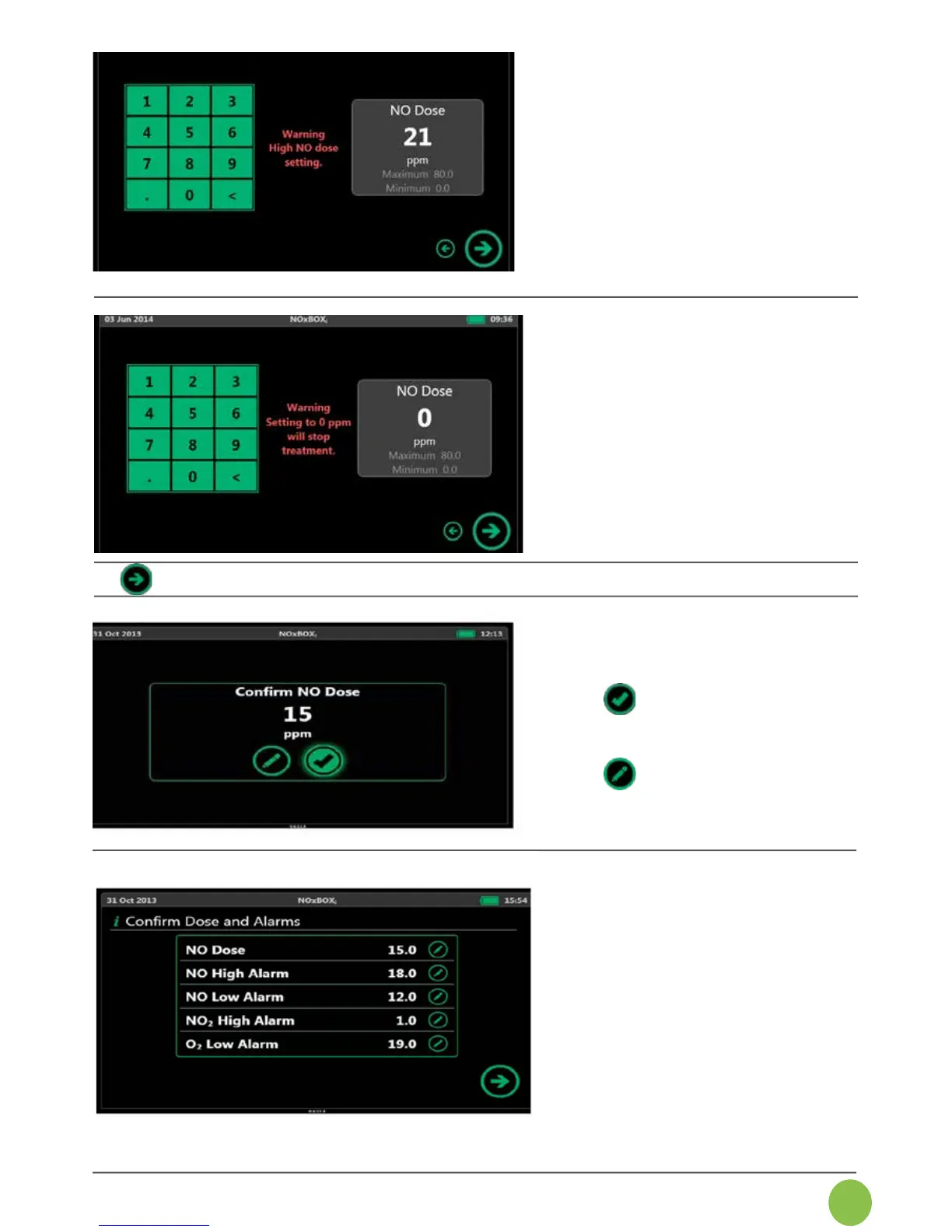
If the dose entered is greater than
20ppm,awarningwillappearto
alert you that a high clinical dose
valuehasbeenentered.
Ifadosevalueofzerois
entered,thesystemwillalertuser
that this will stop the
treatment.
NOTE:
All alarms will still function unless
the regulator hoses are
diconnected,wherethesystem
will enter stand by mode.
3. Press next to continue
4. The system will display a
conrmationscreenforthe
dose entered.
5. To accept the displayed
value,pressthe
check mark.
6. Tochangethisvalue,
press the Edit
The system displays a summary
of the entered dose and calculated
alarmvalues.
• The system calculates a
defaultalarmvalueforthe
NO High Alarm based on
theconrmedNOdose
entry.
• The system calculates a
default alarm setting for the
NO Low Alarm based on the
conrmedNOdoseentry.
• The system has a default
NO
2
High Alarm setting of
1 ppm.
• The system has a default
O
2
Low Alarm setting of
19 %.


 To Next Page