52
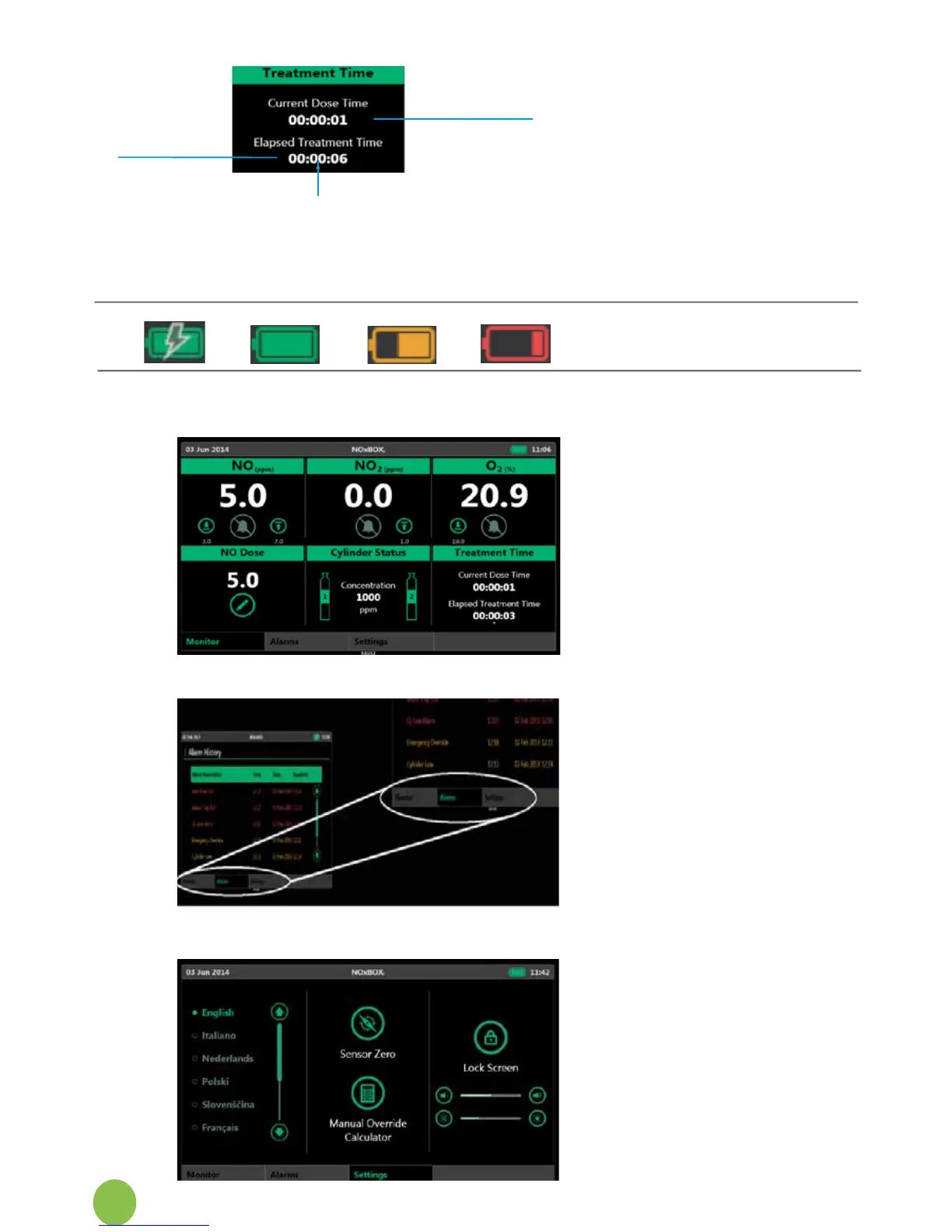
Thetreatmenttimeclocksshow:
Total time patient has been on
NOxBOX
i
treatment
Timepatienthasbeenreceiving
current dose
Both clocks show the time elapsed
as:
Days:Hours:Minutes
The seconds timing marker is
below the lower clock.
Batteryindicatoricon:1:onmains;
2:fullcharge;3:chargelow;4:
battery empty.
1.
2.
3.
4.
6.7.2 Tabbed Navigation
Wheninnormaloperation,thesystemwillshowthemainmonitoringanddeliveryscreen.
Themainscreenhastabbednavigationelementstoallowtheusertocheckthealarm
history status for this treatment.
Thetabnavigationalsoallowstheusertoadjustsomesettingspreferencessuchaslanguage
orscreenbrightness.Fromhereitisalsopossibletoaccesstheserviceengineeringscreens.
time at current
dose
days:hours:mins
total treatment
time
days:hours:mins
seconds timing marker


 To Next Page