60
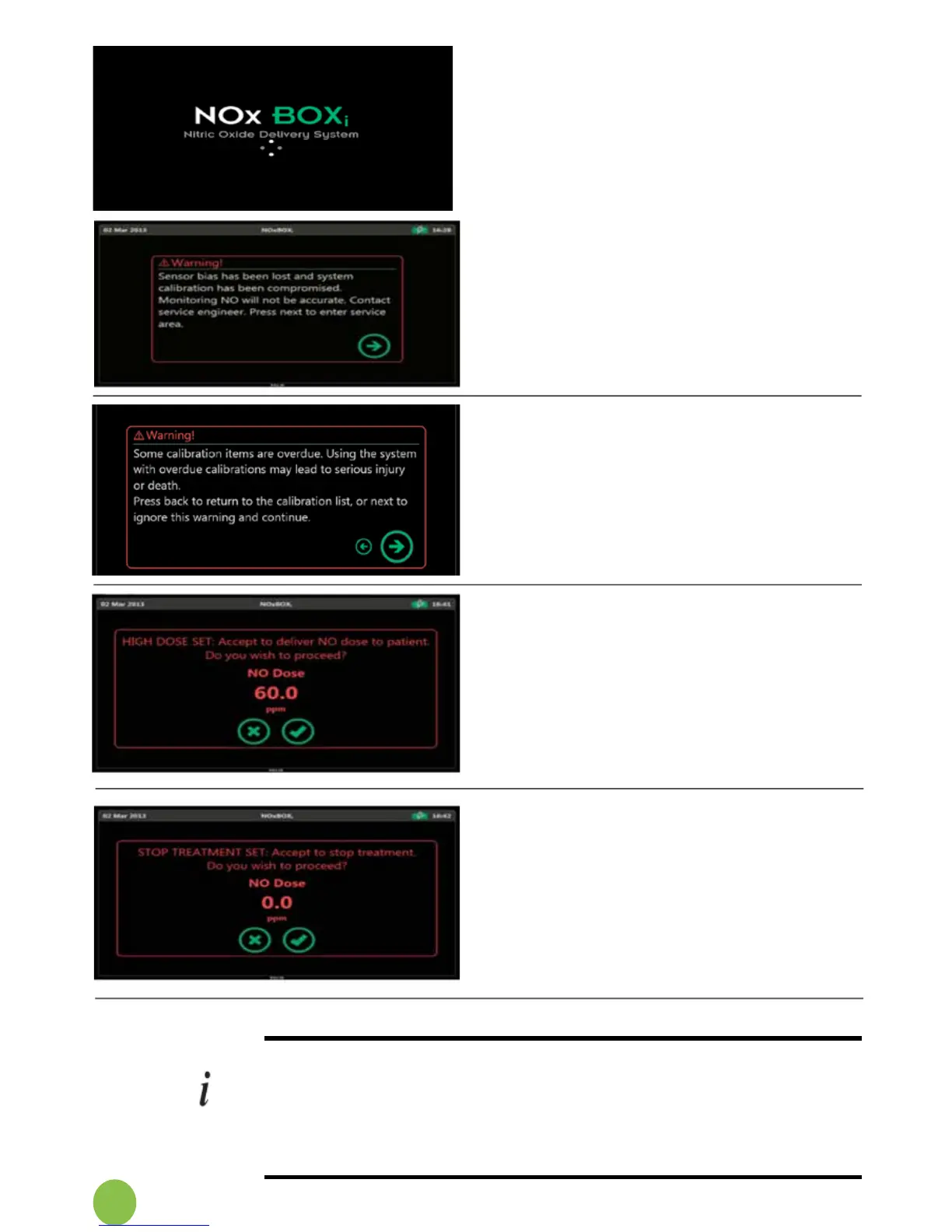
Sensor Bias Lost
System sensors require a constant
verylowtricklechargetomaintaintheir
calibration. The system will extend
biassettlingtime.Intheeventthatthe
system is not stored on mains power
charge,afteranextendedperiodof
time the battery may completely
discharge and the sensors will lose
their calibration bias.
Ifthishasoccurred,thesystemwill
display this screen at start up.
The system must be fully calibrated
prior to use to ensure correct and
safe system performance. Contact
theServiceEngineer.
High Dose Set
SettingtheNOdoseabove20ppm
will display warning messages so the
user is aware that a high clinical dose
setting has been selected.
Prior to administering a high dose
settingtothepatient,thesystemwill
display this warning to alert the user
to the dose setting selected.
Stop Treatment Set
To stop administering Inhaled NO
Therapy,settheNOxBOX
i
doselevel
to zero.
The system will display warning
messages so the user is aware that
thestopdeliveryoftreatmentmode
has been selected.
Priortostoppingthetreatment,the
system will display this warning to
alert the user.
6.10 Zero Calibration During Delivery
Zero Calibration is an important maintenance test that the system
can run without interruption to the NO dose delivery function. Zero
calibration takes approximately 2-3 minutes to complete, during
which time the monitoring and alarm functions will be ofine. No
special connections or tools are required to perform zero calibration,
just follow the simple on-screen instructions.
Calibration Overdue Warning
The system will display this warning
if user proceeds without calibrating
whenthecalibrationisoverdue.


 To Next Page