INTEGRA® / E-1063
1MANUL102 Belanger, Inc. * 1001 Doheny Ct. * Northville, MI 48167 * Ph (248) 349-7010 * Fax (248) 380-9681 4-11
Chapter 4 Operator Interface/Standard Wash Operation Screens
User
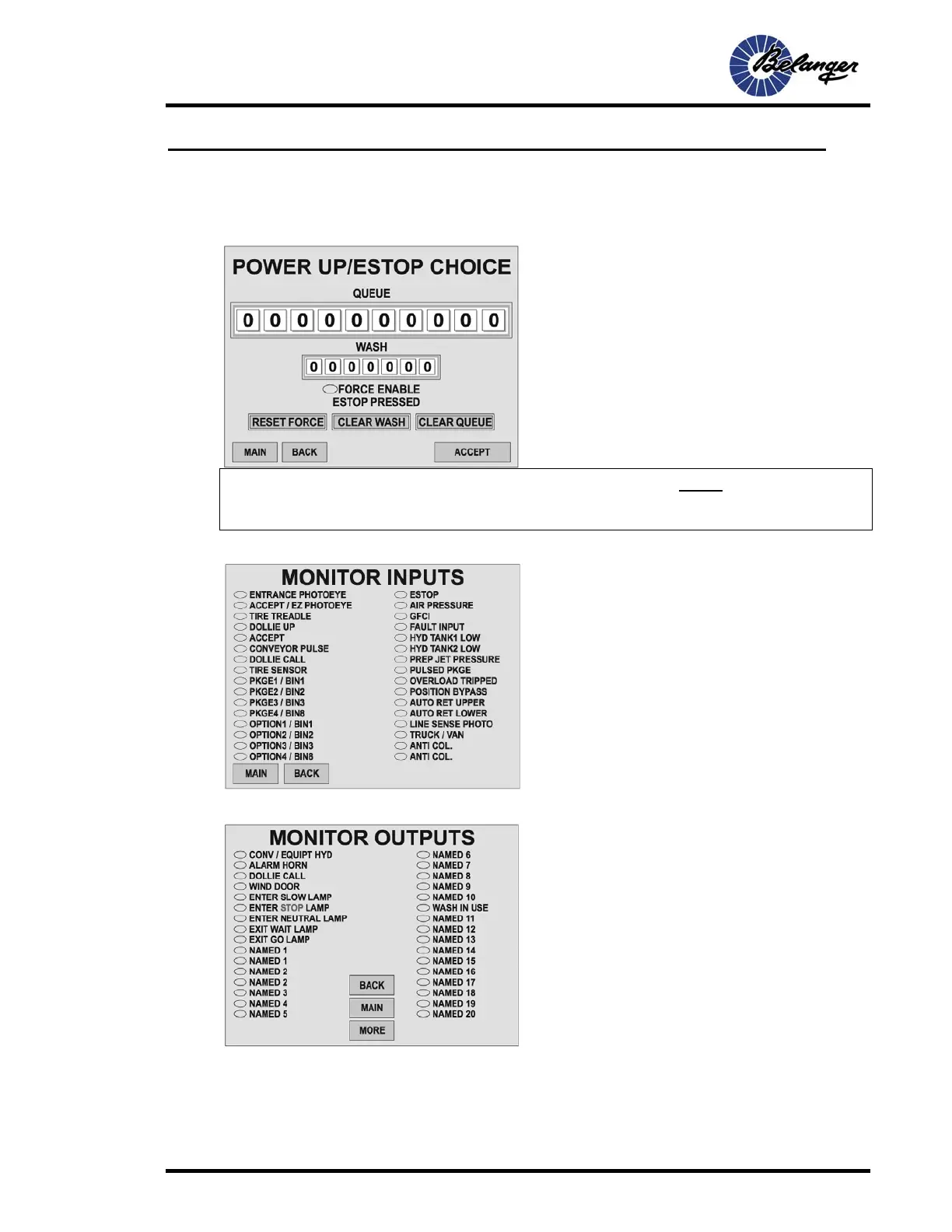
User / Power Up Choice
Note: If MAIN screen displays “Make Power Up Choice”, the user MUST come to this screen to
ACCEPT before wash will continue. See SETUP/MISC to disable this option. Option can
NOT be disabled for E-Stop.
User / Monitor Inputs
User / Monitor Outputs
Screen Key:
• This screen is to monitor wash status after a Power
Up or E-Stop.
• The user can accept the current status or make
changes from this screen.
Screen Key:
• This screen allows monitoring of Input status. The
ovals are filled when the Input is ON. Check prints
for description of Input behavior.
.
Screen Key:
• This screen allows monitoring of Output status. The
ovals are filled when the Output is ON.



 To Next Page