PL-6000DC/DCX Two-Post Parking Lift 58 P/N 5900273 — Rev. A6 —July 2024
Using the Control Panel
This section describes how to use the Control Panel.
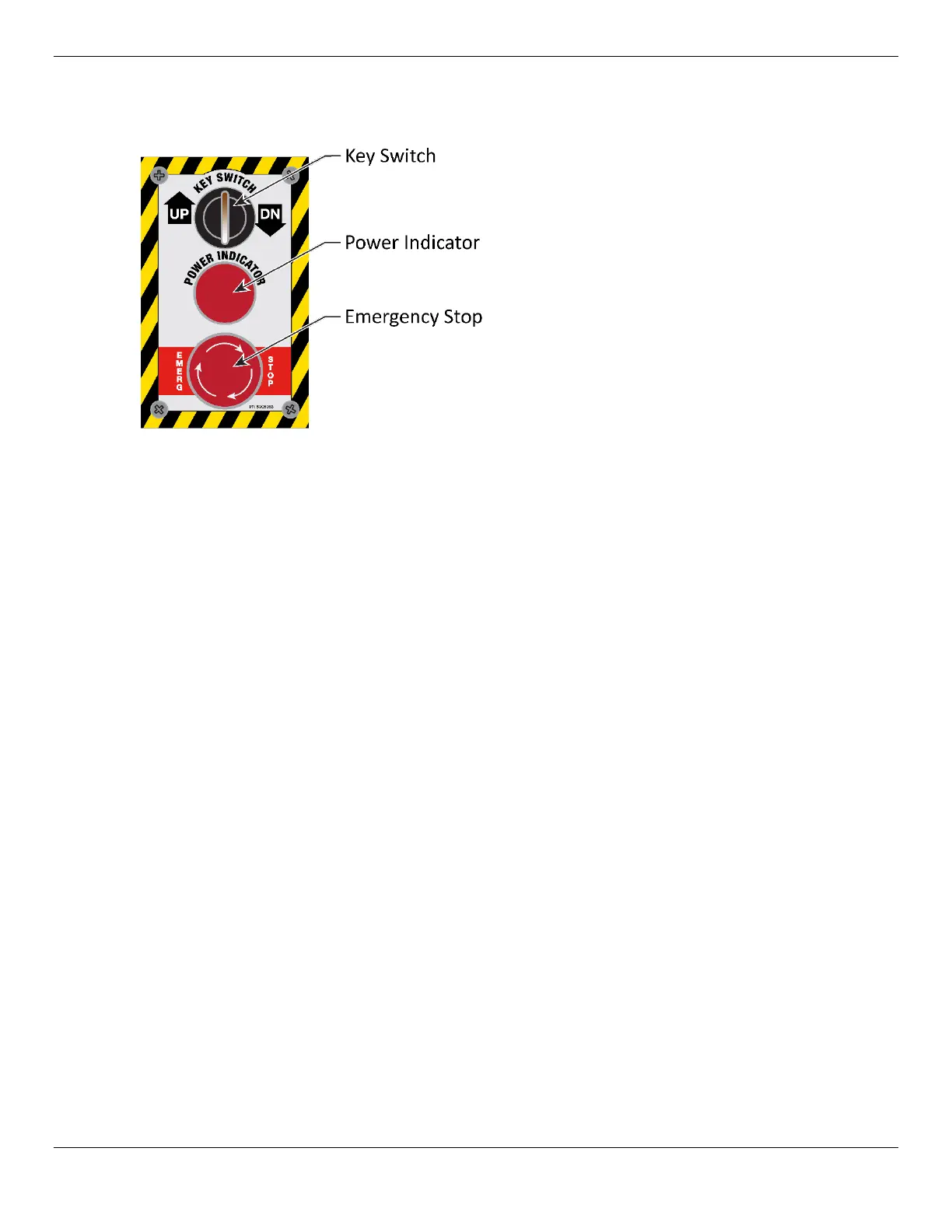
The Control Panel controls your Lift:
• The
Up/Dn Key Switch is a security device; The Lift will not operate without the correct key
inserted in the switch. The center Key position is a neutral position. Rotate and hold the Key to the
left (counterclockwise) to raise the Lift Platform. Rotate and hold the Key to the right
(clockwise) to lower the Lift Platform. The Key switch will return to the center neutral position
when released.
• The Power Indicator is illuminated when electrical power is supplied to the Lift.
• The Emergency Stop Button, when pressed, stops the Lift immediately by removing power to
the Hydraulic Power Unit. Use this button if an unexpected and/or dangerous situation arises.
When pressed, the button physically moves inwards and locks. To release the Emergency Stop
Button, twist it clockwise until it pops back out, restoring power.
Raising and Lowering Vehicles
Keep the following in mind when operating your Lift:
• Be safe. Make sure to check for people, pets, and objects that might be in the path of the Lift as
you raise or lower it. Watch the Lift and Vehicle carefully as it raises and lowers.
⚠ DANGER Pay careful attention when you are raising or lowering the Platforms. If a person or
pet gets stuck under the Platform, they could be injured or, in rare cases, killed.
• Vehicles must be centered on the Lift Platform. Vehicles need to be centered on the
Platform, along the left-right axis. All four wheels must also rest fully on the Platform, not the
approach ramp or side structures.
• The Emergency Stop button is there for a reason. We hope you never have to use it, but
if something unexpected happens, use the Emergency Stop button to immediately stop the Lift
from moving.
• Get what you need out of the Vehicle before lifting it.


 To Next Page