60
• Upgrading the Host’s Firmware
After checking for and conrming the availability of a new rmware upgrade you will be able to
upgrade your Host’s Firmware. The product allows you to upgrade the Host’s rmware using either
an OTA (Over The Air) upgrade or a direct upgrade from an upgrade le located on your local
computer.
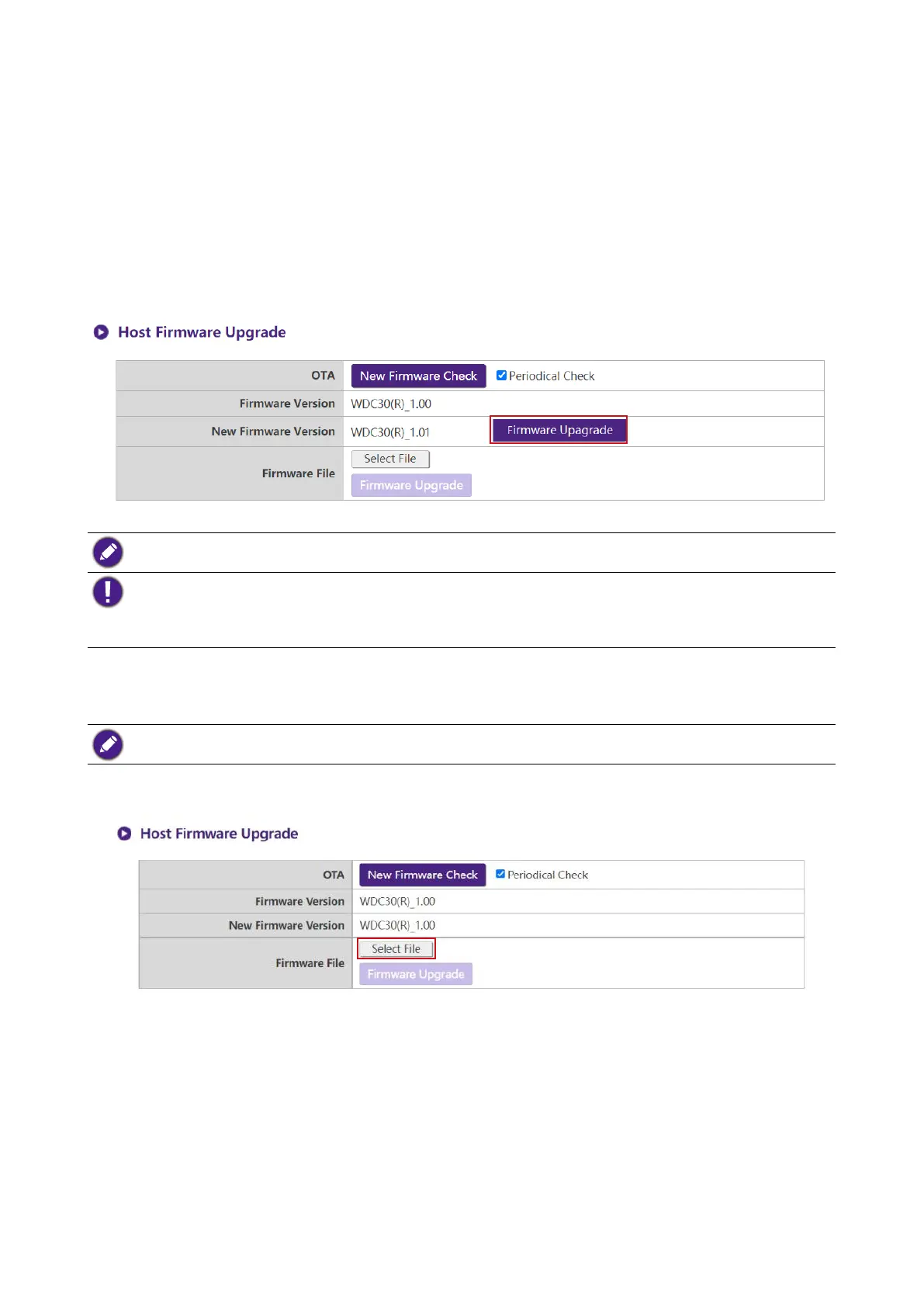
To perform an OTA upgrade of the Host’s rmware, click the Firmware Upgrade button in the
New Firmware Version eld.
To perform an OTA ensure that the Host is connected via the WAN port to a router with access to the
Internet.
When performing any type of upgrade, DO NOT do any of the following:
• Power off or press the reset button on the Host or Button.
• Close the browser window of the web management interface.
Failure to follow these warnings will result in rmware upgrade failure and subsequent product failure.
To perform a direct upgrade from an upgrade le located on your local computer follow the steps
below:
Before executing a direct rmware upgrade, please contact your BenQ regional ofce for access to the upgrade
les.
1. Click the Select File button in the Firmware File eld.
2. Navigate to and select the rmware upgrade le.
3. Click the Firmware Upgrade button in the Firmware File eld.



 To Next Page