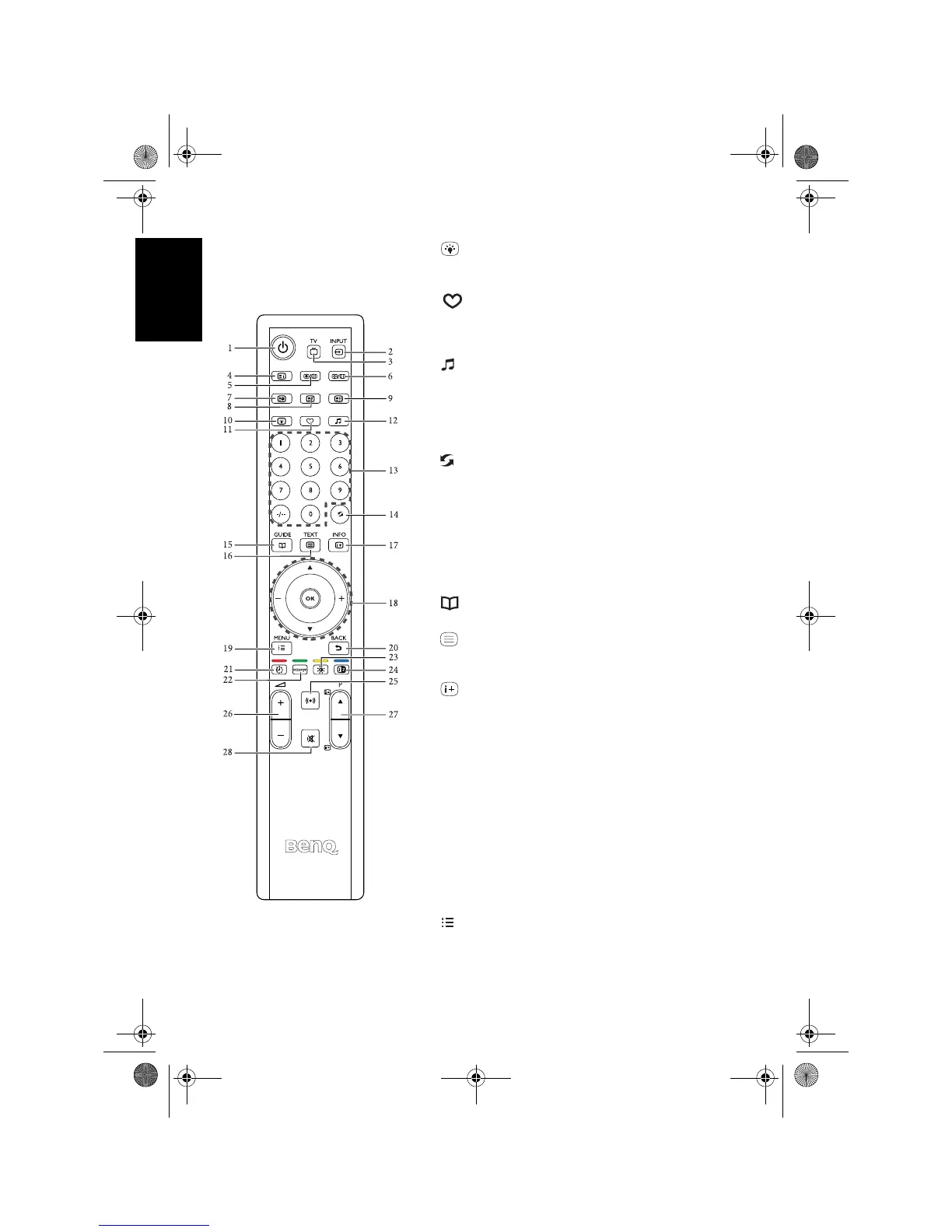
Getting to know the remote control18
English
10. Backlight
Press this button to adjust your desired screen
backlight level. See "Adjusting backlight" on page 23.
11. Favorite
Press this button to jump to one of the favorite
channels you have stored. See "Jumping to your
favorite channels" on page 22.
12. EQ Mode
Press this button to select from preset EQ modes. See
"Selecting a preset EQ mode" on page 21.
13. Program selection
Press these buttons to select the program you wish to
view. See "Selecting a program directly" on page 21.
14. Recall
• When viewing TV programs, press this button to
toggle between the current and the previous
program you were viewing. See "Returning to the
previous viewed program or input" on page 21.
• When viewing different input sources, press this
button to toggle between the current and previous
viewed input sources. See "Returning to the
previous viewed program or input" on page 21.
15. GUIDE
(Function not available)
16. TEXT
Press this button to turn the Teletext decoder on or
off. See "Using the Teletext function" on page 23.
17. INFO
Press this button to display the input source
information. See "Displaying information" on page
23.
18. // + / - and OK
• Press or to change TV programs sequentially.
• Press + or - to adjust volume.
When the OSD (On-Screen Display) menu displays
on-screen:
• Press or to select settings.
• Press + or - to adjust settings.
• Press
OK to execute selections, or to enter a
submenu you have selected.
See "Navigating the OSD menu" on page 31.
19. MENU
Press this button to display the OSD menu for
commands and settings. Press it again to close. See
"Navigating the OSD menu" on page 31.
V32B_V37B_EN.book Page 18 Wednesday, January 23, 2008 10:55 AM



 To Next Page