Connecting video and audio signals
Input options
This TV supports the simultaneous connection of several different types of signal
sources, and permits you to select whichever one of the available sources you wish
to view at any time. You can press INPUT on the display to select an input source.
Before connecting any devices, please turn all equipment off.
To obtain the most benet from the digital LCD screen, you should select the
connection method which will provide you with the best possible signal.
Once connected, please ensure that all plugs are fully inserted and rmly
seated. Be aware that if incorrect connections are made, picture quality may be
adversely affected.
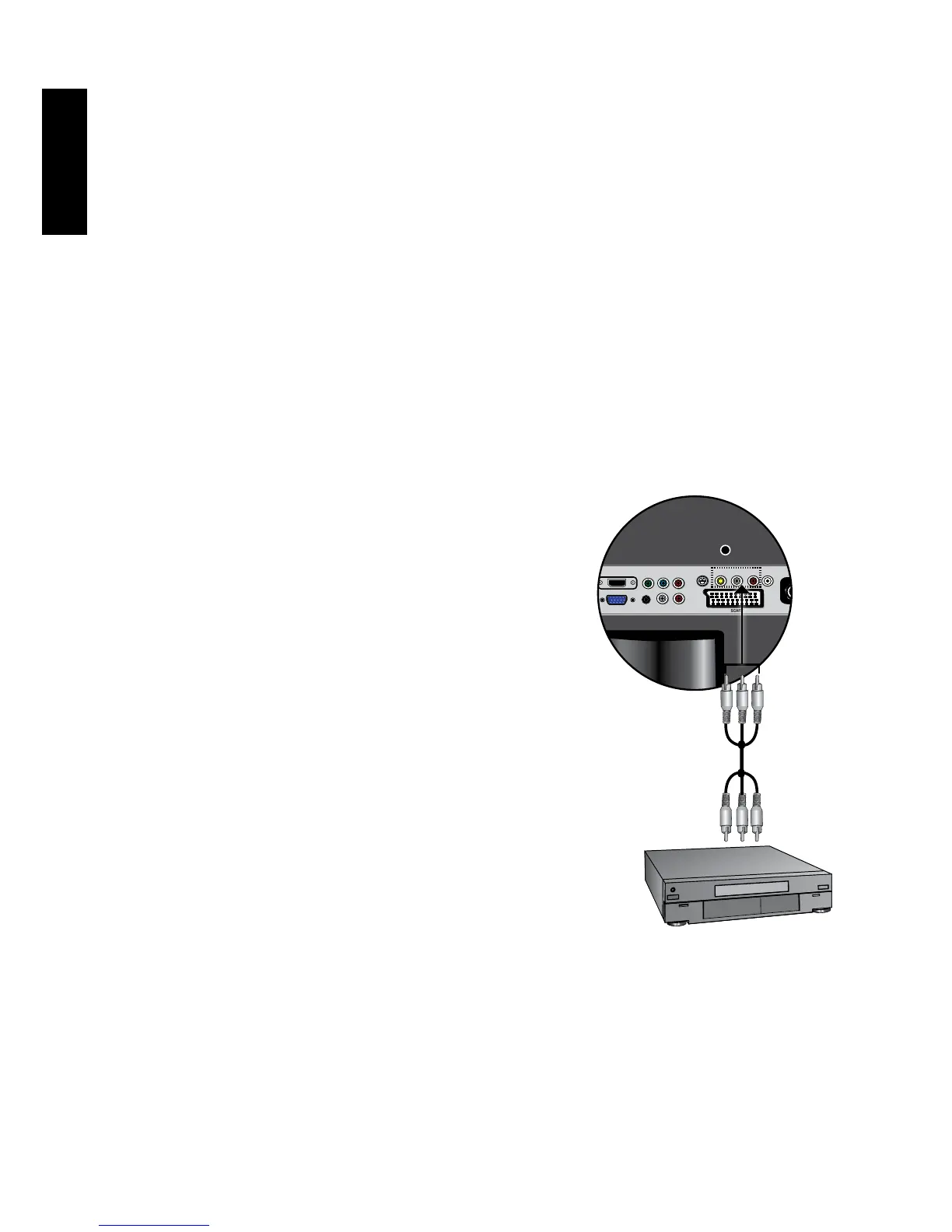
Connecting the Composite Video input
Connect the Composite Video output of your
output equipment to the VIDEO and AUDIO L/
R terminals on the display using the Composite
Video cable as illustrated. A Composite Video
cable consists of three connectors: Yellow (video),
White (left channel audio), and Red (right channel
audio). Ensure that the colors of the plugs and
terminals match when making connection.
To view video image from these inputs, press
INPUT and use
▲▼
button to selectVIDEO(AV)
then press OK button.
CompositeVideoprovidestheleastoptimal
imagequality.BothS-VideoandComponent
Videoprovidebetterqualityvideosignals.AV3
supportsbothCompositeVideoandSVideo
signal inputs. If you use S-Video, you cannot use
CompositeVideoforthatinput.
VCR
Composite
Video cable



 To Next Page