6
3
5
2
1
15
11
7
4
10
8
9
13
12
14
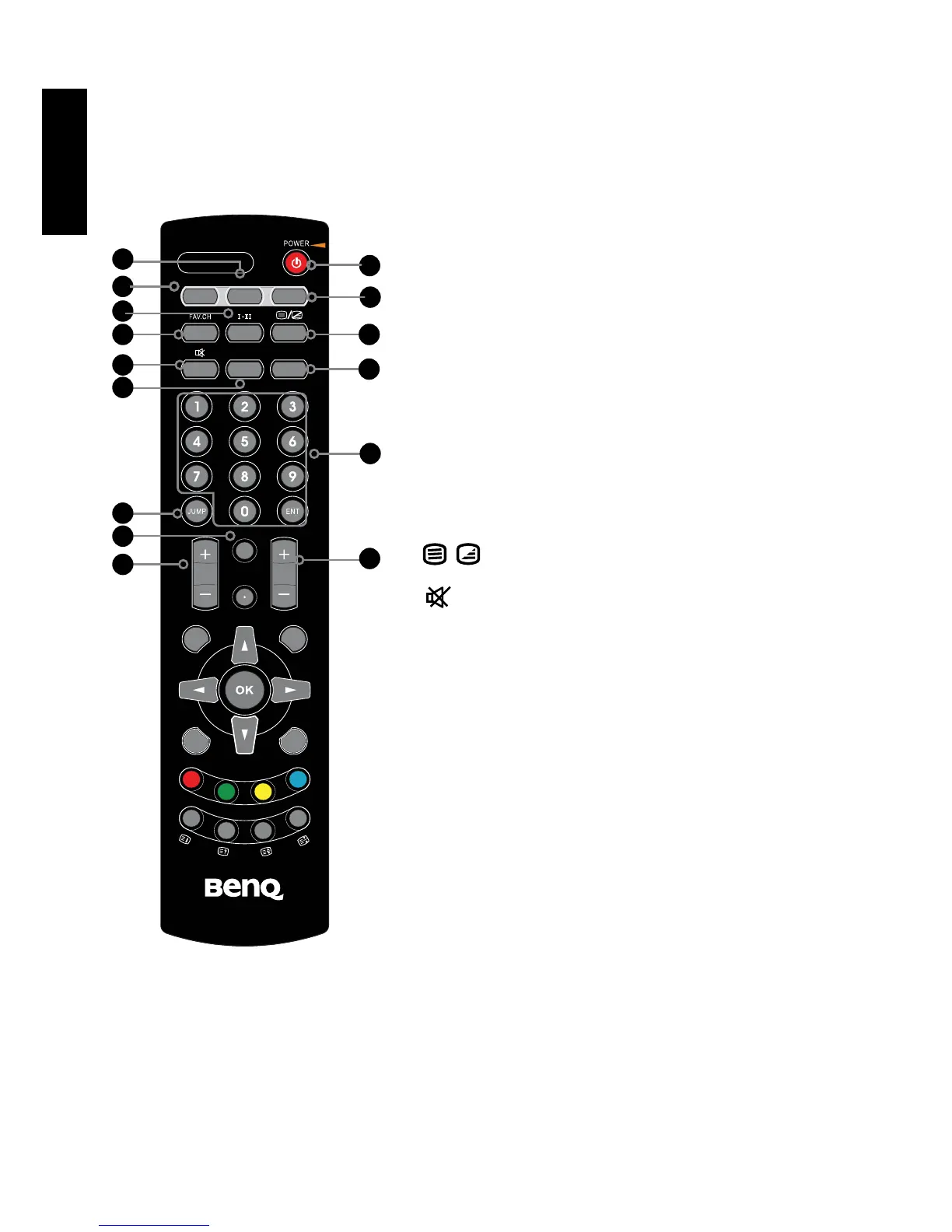
1.POWER/STANDBY
Press this button to power the display on or put it to
standby mode.
2.SUBTITLE
Cycles through the TV subtitle options in DTV mode.
3.FREEZE
Pressing FREEZE to freeze the current picture, press
again to restore the picture.
4.GUIDE
Displays the Program Guide on the screen in TV
mode. Pressing again to turn GUIDE off.
5. I-II
Cycles through the available TV/video sound
reception options (items available will depend on the
TV or video sound system being received) : MONO/
DUAL/STEREO
6.FAV.CH
Pressing FAV.CH display favorite channels list.
7.
Turns on and off the Teletext function.
8.
Mutes and restores your LCD TV sound.
9.SLEEP
Cycles through the LCD TV sleep time.
10.P.SIZE
Cycles through Wide mode settings: Panorama/
Auto/4:3/16:9/ZOOM1/ZOOM2
11.0-9/ENT
Pressing a number selects a channel.
Following selection, pressing ENT activates the
channel, or channel activates automatically in 3
seconds.
12.JUMP
Switches back and forth between the current and
previous channels.
13.INFO
Pressing once displays a variety of information such
as the current channel and the input source.
14.VOL.+-
Increases and decreases volume.
15.CH.+-
Scans up and down the channels.



 To Next Page