Setup Program
55
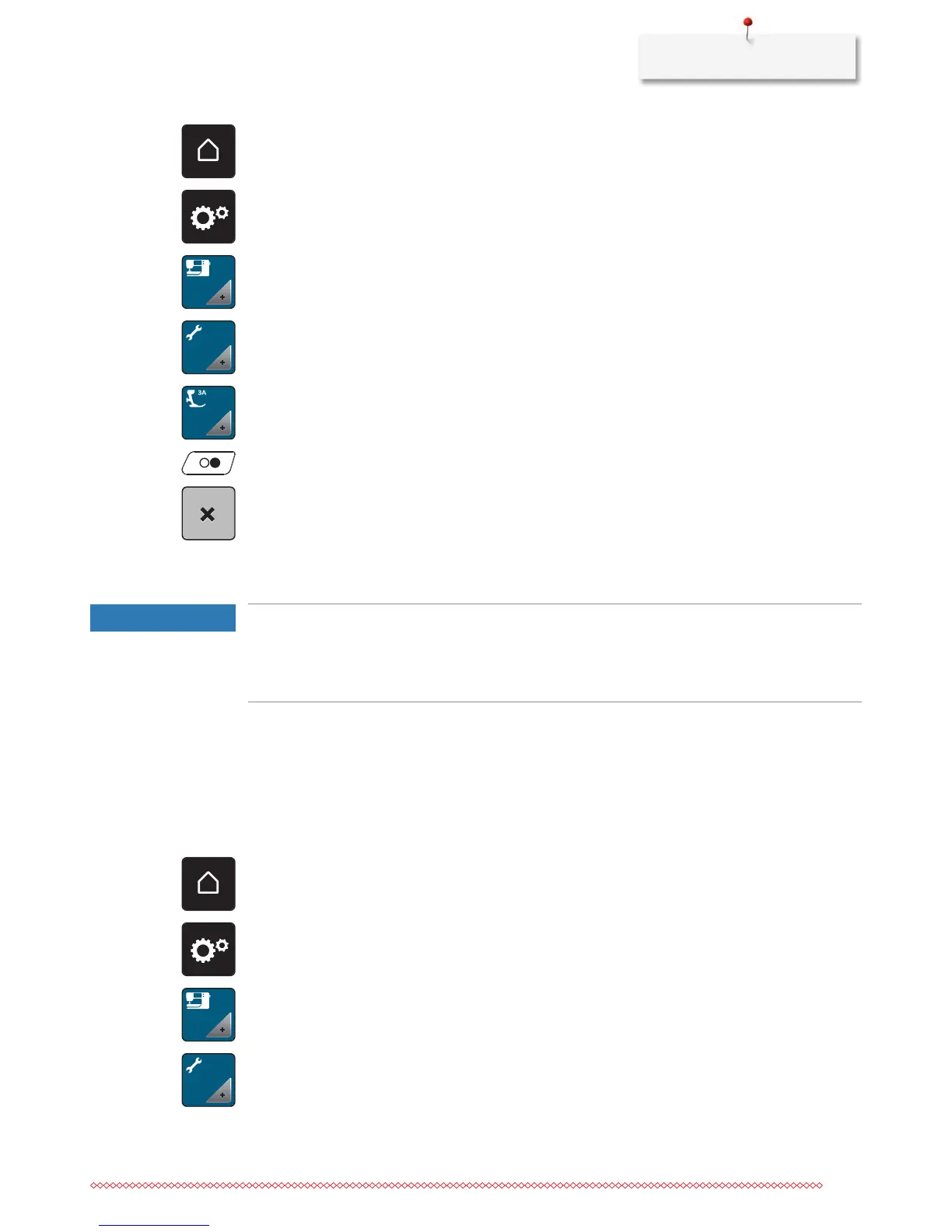
> Touch the icon «Home».
> Touch the icon «Setup Program».
> Touch the icon «Machine settings».
> Touch the icon «Maintenance/Update».
> Touch the icon «Calibrate the Buttonhole foot with slide No. 3A».
> Lower the Buttonhole foot with slide No. 3A.
> Touch the button «Start/Stop» to start the calibration.
> After the calibration is finished, touch the icon «Close».
Updating the machine Firmware
NOTICE
The BERNINA USB stick (optional accessory) has been removed too early
Firmware has not been updated and the machine cannot be used.
> Remove the BERNINA USB stick (optional accessory) only after the update has been completed
successfully.
The latest firmware of the machine and a detailed step-by-step instruction for updating processes can be
downloaded at www.bernina.com. In general, personal data and settings are automatically transferred
during a firmware update. For reasons of safety, it is also recommended to save data and settings on a
BERNINA USB stick (optional accessory) before the firmware update is started. If personal data and settings
should get lost during a firmware update, they can be transferred to the machine again afterwards.
> Insert the BERNINA USB Stick (optional accessory), FAT32 formatted, providing the latest software into
the port.
> Touch the icon «Home».
> Touch the icon «Setup Program».
> Touch the icon «Machine settings».
> Touch the icon «Maintenance/Update».










 To Next Page