Creative sewing
60
5 Creative sewing
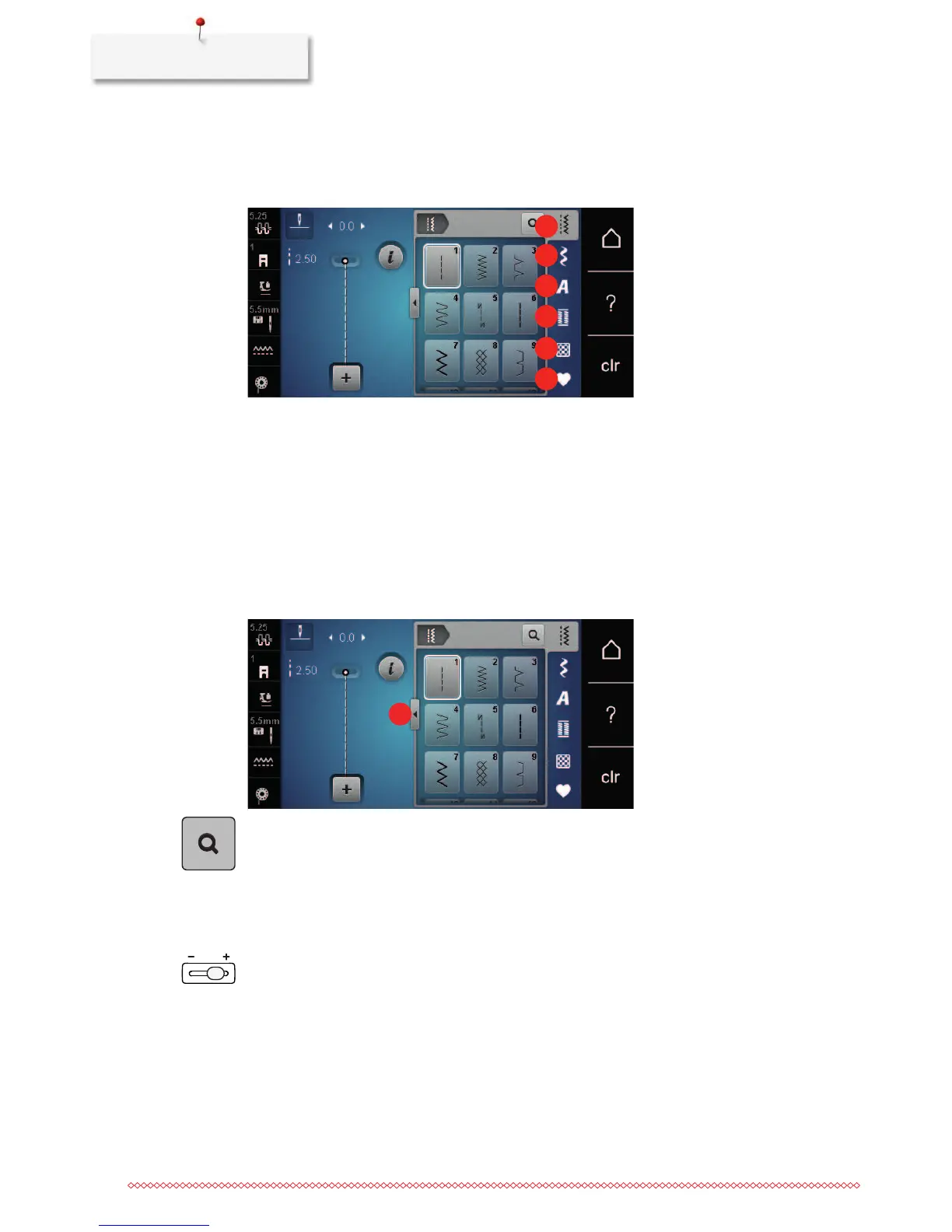
5.1 Overview selection menu sewing
1 Practical stitches 4 Buttonholes
2 Decorative stitches 5 Quilt stitches
3 Alphabets 6 Personal Memory
Selecting a stitch pattern
> Select a stitch pattern, an alphabet or a buttonhole.
> With the touchscreen pen/finger scroll up within the range of the practical stitches to have more stitch
patterns displayed.
> Touch the icon «Display all the stitch patterns» (1) to scale up the view.
> Touch the icon «Display all the stitch patterns» (1) again to downsize the stitch pattern view.
> Touch the icon «Stitch pattern number entry» to select the stitch pattern via entering the stitch number.
5.2 Regulating the speed
The speed is infinitely variable with the slide-speed control.
> Move the slide-speed control to the left to reduce the speed.
> Move the slide-speed control to the right to increase the speed.
5.3 Adjusting the upper thread tension
The default setting of the upper thread tension is made automatically as soon as a stitch pattern is selected.
The upper thread tension is set optimally at the BERNINA factory and the machine has been tested.
Metrosene-/Seralon thread size 100/2 (Company Mettler, Switzerland) is used for upper and bobbin thread.










 To Next Page