Creative sewing
69
Deleting stitch patterns from the personal memory
Prerequisite:
• The stitch pattern is saved in the personal memory.
> Touch the icon «Personal memory».
> Touch the icon «Delete».
> Select the file where the stitch pattern has been saved.
> Select a stitch pattern.
> Touch the icon «Confirm» to delete the stitch pattern.
5.7 Securing
Securing a seam with the button «Securing»
> Push the button «Securing» before starting to sew.
– The stitch pattern/stitch pattern combination is secured at the beginning.
> Press the «Securing» while sewing.
– The machine stops immediately and secures.
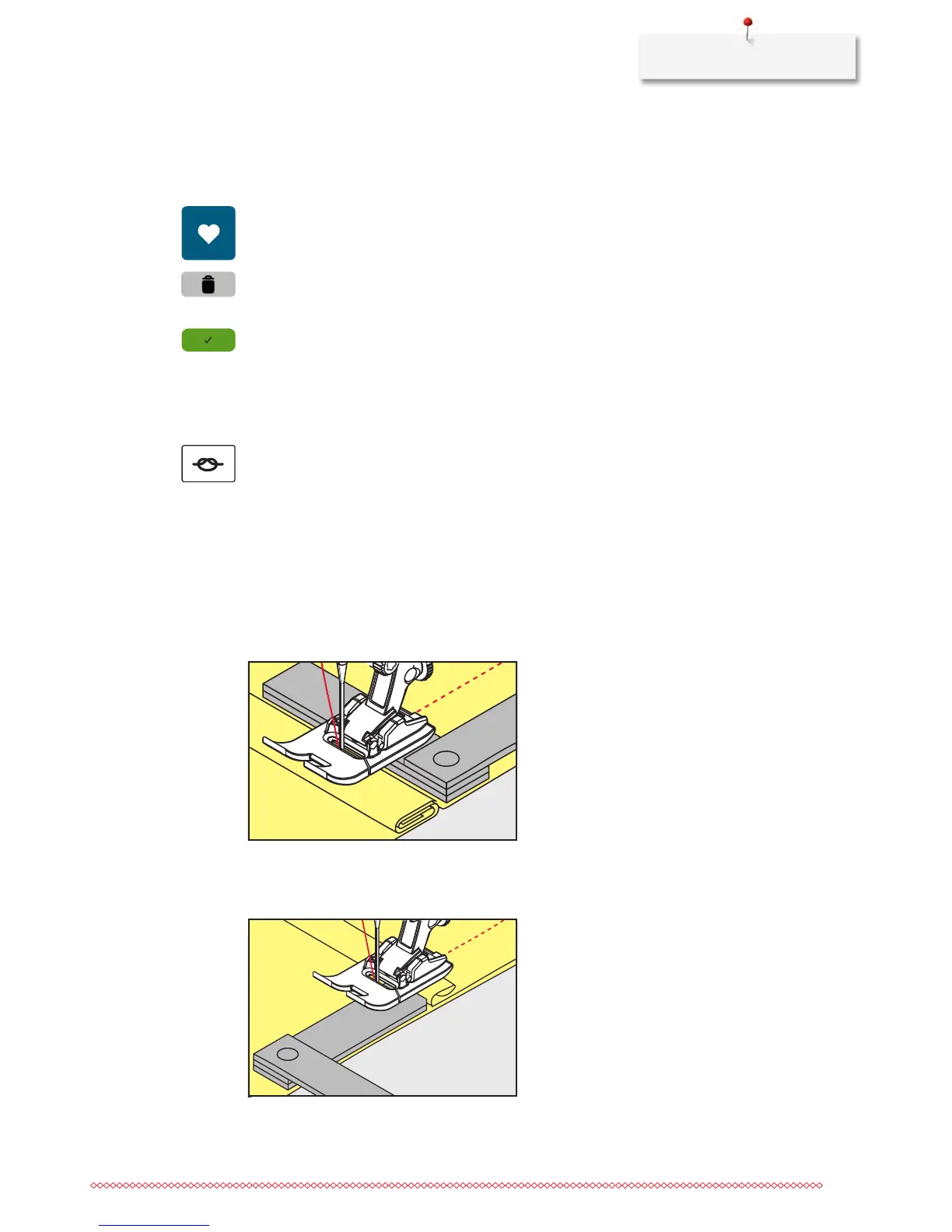
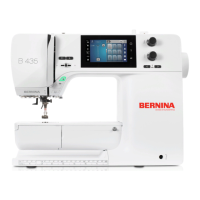
5.8 Height Compensation of uneven layers
If the presser foot is at an angle when sewing over a thick seam, the feed dog cannot grip the fabric and the
sewing project cannot be sewn out properly.
> Place 1 – 3 compensating plates as required from the back of the presser foot close to the needle to level
the fabric layer.
– The presser foot is leveled with the sewing project.
> Place 1 – 3 compensating plates as required from the front of the presser foot close to the needle to level
the fabric layer.
– The presser foot is leveled with the sewing project.










 To Next Page