120
Troubleshooting
Fault
Lower thread indicator does not respond
Bobbin damaged or defective
Monitoring function is deactivated
Defective sensors
Check bobbin or replace if required
Activate monitoring functions in the Setup Program
Have the sewing computer checked by a dealer
Update error
USB stick is not recognized
Update process is at a standstill (hour glass remains)
Use a BERNINA USB stick
Remove the stick and turn the sewing computer off and on
again. Proceed with the update as indicated by the message
Thread is caught in the area of the take-up
lever
Upper thread breaks
Upper thread slipped unvisibly back into the sewing
computer and wrapped itself around the thread
take-up lever
► Cut thread near bobbin
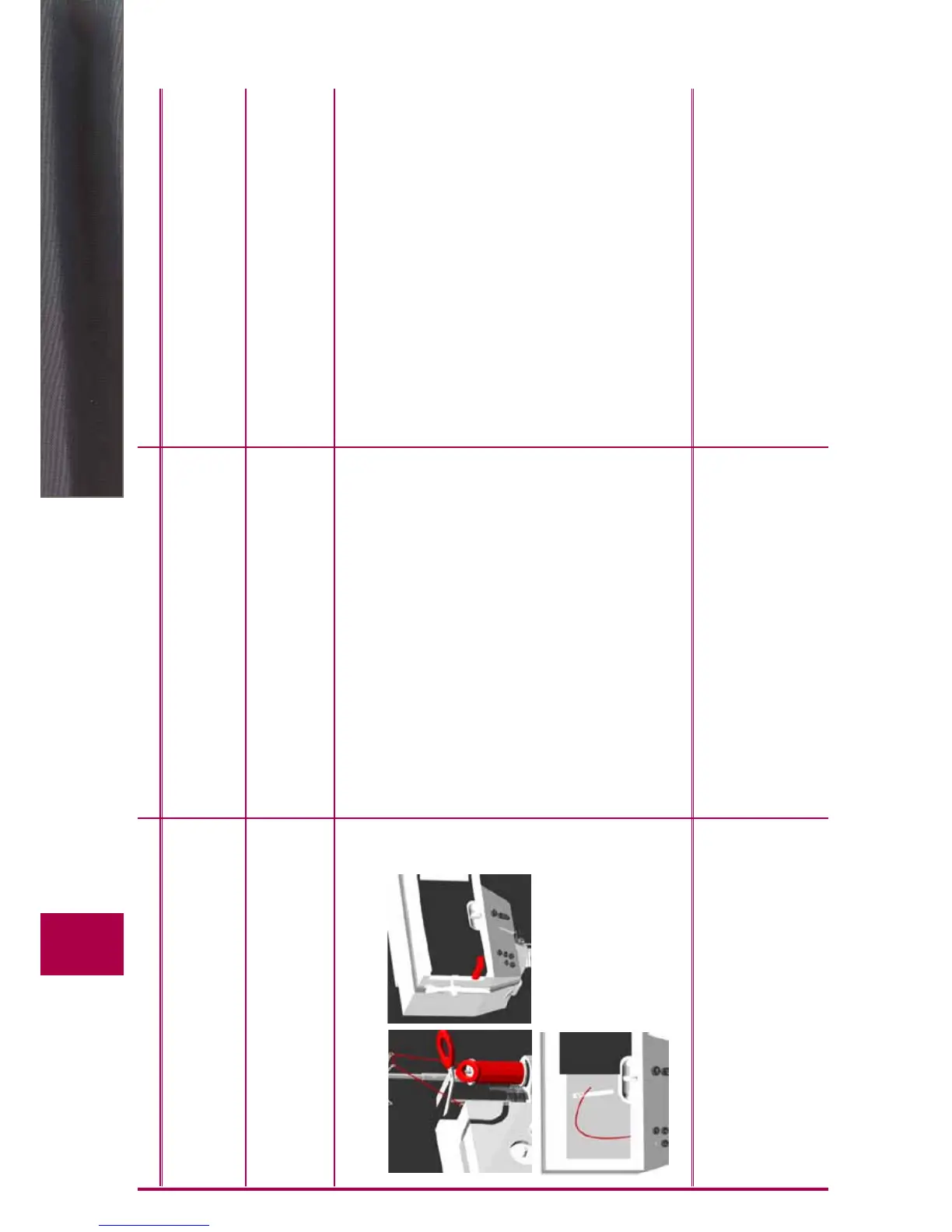
Remove the cover to the left of the screen as follows:
► with your left hand, insert the multifunction tool in the slot
on the left side of the cover and press the lock
► with your right hand remove the cover facing the front
► carefully remove thread remnants from the thread take-up
lever/regulator with tweezers
► put on cover and press down at the back until it clicks into
place
Automatic thread cutter blocked
Thread remnants jammed in the thread Catcher Under Cleaning in Setup Program, proceed as follows:
► touch field 1
► thread catcher of automatic thread cutter moves to the
right
► carefully remove thread remnants with the tweezers
► touch field 3
► automatic thread cutter re-initializes and is ready for use
Cause Repair



 To Next Page