2
OPERATION
27
EN
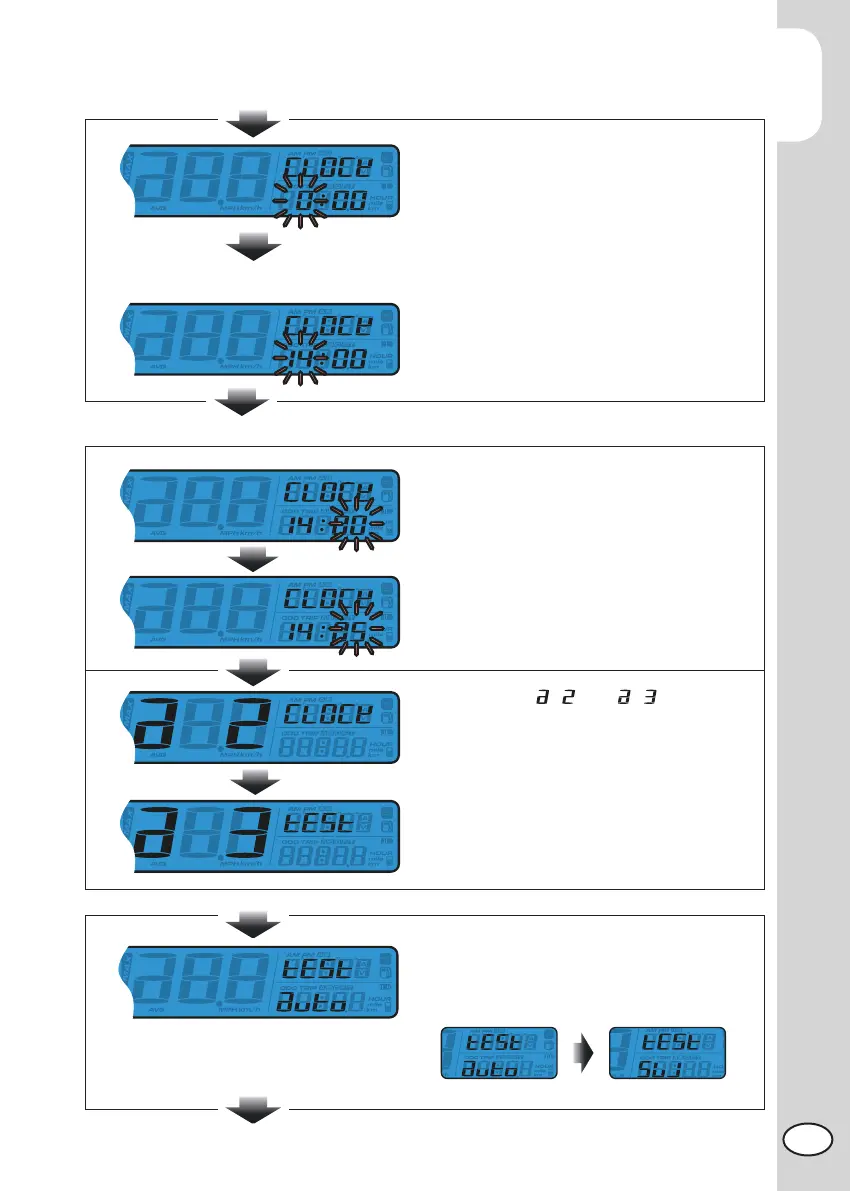
The clock (Hour) setting
EX: You want to set the hour at 14.
Press the Select button to choose the hour
you want to set.
NOTE: Setting range: 0~23 H
.
NOTE: The sequent of cursor movement:
Hour>Ten-Digit of Minute>Single
Digit of Minute
EX. Now the setting is changed from
0:00 to 14:00.
Press the to enter the Adjust button minute setting.
The clock (minute) setting
EX. To change the setting to 14:05.
Press the Select button to choose the
minute you want to set.
NOTE: Setting range: 0~59 minutes..
EX. Now the minute is changed from
14:00 to 14:05.
Press Adjust button to get back to Clock
setting screen.
Switch from to
Press Select button to switch to Stopwatch
distance setup entering screen.
Press Adjust button to enter the distance
setup for Stopwatch.
Distance setup for Stopwatch
Press the Select button to choose auto/
manual stopwatch function.
If Auto is chosen, press the Adjust button
to exit the stopwatch setting function.
NOTE: Default:AUTO



 To Next Page