2
OPERATION
28
EN
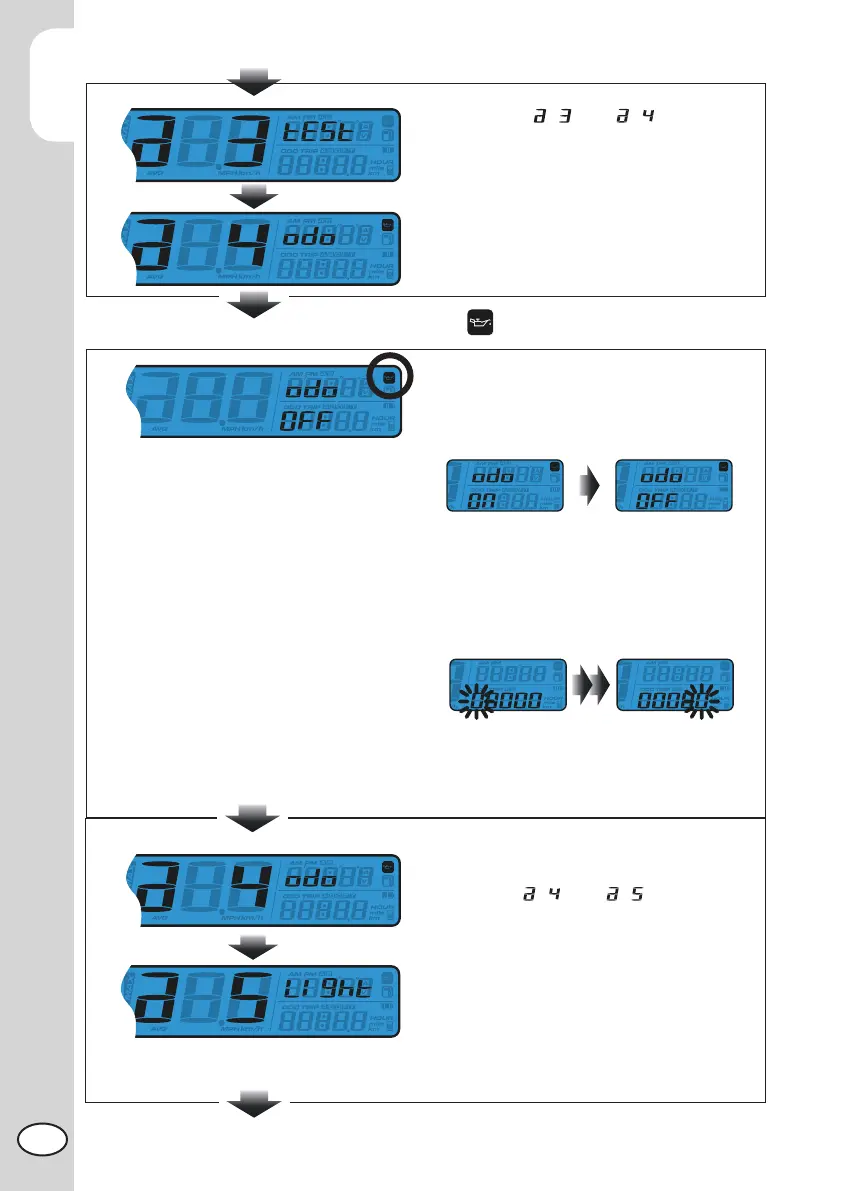
Switch from to
Press Select button to switch to Engine Oil
Light Mileage setting screen.
Press Adjust button to enter the Engine Oil
Light Mileage setting.
Maintenance Light Mileage Setting
Press the Select button to choose mainte-
nance mileage ON or OFF.
NOTE: Default: OFF
If ON is chosen, press Adjust button to
enter the maintenance mileage setting
Press the Adjust button to move the cursor
to the digit that would like to set.
If OFF is chosen then press the Adjust
button to exit the maintenance mileage
setting.
Press Select button to switch the ODO setting.
screen from to
Press the Adjust button to enter the Back-
light Brightness setting



 To Next Page