2
OPERATION
29
EN
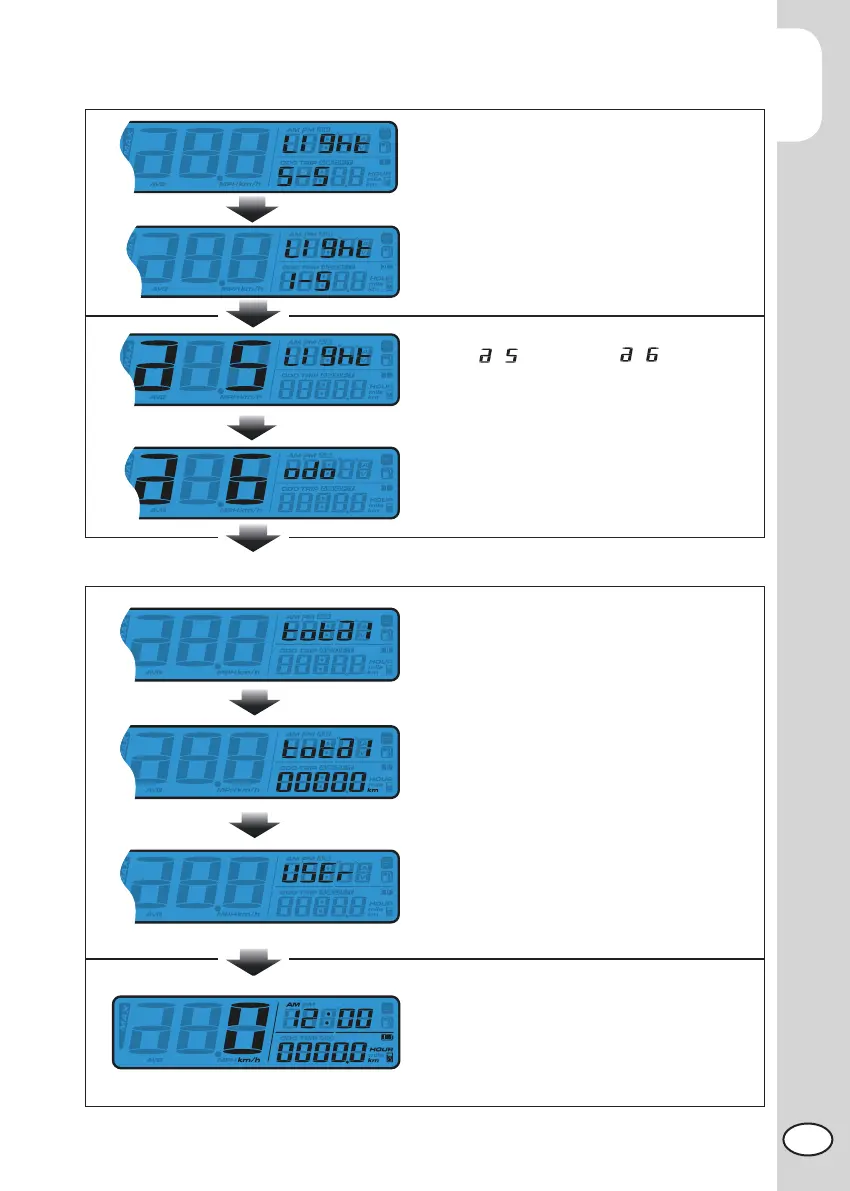
Backlight brightness
Press the Select button to adjust the bright-
ness of the backlight
NOTE: Adjustable Range: 1 ~ 5
NOTE: Default: 5
Press the Adjust button to exist from the
Backlight Brightness setting.
From switch to screen
Press Adjust button to enter the mileage
setting.
ODO setting.
Press the Adjust button to enter the actual
ODO viewing display (ODO).
Press the Select button to enter the User
ODO setting (user).
Press Adjust button to enter the User ODO
setting.
Press the Adjust button to back to ODO
adjust function
Press Select Button to switch to ODO
viewing adjusting function.
In Setting Screen, press and hold the both
Adjust and Select button for 3 sec. to exist
the setting.



 To Next Page