DNA Engine Tetrad 2 Thermal Cycler Operations Manual
5-26 Tech Support: 1-800-4BIORAD • 1-800-424-6723 • www.bio-rad.com
Entering a Forever Incubation
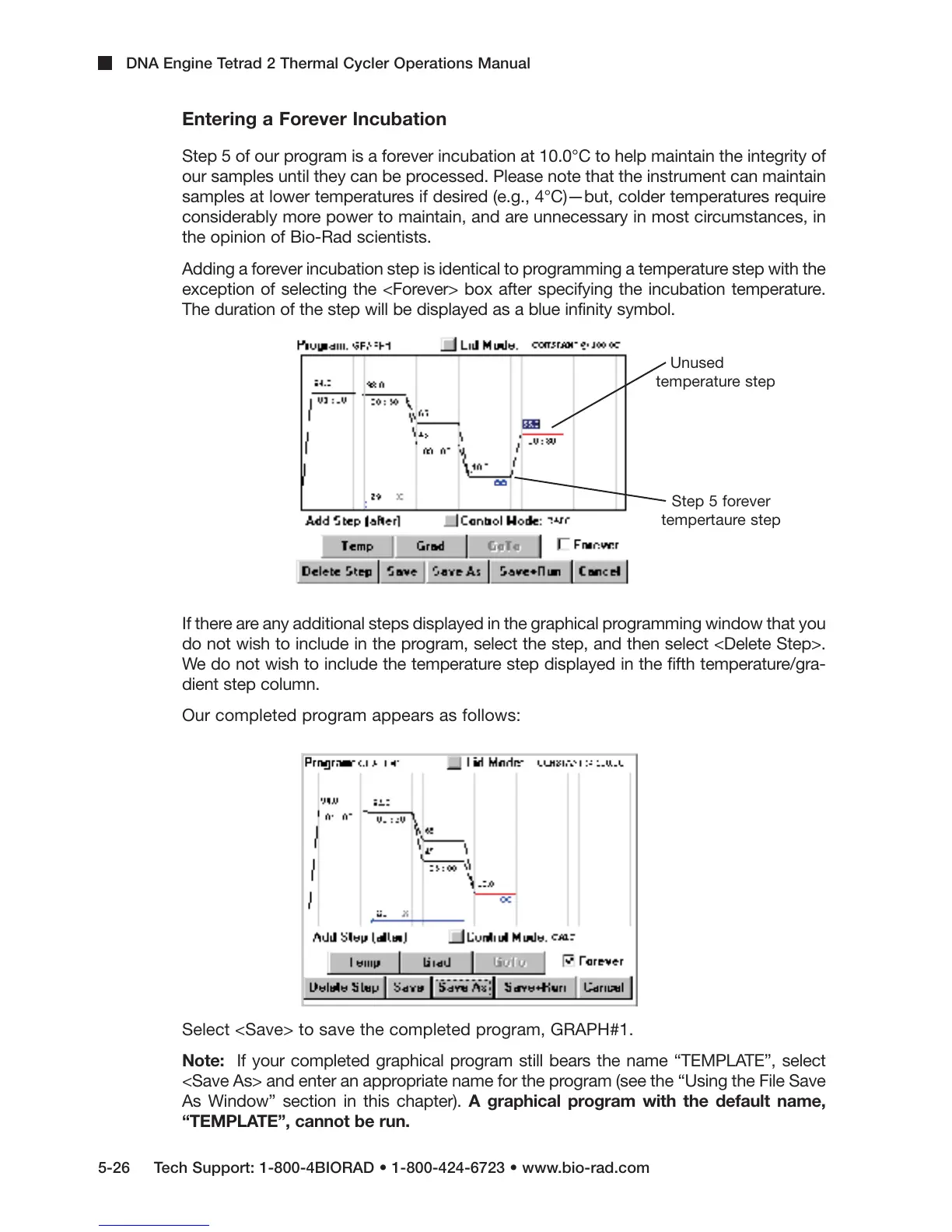
Step 5 of our program is a forever incubation at 10.0°C to help maintain the integrity of
our samples until they can be processed. Please note that the instrument can maintain
samples at lower temperatures if desired (e.g., 4°C)—but, colder temperatures require
considerably more power to maintain, and are unnecessary in most circumstances, in
the opinion of Bio-Rad scientists.
Adding a forever incubation step is identical to programming a temperature step with the
exception of selecting the <Forever> box after specifying the incubation temperature.
The duration of the step will be displayed as a blue infinity symbol.
If there are any additional steps displayed in the graphical programming window that you
do not wish to include in the program, select the step, and then select <Delete Step>.
We do not wish to include the temperature step displayed in the fifth temperature/gra-
dient step column.
Our completed program appears as follows:
Select <Save> to save the completed program, GRAPH#1.
Note: If your completed graphical program still bears the name “TEMPLATE”, select
<Save As> and enter an appropriate name for the program (see the “Using the File Save
As Window” section in this chapter). A graphical program with the default name,
“TEMPLATE”, cannot be run.
Unused
temperature step
Step 5 forever
tempertaure step



 To Next Page