DNA Engine Tetrad 2 Thermal Cycler Operations Manual
6-2 Tech Support: 1-800-4BIORAD • 1-800-424-6723 • www.bio-rad.com
In the previous chapter, various entering and editing features were discussed as they
applied to entering a graphical and/or an advanced program. In this chapter, we cover in
more depth the options available for the manipulation of existing Tetrad 2 programs.
The programming conventions listed in Chapter 5 will also be used here. Please review
these before proceeding.
Opening a Program
Several useful protocols, covering a variety of applications, are preprogrammed into
the DNA Engine Tetrad 2 cycler and stored in the [MAIN] folder. These programs are
listed in Appendix C. Any of the protocols saved on the DNA Engine Tetrad 2 cycler,
whether created by the user or preprogrammed in the factory, can be opened for
editing or running.
From the Status window menu bar,
• Select <Programs>.
• Select <Open>.
An additional menu appears allowing you to choose <Advanced Mode> or
<Basic Mode>.
Opening a Program in Advanced Mode
To open our example advanced program, ADV#1,
• Select <Advanced Mode>.
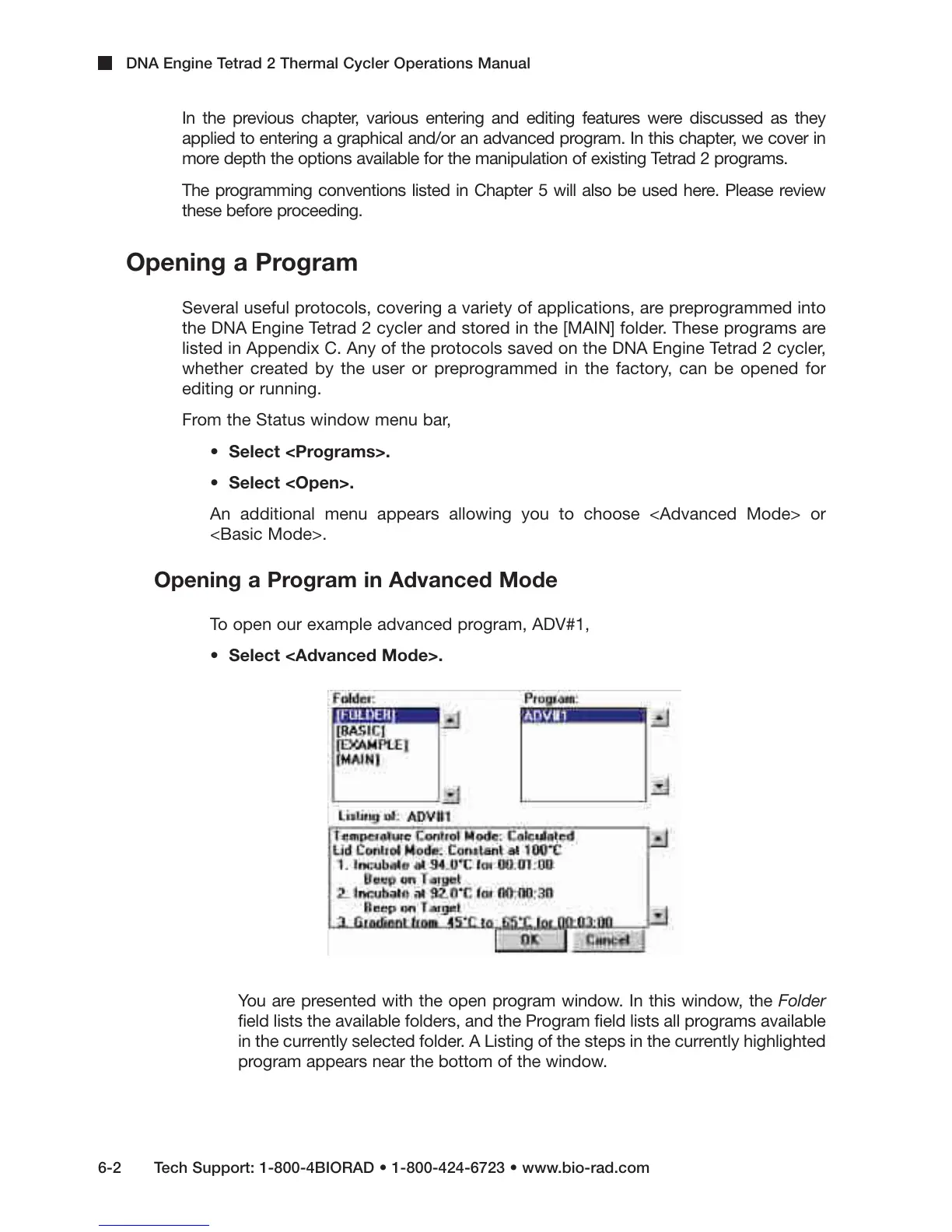
You are presented with the open program window. In this window, the Folder
field lists the available folders, and the Program field lists all programs available
in the currently selected folder. A Listing of the steps in the currently highlighted
program appears near the bottom of the window.



 To Next Page