N-1Rev F
Run Test
InStallatIon
N-1
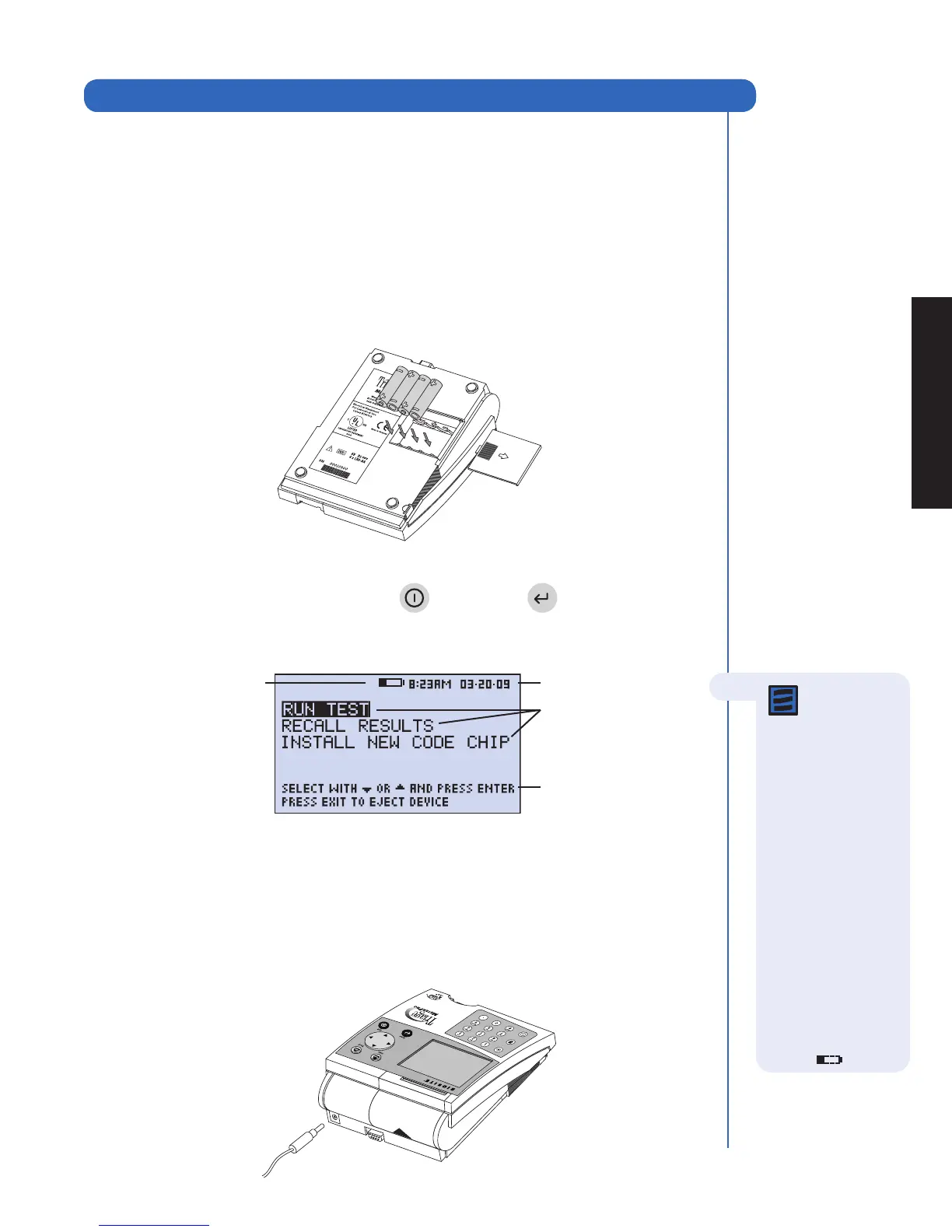
The Main Menu
1. Unpack Meter:
a. Remove the meter from the box and protective plastic bag.
2. Power Meter On:
Batteries
a. Turn the meter over.
b. Remove battery cover.
c. Install 4 AA batteries, paying attention to battery orientation in the battery
compartment.
d. Replace battery cover and turn meter right side up.
e. Power the meter on by pressing the key. Press the key to run self-test.
When the test is completed, the meter display screen will come to rest at the
main menu.
AC Power Supply
a. Remove the power supply from the box.
b. Plug one end into an AC outlet.
c. Plug the opposite end into the round hole in the back of the meter.
Installation
User instructions
Low Power Indicator
Menu items
Time and date
Note: The Low
Power Indicator
monitors the active
power source. To
verify adequate
battery power:
•Navigatetothe
Main Menu
•RemovetheAC
power supply
•PresstheEXIT key
(the meter attempts
to eject a device)
•ObservetheMain
Menu on the
meter’s display.
Replacethebatteries
if the power icon is
visible.



 To Next Page