N-2 Rev F
InStallatIon
N-2
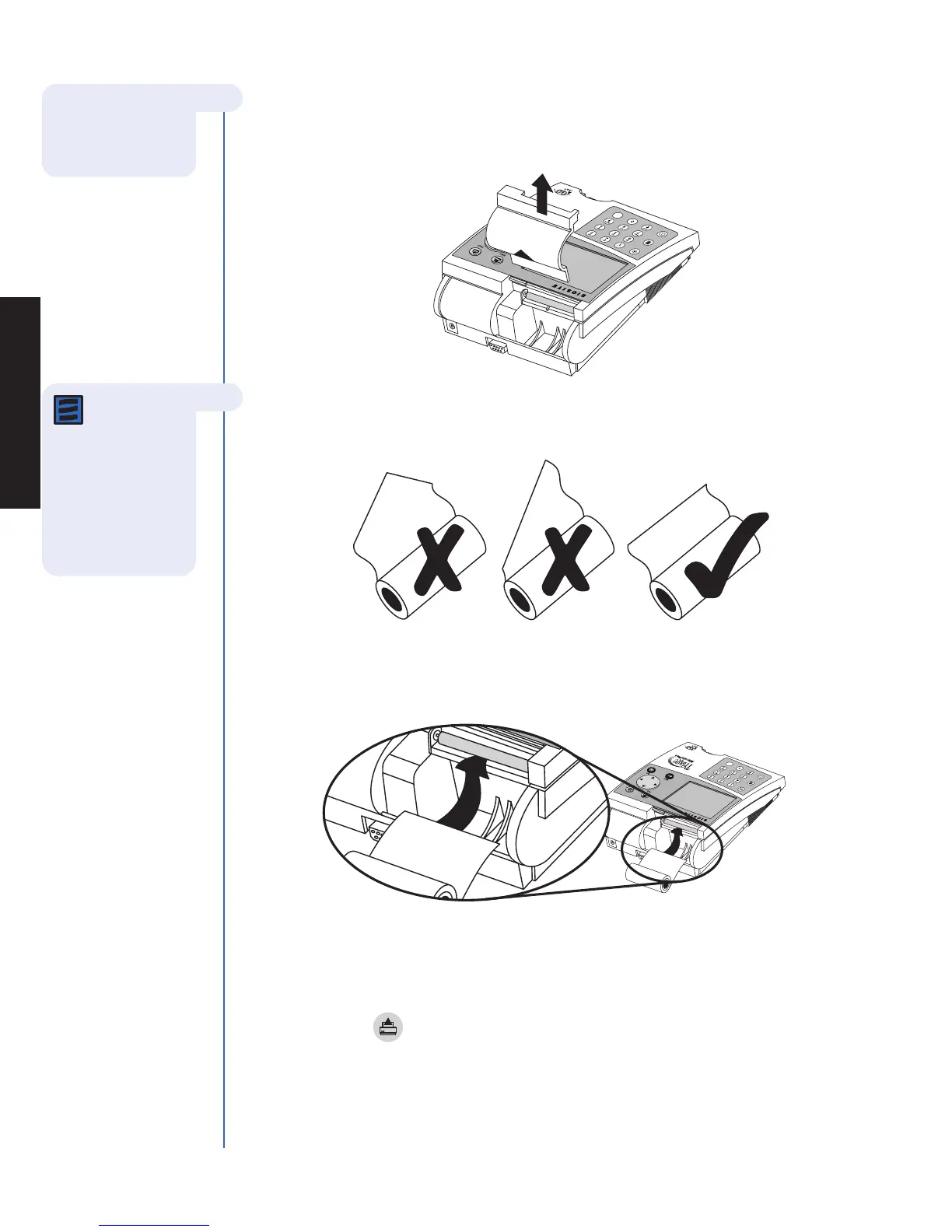
3. Install paper:
a. Remove the printer cover by pulling up on the cover as indicated by the arrow on
the back of the cover.
b. Tear or cut a clean, straight edge to feed into the printer. Do not cut paper at an
angle, as the printer must sense the edge of the paper along the feed path.
c. Position the paper such that the paper will feed from under the roll (as opposed to
over the top of the roll, see picture).
d. Insert the paper edge under the paper roller (platen) until it firmly seats or
resistance is felt.
e. Press the key twice, paper will feed through the printer and extend
out the meter.
f. Place the roll of paper into the paper compartment.
g. Replace the printer cover and continue operation.
Note: The
printer contains
a paper sensor and
will feed the new
paper roll only when
paper with a clean
straight line is
pressed into the
paper roller.
For more details
about Installing
Paper see the Care &
MaintenanCe section.



 To Next Page