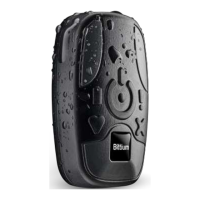
Faros device is a wearable, portable, externally applied electrocardiograph (ECG) recorder and wireless
transmitter for ECG measurement, R-R interval data measurement and patient motion capturing.
The device monitors patient ECG and can be set to generate event markers using the built-in arrhythmia
detection algorithms. The data recorded by the device can be extracted by either a USB connection or via a
Bluetooth connection to a wireless device.
The device comes together with two bundled software: eMotion EDF Viewer for ECG data viewing and
Faros Manager software for changing the device settings and updating the device firmware. Detailed
analysis can be executed with Cardiac Navigator analysis software, available from Bittium. Also, a Faros
Bluetooth protocol is available for third party connectivity and data extraction.
There are several different options for device attachment to human body. ECG and RR can be measured by
using Faros device with OmegaSnap electrode or cable set and commercially available single-use snap on
ECG electrodes.
Faros device is intended for adult and pediatric patients who require vital sign monitoring be it inside or
outside hospital, or healthcare facility environment.
Faros device does not provide interpretive statements. Final interpretation and diagnosis are the
responsibility of a physician.
Before operating Faros device, please read this manual thoroughly and keep it for future reference.


 To Next Page