800953 Bittium Faros Manual
© Bittium Biosignals Ltd 2023
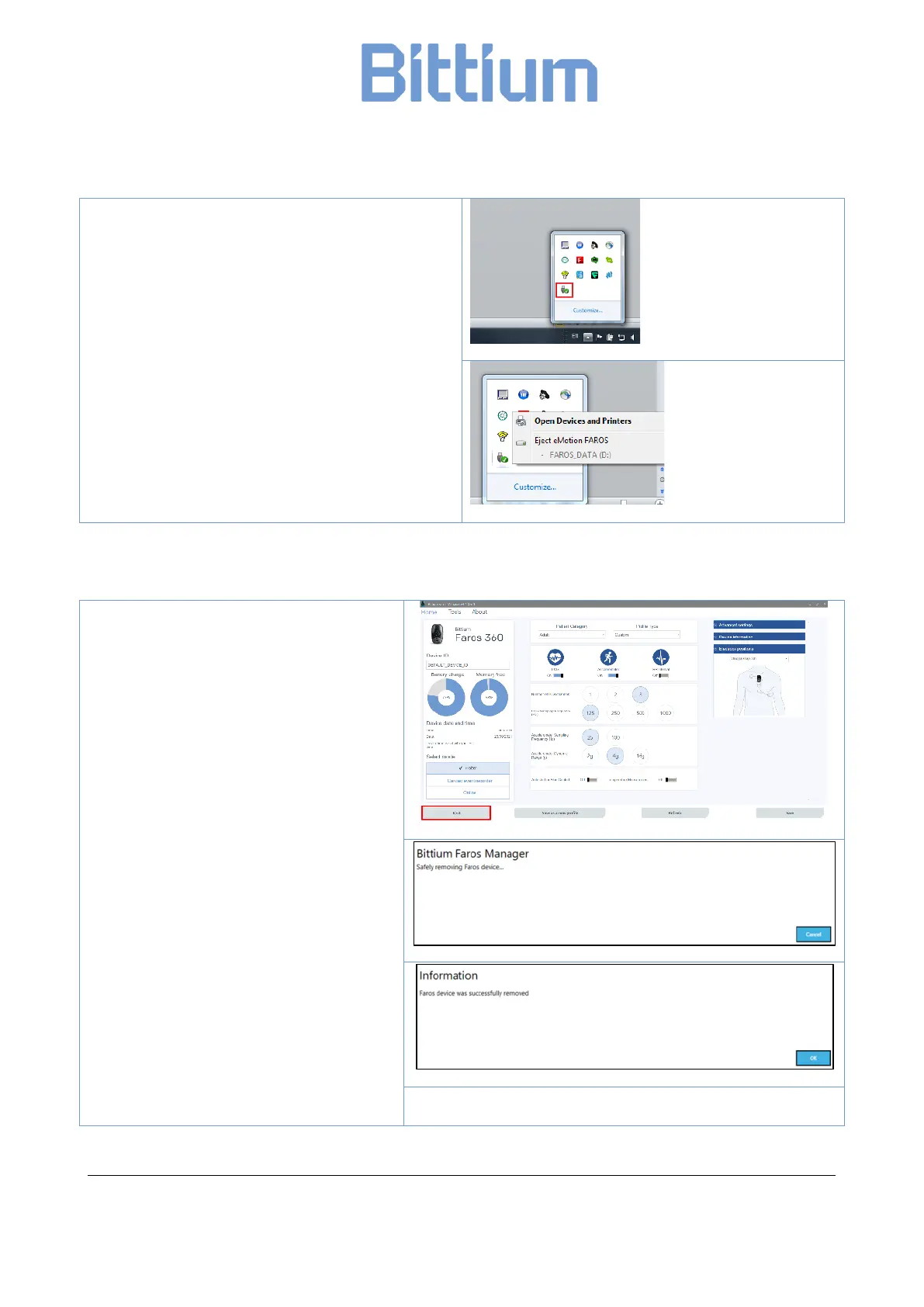
2. One of the hidden tools is the “Safely
Remove Hardware and Eject Media”
3. Click on the icon of the tool, it should show
an option to “Eject FAROS”
4. Choose “Eject FAROS” and wait until Faros
device has only blue light indicator turning
on. You can disconnect the device now.
4.5.2.2 Disconnecting from Faros Manager
1. When Faros device is already con-
nected to computer and Faros
Manager is opened, click on “Eject”
button.
2. A dialog opens and informs to wait
as software removes Faros device
safely.
3. After that, software shows a mes-
sage to inform whether Faros de-
vice was removed successfully or
not.
If Faros device could not be removed, please check if there are any measurement files still open on the
computer or any program is using Faros device memory card.


 To Next Page