EasyManua.ls Logo

BIXOLON SRP-F310 - Setting Up the Printer; Unpacking and Contents

BIXOLON SRP-F310
42 pages
Print Icon
To Next Page IconTo Next Page
To Previous Page IconTo Previous Page
Loading...
POS Printer
Rev. 2.00
- 8 -
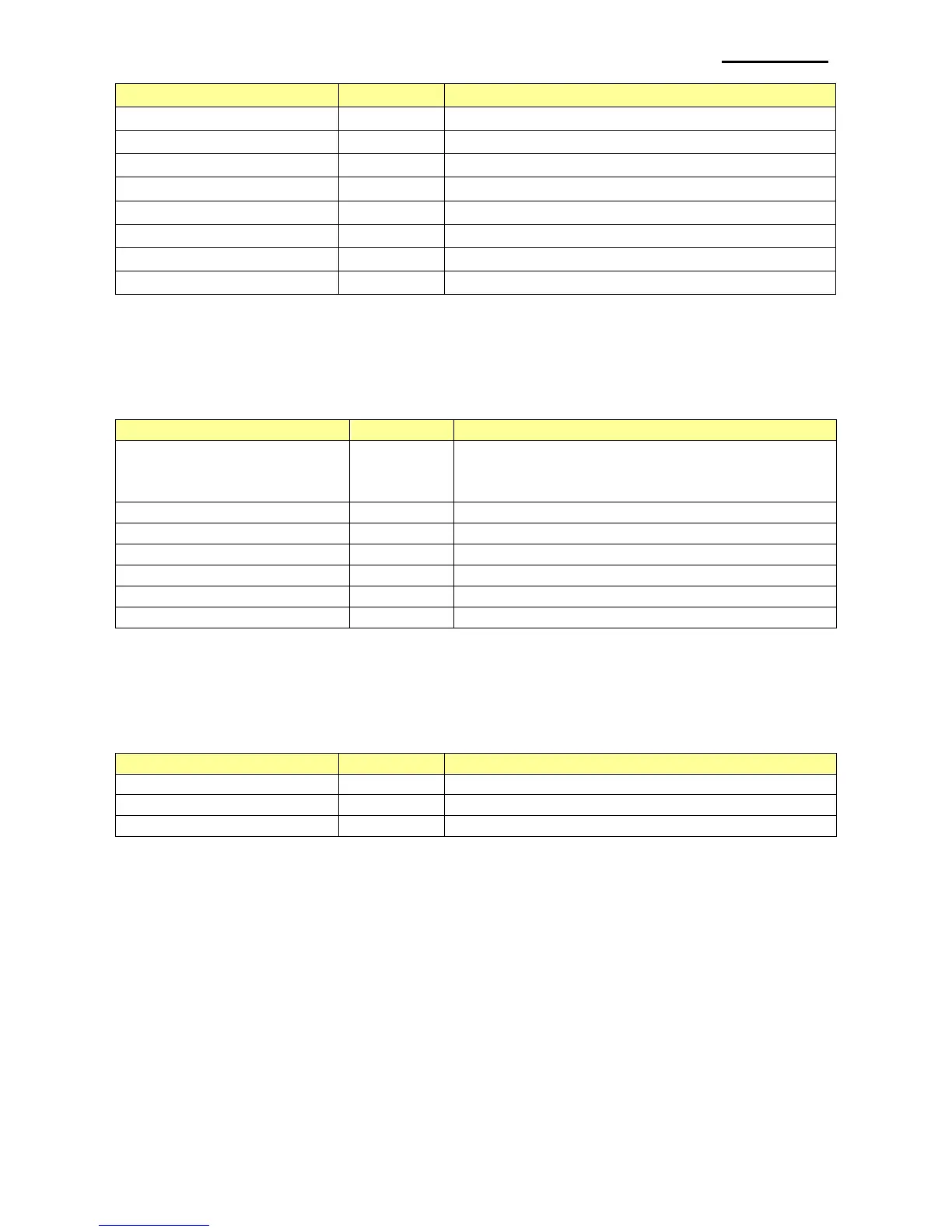
Code
Value
Description
BXL_TS_0HEIGHT
0
Set the ratio of vertical height to X1
BXL_TS_1HEIGHT
16
Set the ratio of vertical height to X2
BXL_TS_2HEIGHT
32
Set the ratio of vertical height to X3
BXL_TS_3HEIGHT
48
Set the ratio of vertical height to X4
BXL_TS_4HEIGHT
64
Set the ratio of vertical height to X5
BXL_TS_5HEIGHT
80
Set the ratio of vertical height to X6
BXL_TS_6HEIGHT
96
Set the ratio of vertical height to X7
BXL_TS_7HEIGHT
112
Set the ratio of vertical height to X8
2-5 Text Attribute
This is a text property and each property can be combined with OR operation.
Available settings are as follows.
Code
Value
Description
BXL_FT_DEFAULT
0
Default setting
NOT BOLD, FONTA, NOT UNDERLINE,
NOT REVERSE
BXL_FT_FONTB
1
Use FONTB
BXL_FT_FONTC
16
Use FONTC
BXL_FT_BOLD
2
Use Bold font
BXL_FT_UNDERLINE
4
Set Underline property
BXL_FT_REVERSE
8
Set Reverse property
BXL_ExFT_CHINA_FONTB
32
2-6 Bar Code Text Position
This is for setting the position where bar code data is printed.
Available settings are as follows.
Code
Value
Description
BXL_BC_TEXT_NONE
0
Do not print bar code data
BXL_BC_TEXT_ABOVE
1
Print bar code data above bar code
BXL_BC_TEXT_BELOW
2
Print bar code data below bar code

Table of Contents

Other manuals for BIXOLON SRP-F310

Related product manuals