EasyManua.ls Logo

BIXOLON SRP-F310 - USB Interface; Ethernet Interface

BIXOLON SRP-F310
42 pages
Print Icon
To Next Page IconTo Next Page
To Previous Page IconTo Previous Page
Loading...
POS Printer
Rev. 2.00
- 9 -
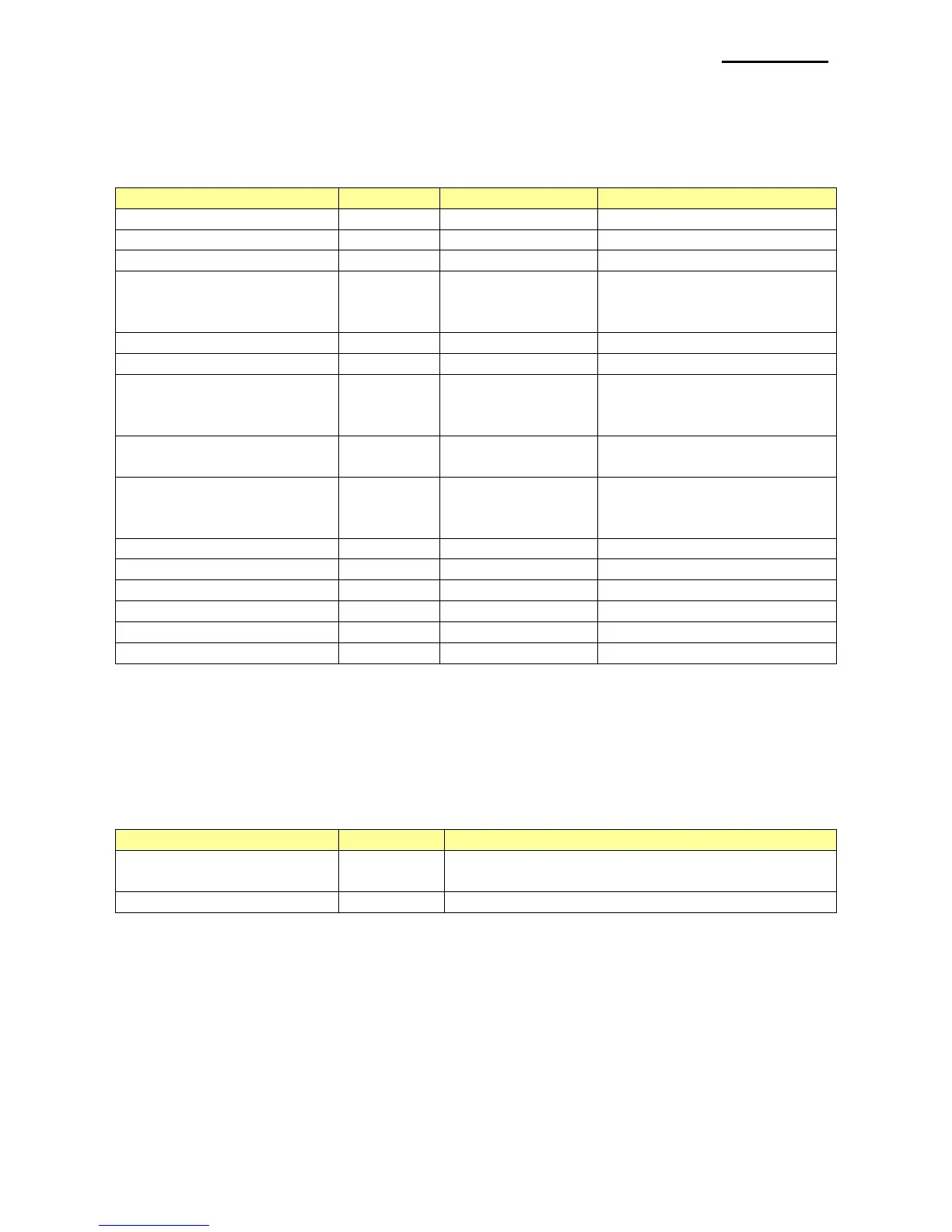
2-7 Bar Code Symbology
This defines the bar code type.
Available settings are as follows.
Code
Value
Number of data
Range of data
BXL_BCS_UPCA
101
11 <= n <= 12
48 <= data <= 57
BXL_BCS_UPCE
102
11 <= n <= 12
48 <= data <= 57
BXL_BCS_EAN13
103
12 <= n <= 13
48 <= data <= 47
BXL_BCS_JAN13
104
7 <= n <= 8
48 <= data <= 57
64 <= data <= 90
data = 32,36,37,43,45,46,47
BXL_BCS_EAN8
105
7 <= n <= 8
48 <= data <= 57
BXL_BCS_JAN8
106
7 <= n <= 8
48 <= data <= 57
BXL_BCS_Code39
107
1 <= n <= 255
48 <= data <= 57
65 <= data <= 68
data = 32,36,37,43,45,46,47
BXL_BCS_ITF
108
1 <= n <= 255
(Even)
48 <= data <= 57
BXL_BCS_Codabar
109
1 <= n <= 255
48 <= data <= 57
65 <= data <= 68
data = 36,43,45,46,47,58
BXL_BCS_Code93
110
1 <= n <= 255
0 <= data <= 127
BXL_BCS_Code128
111
2 <= n <= 255
0 <= data <= 127
BXL_BCS_PDF417
200
2 <= n <= 928
0 <= data <= 255
BXL_BCS_QRCODE
202~203
2 <= n <= 928
0 <= data <= 255
BXL_BCS_DATAMATRIX
204
2 <= n <= 928
0 <= data <= 255
BXL_BCS_MAXICODE
205~6
2 <= n <= 928
0 <= data <= 255
2-8 Image Width
Set the width of image and valid range is 0~ max width.
Image is resized for the conditions according to the given conditions when the following
values are set.
Available settings are as follows.
Code
Value
Description
BXL_WIDTH_FULL
-1
Value is set to max width and the image is
resized to the full paper size

BXL_WIDTH_NONE
-2
Image is not resized

Table of Contents

Other manuals for BIXOLON SRP-F310

Related product manuals