54
1.8 7 7. 8 7 7. 2 2 6 9 BLACKBOX.COM
NEED HELP?
LEAVE THE TECH TO US
LIVE 24/7
TECHNICAL
SUPPORT
1.8 77.877.2269
CHAPTER 13: CENTRAL MANAGEMENT
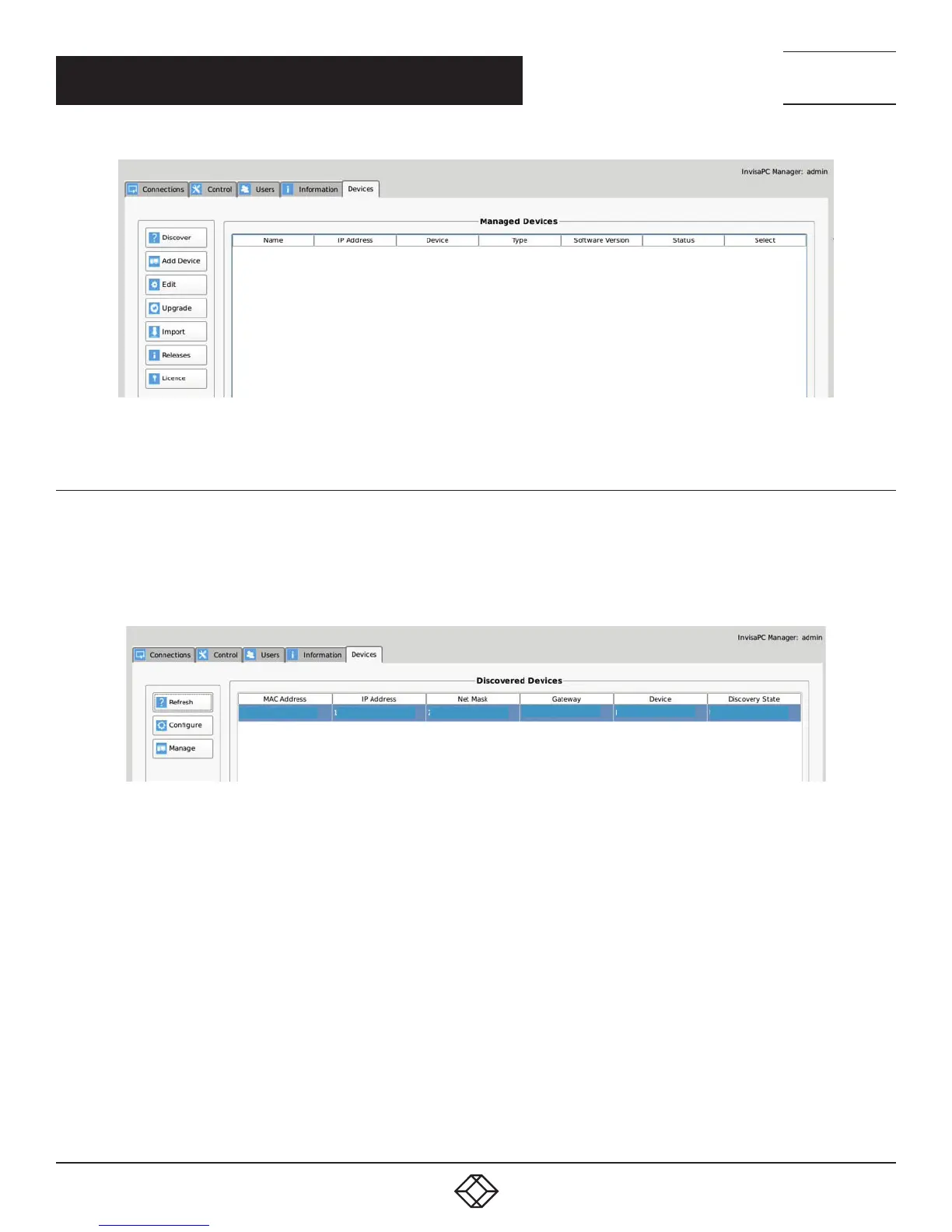
FIGURE 13-2. DEVICE TAB EXPANDED
13.1.1 DISCOVERING AND ADDING DEVICES
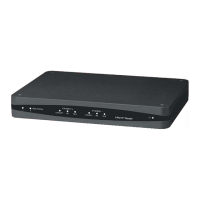
Using the Discover button is the best way to add devices to your managed devices. When you click the Discover button, the manager
will look for unmanaged devices on the network. These devices will appear in the Discovered Devices section as shown next. This
shows the MAC Address, IP Address, Net Mask, Gateway, Device Type, and the Discover State (managed, unmanaged, or orphaned)
of the devices discovered.
1c:37:bf:00:10:22 19 8.168.1.22
255.255.255.0
19 8.168.1.1 DTX1002-T
Unmanaged
FIGURE 13-3. DISCOVERED DEVICES


 To Next Page