55
1.8 7 7. 8 7 7. 2 2 6 9 BLACKBOX.COM
NEED HELP?
LEAVE THE TECH TO US
LIVE 24/7
TECHNICAL
SUPPORT
1.8 77.877.2269
CHAPTER 13: CENTRAL MANAGEMENT
13.1.2 ADDING A DEVICE ON YOUR NETWORK
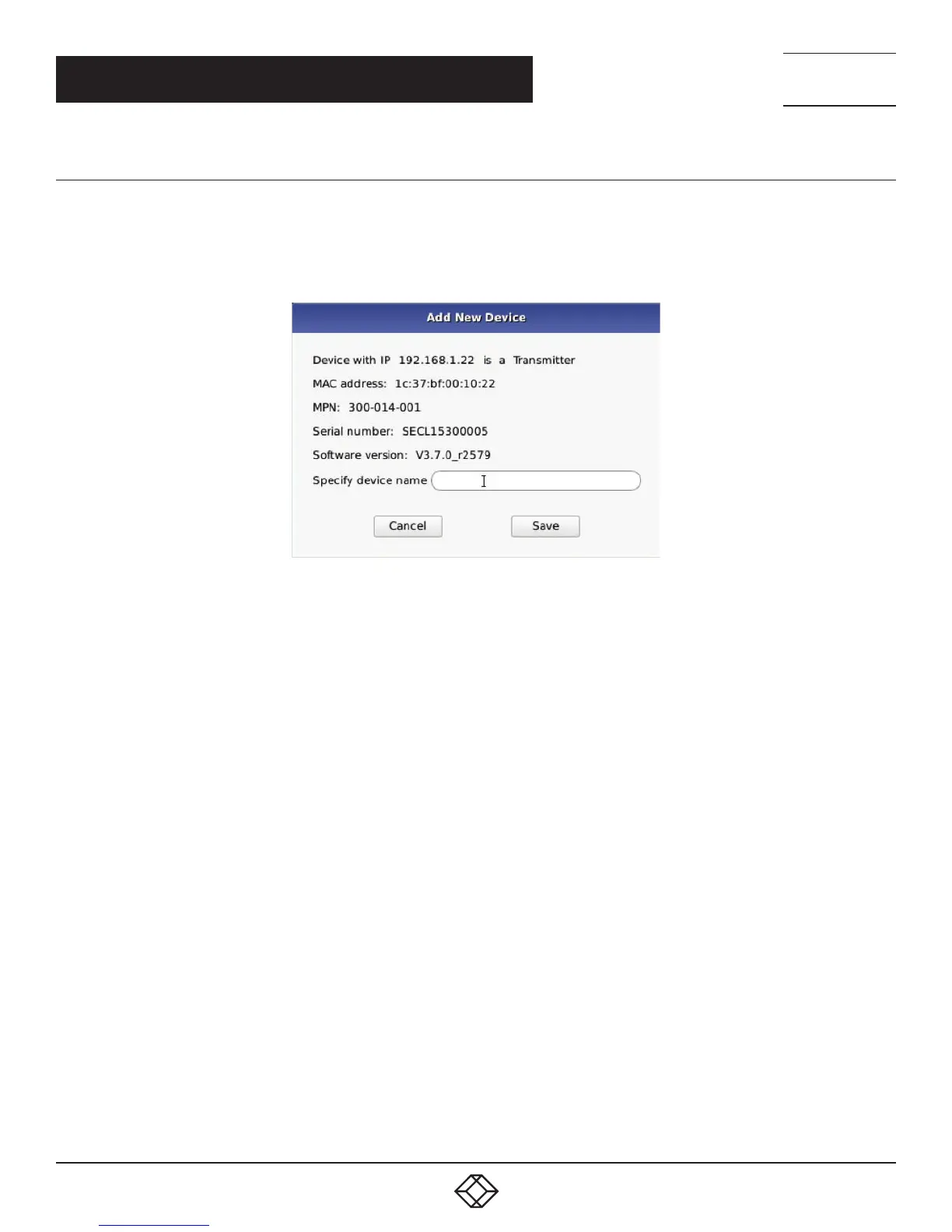
If the device you have discovered is on your network, you can simply click the Manage button. You will then be asked to give
this device a name and it will be added to your Managed Devices section. We highly recommend giving all devices a unique name.
Press the Back button to go back to the Managed Devices page where you will see the device you have added.
FIGURE 13-4. ADD NEW DEVICE
If a device has a managed state of “Orphaned”, then there is a conflict between the reported state on the Manager and that of the
device. This may occur where the device was removed from the Manager’s database when the device was off-line, or if the Manager
was restored to factory default settings. A device in the orphaned state can be set back to “Managed” by selecting the Manage
button and following the same process as for unmanaged devices.


 To Next Page