32
1.8 7 7. 87 7. 2 2 6 9 BLACKBOX.COM
NEED HELP?
LEAVE THE TECH TO US
LIVE 24/7
TECHNICAL
SUPPORT
1.8 77.87 7.2269
CHAPTER 3: INSTALLATION
CONFIGURATION VIA WEB UI
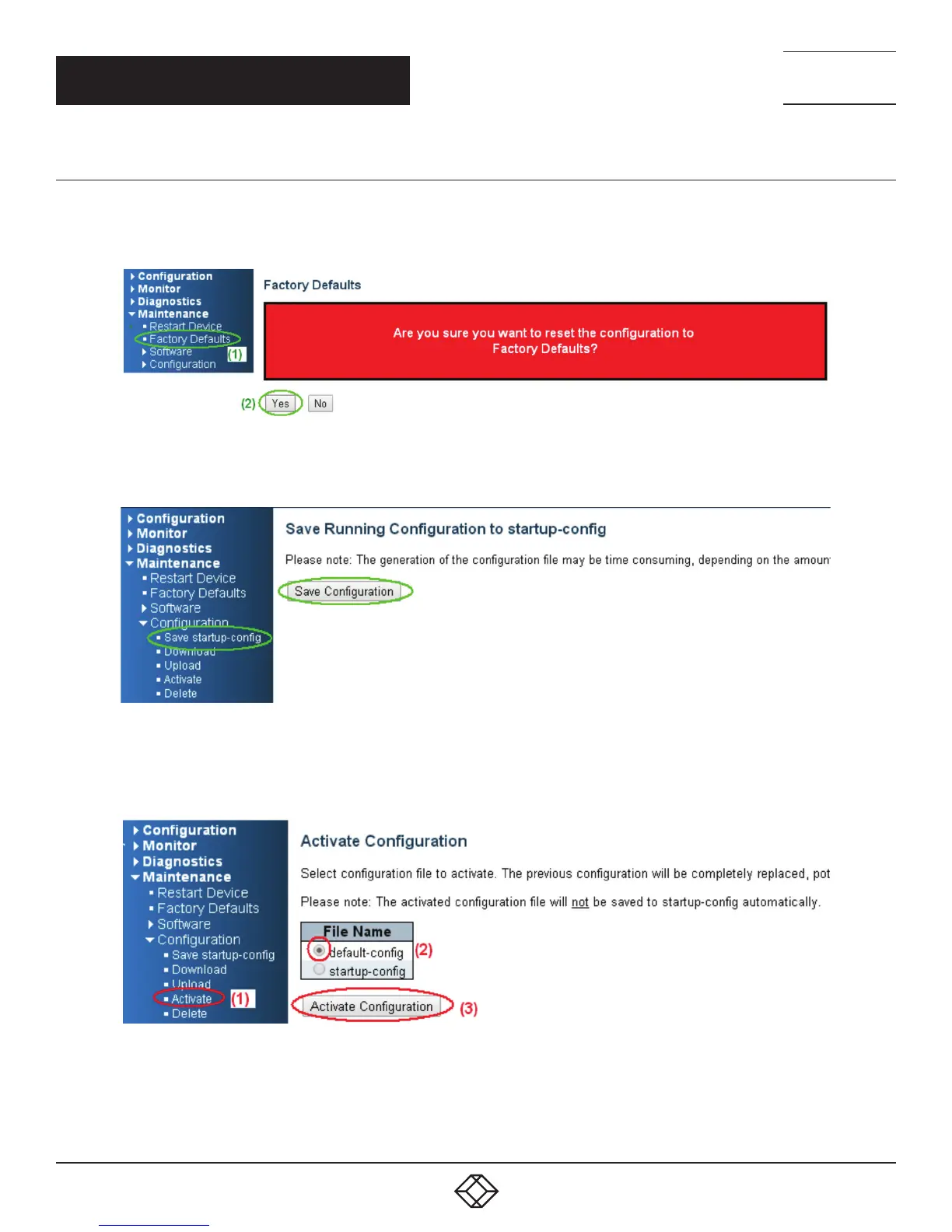
If the manager wants to reset the configuration to default but keep the management IP setting:
1. Go to Maintenance —> Factory Defaults page and click the Yes button.
FIGURE 3-19. RESET TO FACTORY DEFAULTS SCREEN
2. Go to Maintenance —> Configuration —> Save startup-config pagination, then click the Save Configuration button, then reset.
FIGURE 3-20. SAVE CONFIGURATION SCREEN
To reset all configurations to defaults:
1. Go to the Maintenance —> Configuration —> Activate page, select default-config, then click the Activate Configuration button.
FIGURE 3-21. ACTIVATE CONFIGURATION SCREEN













 To Next Page