53
1.8 7 7. 87 7. 2 2 6 9 BLACKBOX.COM
NEED HELP?
LEAVE THE TECH TO US
LIVE 24/7
TECHNICAL
SUPPORT
1.8 77.87 7.2269
CHAPTER 5: SECURITY APPLICATION
CASE 1J
User can set default ACL Rule of GE port as “Deny”, then bind a suitable profile with “Copy Frame” action for mirror analyzer used. It
means the system will copy frames from the binding GE Port to the analyzer port. No frames are received from the denied GE port but
the mirror analyzer port.
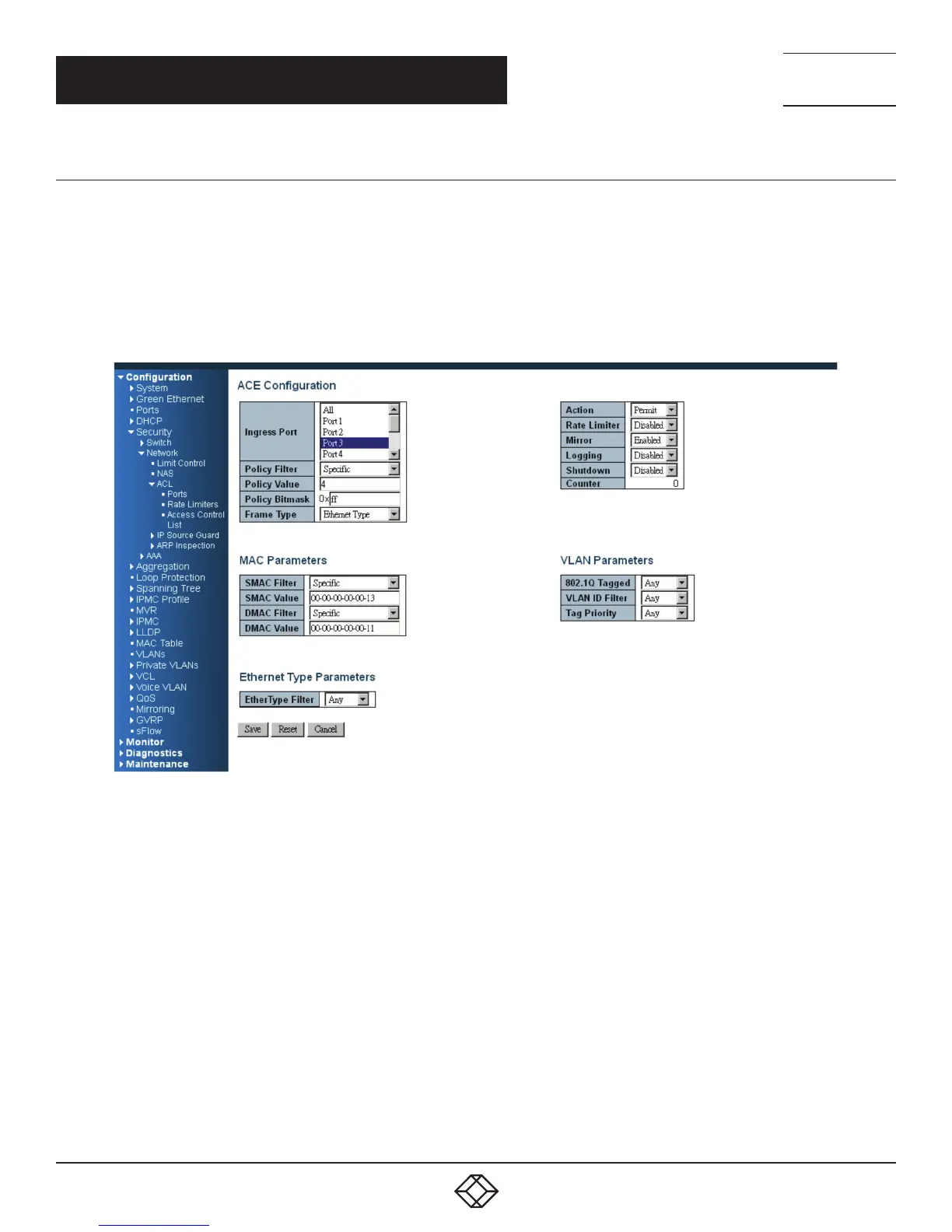
One directional MAC address with Copy Frame action. (Don’t case VLAN, Ether Type)
STEP 1: Create a new ACL Profile. (Profile Name: CopyFrameTest)
STEP 2: Create a new ACL Entry rule under this ACL profile. (SrcMAC: 13 and DesMAC: 11)
FIGURE 5-15.
STEP 3: Bind this ACL profile to a GE port. (PORT-3)
STEP 4: Set the analyzer port to enable and mirror analyzer port.













 To Next Page