SAM 950 Berkeley Nucleonics Corporation 17 of 62
SOFTWARE UPGRADE GUIDE
SW update notification message is automatically sent and displayed when the latest SW version is available
and the currently installed version is lower than the latest one.
The SAM 950 unit has to be connected WiFi network to download/upgrade to the latest SW.
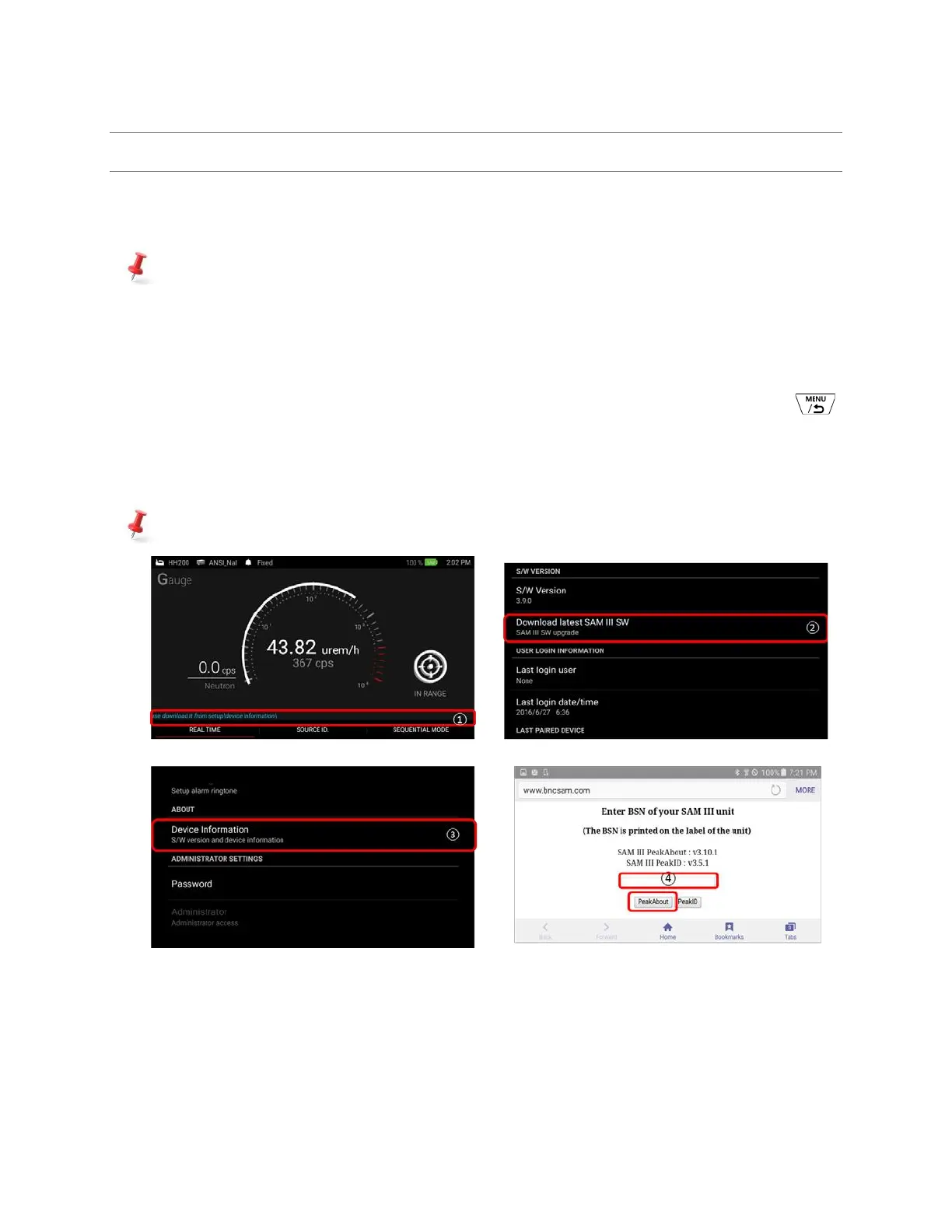
✓ Following is software upgrade procedure. Refer to the figure 4.2 below.
1. SW upgrade notification message is appeared on the low bottom of the main screen as shown in
figure 4.1. only if the currently installed version is lower than the latest one.
2. To upgrade, go to the Device Information by following path: Pop up menu (by press and hold )
→ Setup → Device Information
3. Touch and select ‘Download latest SAM III SW’.
4. Type in ‘BSN” number and select ‘PeakAbout II’ PDA application SW.
BSN (BNC Serial Number) is located on the label.
Figure 4.2. SAM III SW upgrade procedure
5. Installation screen is opened as shown in figure 4.3. Follow 4 steps below.



 To Next Page