SAM 950 Berkeley Nucleonics Corporation 45 of 62
STEP 10. MANUAL ID
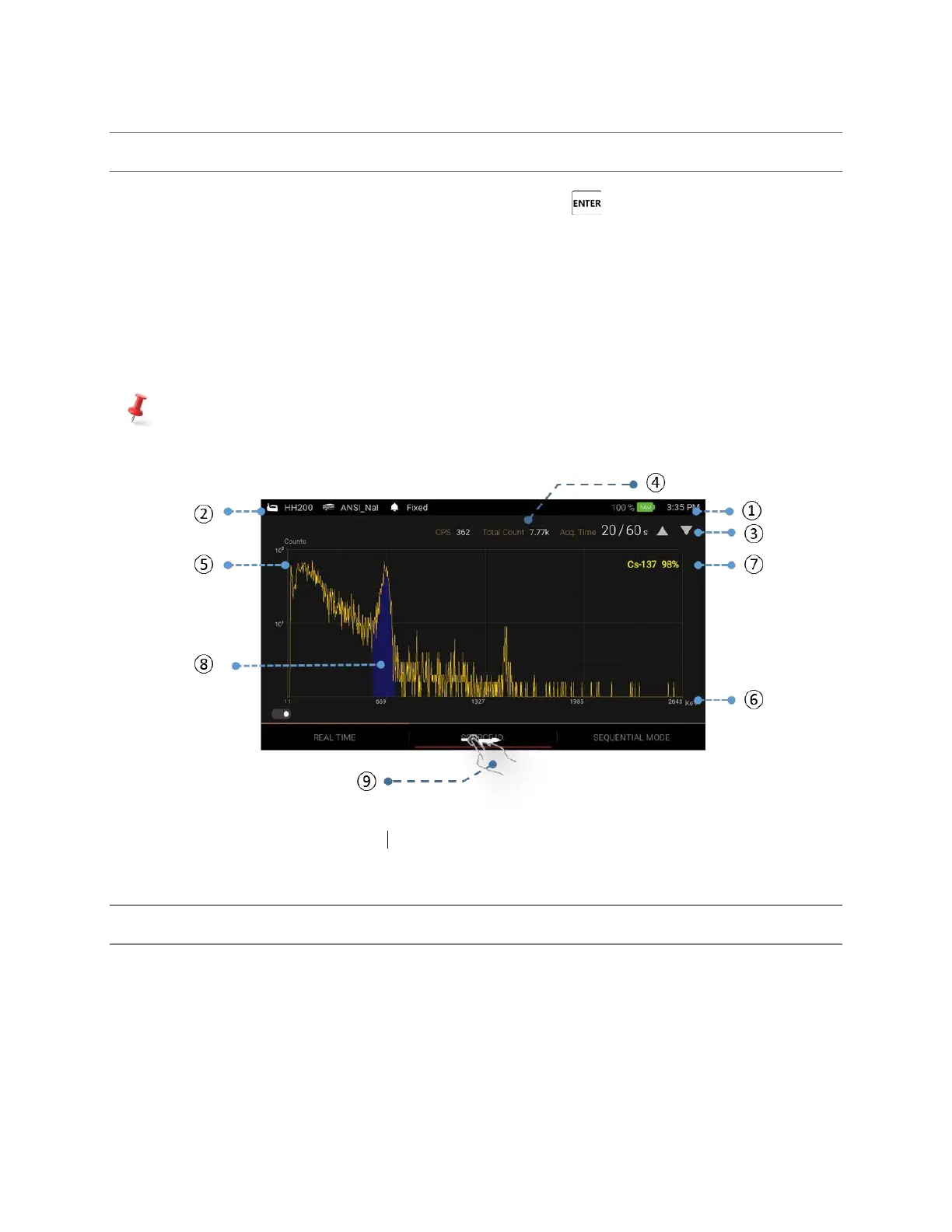
There are three ways to execute ‘Manual ID’; 1. Press and hold the ‘Enter’ key for about 2 seconds, 2.
Touch the ‘Source ID’ menu on the main screen, or 3. Scroll and locate the red bar on the ‘manual ID’ menu
by using left/right button on the handle and press ‘Enter’ key.
1. Touch the Manual Identification bar and an Event Spectrum will begin immediately.
2. The default capture time for Manual Identification is 30 seconds. You may increase or decrease the
capture time by touching the symbols ▲ or ▼ respectively. Default ime is increased or decreased in
increments of 10 seconds.
Default capture time and increment can be programmable in Setup menu.
When the capture time has elapsed, the Isotope Identification screen will return to the ID result screen.
Figure 5.10. Source ID Mode
STEP 11. EVENT LOG LIST
The Event Log associated with a ‘Manual ID’ is automatically generated and saved in the PDA device.
The Event Log screen provides a summary of every alarm event. This data is transferred to the
command center software database by connecting the PDA to the command center PC. Once the
information is downloaded to the database, the content is automatically deleted on the PDA.
Complete analysis of the spectra for the stored events can be performed with either the PDA or the
Command Center SW installed on the Command Center PC.



 To Next Page