SAM 950 Berkeley Nucleonics Corporation 21 of 62
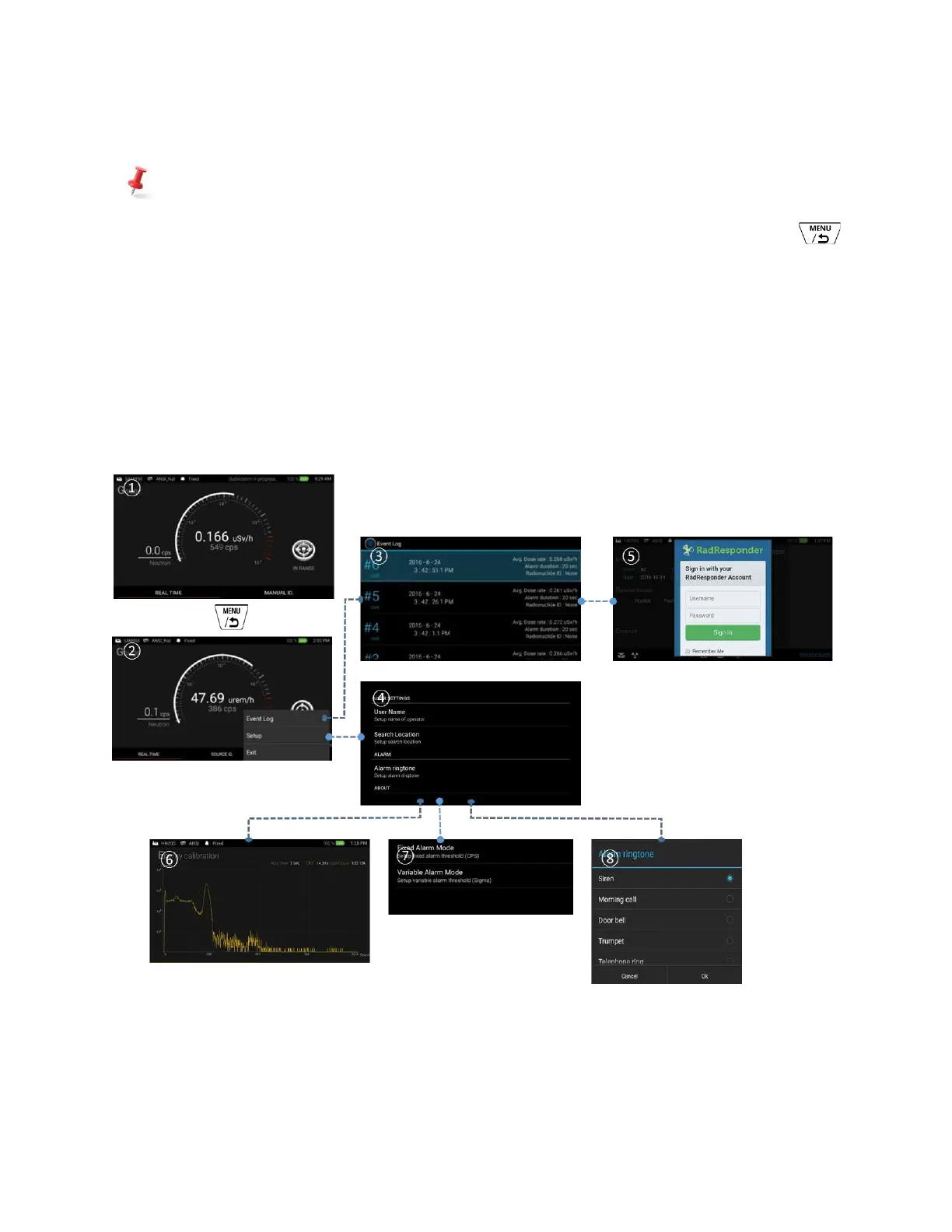
✓ Menu structure of setup and event log management
The setup and event log management features are intentionally hide from the main tasks such as
‘Manual ID’ and ‘Media file generation’ explained above in order to avoid busy traffic and
complications in operation. The setup and event log management can be accessed by press
button from the main screen. The pop-up menu is appeared and allows user to jump to the setup and
event log screen.
‘Setup’ ④ and ‘Event log’ ③ screen is accessible by selecting appropriate menu from the pop-up
menu on the main screen.
‘Event log’ screen ③ allows several tasks such as event analysis, Reach back service, RadResponder
⑤ service, and etc.
‘Setup’ ④ allows user to configure various parameters such as calibration ⑥, sequential mode
programming, alarm threshold ⑦, ringtone selection ⑧, account setup and more.
Figure 4.5. Menu structure of setup and event log management.



 To Next Page