EasyManua.ls Logo

BNC SAM 950 - Page 26

Default Icon
62 pages
Print Icon
To Next Page IconTo Next Page
To Previous Page IconTo Previous Page
Loading...
SAM 950 Berkeley Nucleonics Corporation 26 of 62
The duration of ‘Manual ID’ is configured in setup menu. The default duration is 30 sec. with 10 sec.
increment. However, user can configure the default time and increment by his own preference.
Duration can be increased/decreased by increment time using up/down button key on the handle.
Manual ID provides two screens, i.e., spectrum display and analysis screens. They are toggled by swift
the screen with a finger (left or right) or left/right button key on the handle.
Click the Back Button( ) will stop ‘manual ID’ and switch to the main screen. In this case, the
event data is discarded.
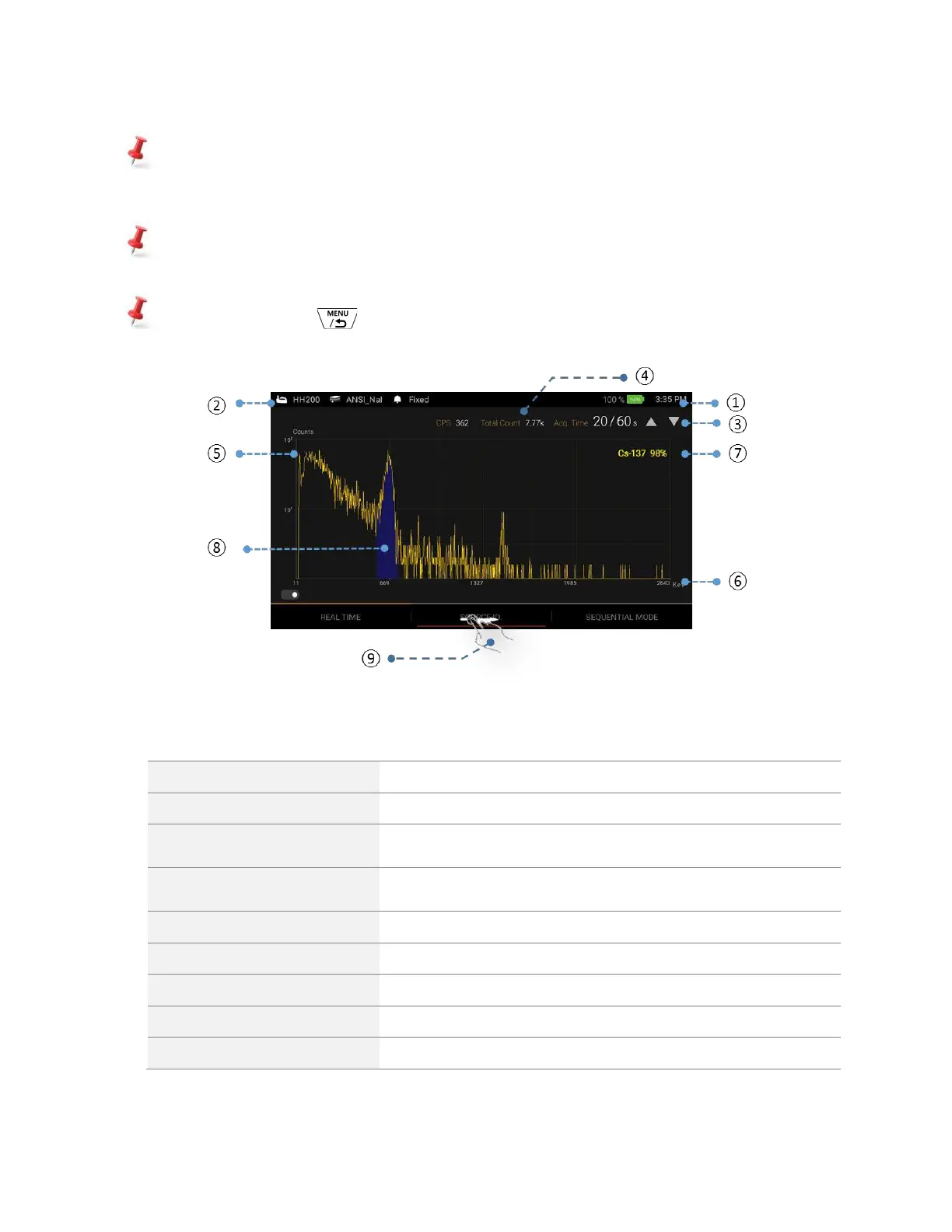
Figure 4.12. Manual ID screen

1
Battery Status
Battery status of SAM 950 unit and time information
2
Library and Alarm
Library and alarm type information
3
ID duration
ID duration and progress. Up/down arrow: increment/decrement ID
duration
4
Count info.
Total count and CPS information
5
Counts
Y-axis unit display (counts in self adjusting and logarithm scale)
6
Ch/Energy
X-axis unit display (channel or energy in linear scale)
7
Isotope ID
Isotope ID information
8
Photo Peak
Photo-Peak with color cording
9
Toggle screen
Toggle screen between spectrum display and ID analysis