14 en | In overview
FPA-5000 | FPA-1200 | AVENAR panel 8000 |
AVENAR panel 2000 | AVENAR keypad 8000
2022-01 | 5.0 | F.01U.378.877
User Guide
Bosch Sicherheitssysteme GmbH
4 In overview
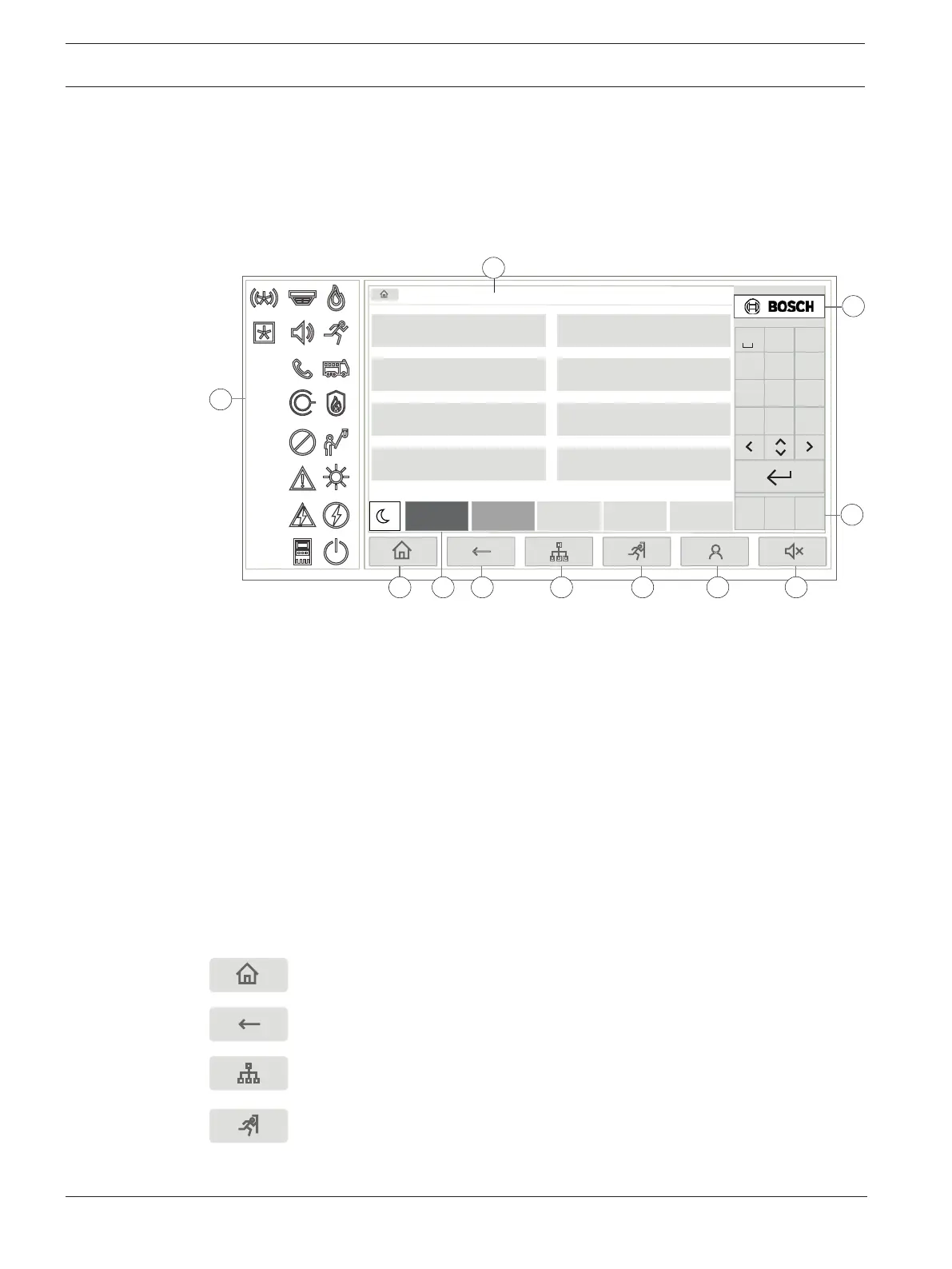
This chapter contains information about the following elements of the panel controller:
–
Operating elements, page 14
–
Status LEDs, page 15
–
Touch screen, page 17
–
Display support information, page 20
Fire
2
Control
2
Fault
0
Bypass
0
Status
Bypass
Block
Diagnostics
Maintenance
Configuration
Switch to day mode
Further functions
Control
Monitoring
Reset
* Level 3 logged in
1
2
4 3 5 6 7 8 9
10
11
DEF
21
ABC
3
4 5 6
GHI JKL MNO
7 8 9
PQRS TUV WXYZ
*
0
#
F1 F2 F3
,.-_
1 Status LEDs 6 Display a list of the networked panels and establish a
remote connection with a networked panel
2 Information bar 7 Display and control all alarm zones
3 Status bar 8 Log-in to the panel and call up personalized menu
4 Open start menu 9 Silence internal buzzer
5 Go back 10 Function keys, programmable
11 Display support information
4.1 Operating elements
Fixed keys
To select a function, touch the appropriate key.
The following functions can be executed with the fixed keys on the bottom of the display:
"Home" key. Call up the start menu.
Return to the previous selection.
Display a list of the networked panels and establish a remote
connection with a networked panel or a remote keypad.
Display and control all alarm zones.









 To Next Page