72 en | Mechanical installation of Contribution Devices DICENTIS
2021.01 | V2.2 |
Hardware Installation Manual
Bosch Security Systems B.V.
7.4 DICENTIS Microphones
Both the DCNM‑HDMIC High Directive Microphone and DCNM-MICL/S Stem Microphone are
typically used with the DICENTIS devices.
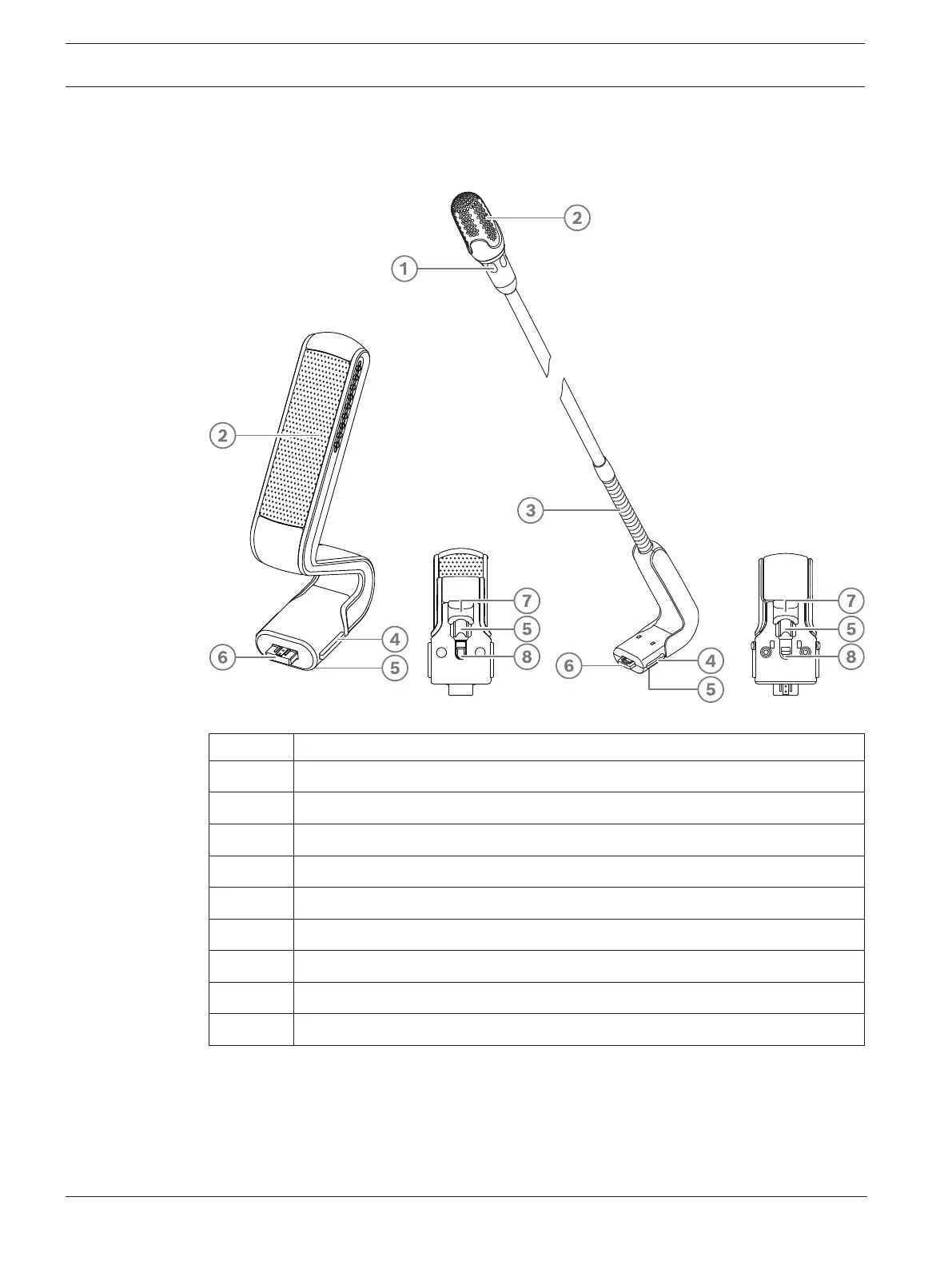
Figure7.9: DCNM‑HDMIC and DCNM‑MICS/DCNM‑MICL front and bottom view
Number Description
1 LED indicator.
2 Microphone grill.
3 Adjustable stem (DCNM‑MICS/DCNM‑MICL).
4 Connection guidance.
5 Slider guidance.
6 Connector plug.
7 Lock-slider for lock release (Press and shift to release).
8 Lock.
9 Device female connector (see following figure).
How to connect or remove the microphone
The microphone can be easily connected to the DICENTIS devices:













 To Next Page