DICENTIS Mechanical installation of Central Equipment | en 51
Bosch Security Systems B.V.
Hardware Installation Manual
2021.01 | V2.2 |
6.2 System server
The DICENTIS System server is provided with pre-installed and configured Windows Server®
2016 for Embedded Systems - Telecommunications (16 Core), pre-installed DICENTIS
Conference System software, and pre-configured DHCP server.
Note: please refer to the datasheet for the technical specifications.
Notice!
The DICENTIS System server contains a printed Microsoft End User License Agreement
(EULA) that needs to be handed over to the End User.
Notice!
Mounting accessories are available from HP.
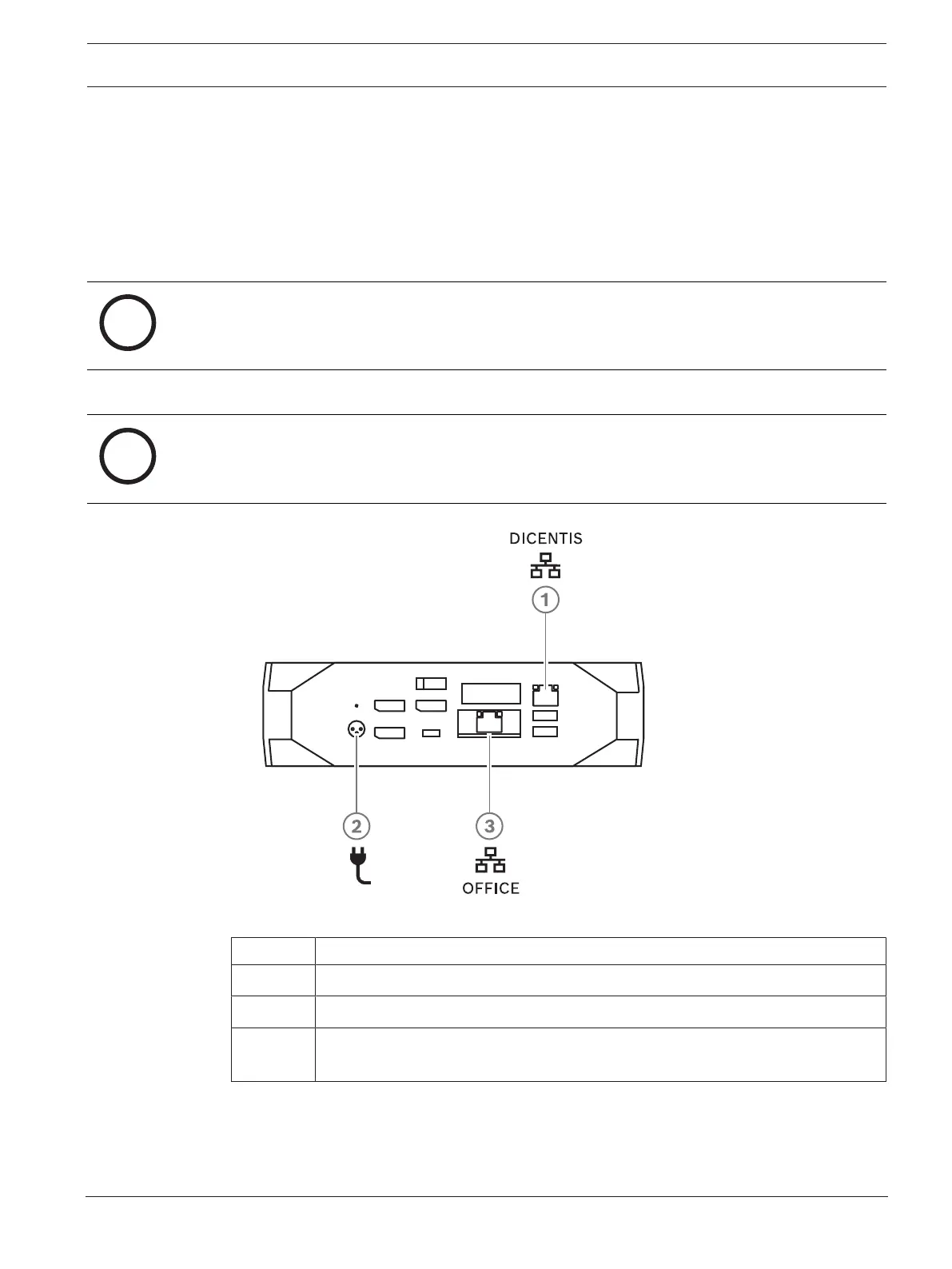
Figure6.5: DCNM-SERVER connections
Item Description
1 Network port to connect the DICENTIS system
2 Power supply input
3 Network port to connect the DCNM-SERVER to a network other than the
DICENTIS network.
How to install
The DCNM-SERVER can be mounted under a desk, behind a display or in a rack.
To install the system server:
1. Connect the DCNM-SERVER to the DICENTIS system (i.e. DCNM-(A)PS2 or network
switch) using a CAT-5E cable.













 To Next Page