DICENTIS Mechanical installation of Contribution Devices | en 69
Bosch Security Systems B.V.
Hardware Installation Manual
2021.01 | V2.2 |
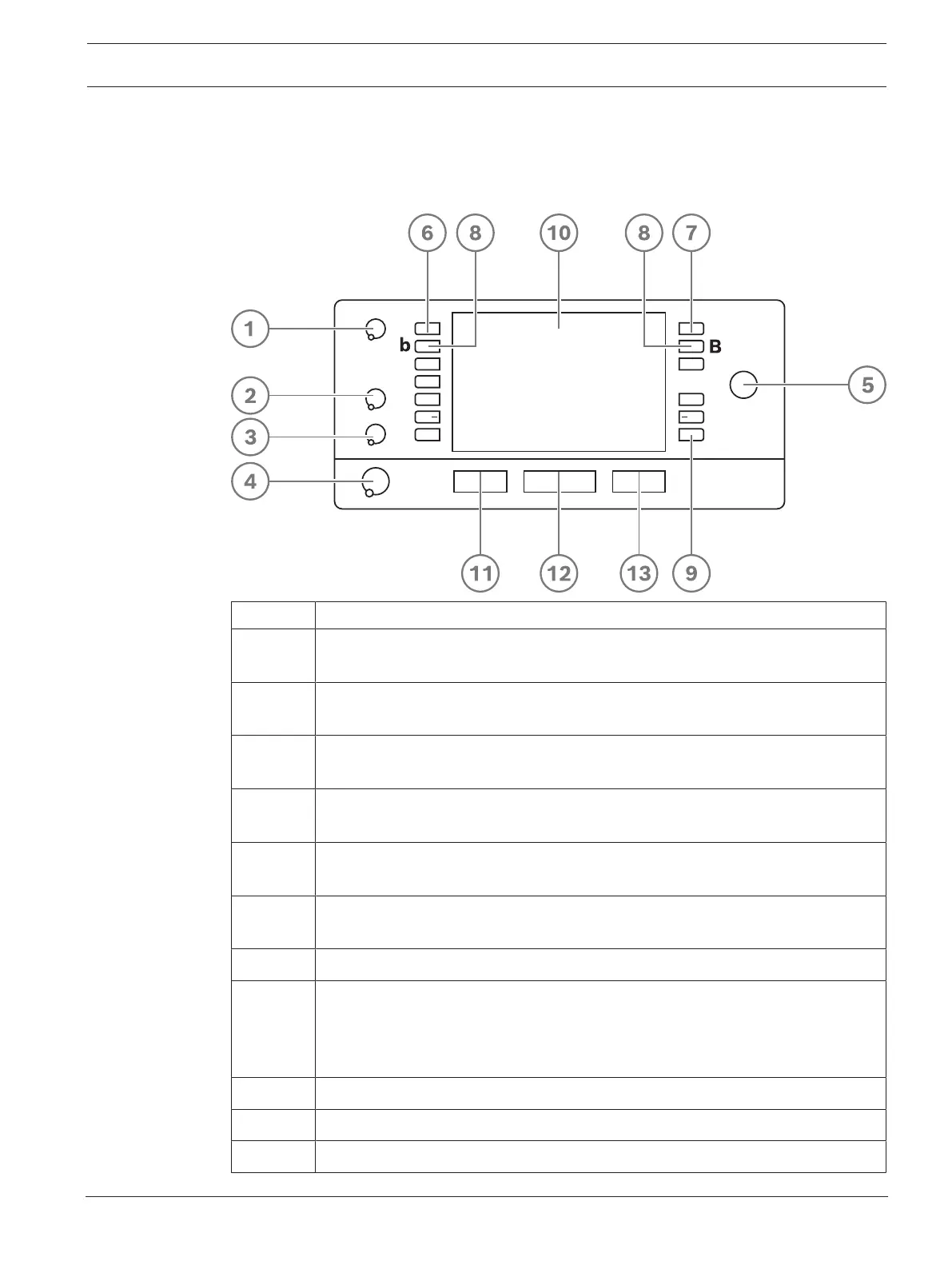
7.3 DCNM-IDESK / DCNM-IDESKVID Interpreter desk
The Interpreter desks (DCNM-IDESK and DCNM-IDESKVID) are used to:
– interpret the floor language (channel A) in a meeting or conference,
– relay the interpretation to various target languages via channel selection (channel B or C).
Item Description
1 Loudspeaker volume knob - Adjusts the volume level of the signal that is sent to
the loudspeaker of the interpreter desk.
2 Treble knob - Adjusts the level of the treble of the signal that is sent to the
headphones.
3 Bass knob - Adjusts the level of the bass of the signal that is sent to the
headphones.
4 Headphones volume knob - Adjusts the volume level of the signal that is sent to
the headphones.
5 Menu knob -Rotary control with integrated push button to configure and operate
the interpreter desk.
6 Pre-select buttons - Allows the interpreters to select a channel from which they
can render an interpretation (input).
7 Output buttons - Sets the output the target language will be sent to (A, B, C).
8 b - B buttons - Press these 2 buttons (with a small raised dash) at the same time
to enter the installation mode and assign the device to a booth and desk. See
“DICENTIS Software manual”, chapter 9 on how to configure the interpreter
desk.
9 Assignable buttons - 3 buttons that can be freely assigned
10 Display - Shows the configuration, user menus and provides user feedback.
11 Floor/Auto-relay button - Sets the source of the interpretation.










 To Next Page