DS7240-UK Reference Guide Copyright 2003 Bosch Security Systems P/N: 4998122677Cr1 Page 91
PART III: PANEL PROGRAMMING
35.2.1.2 24-hour Tamper Input
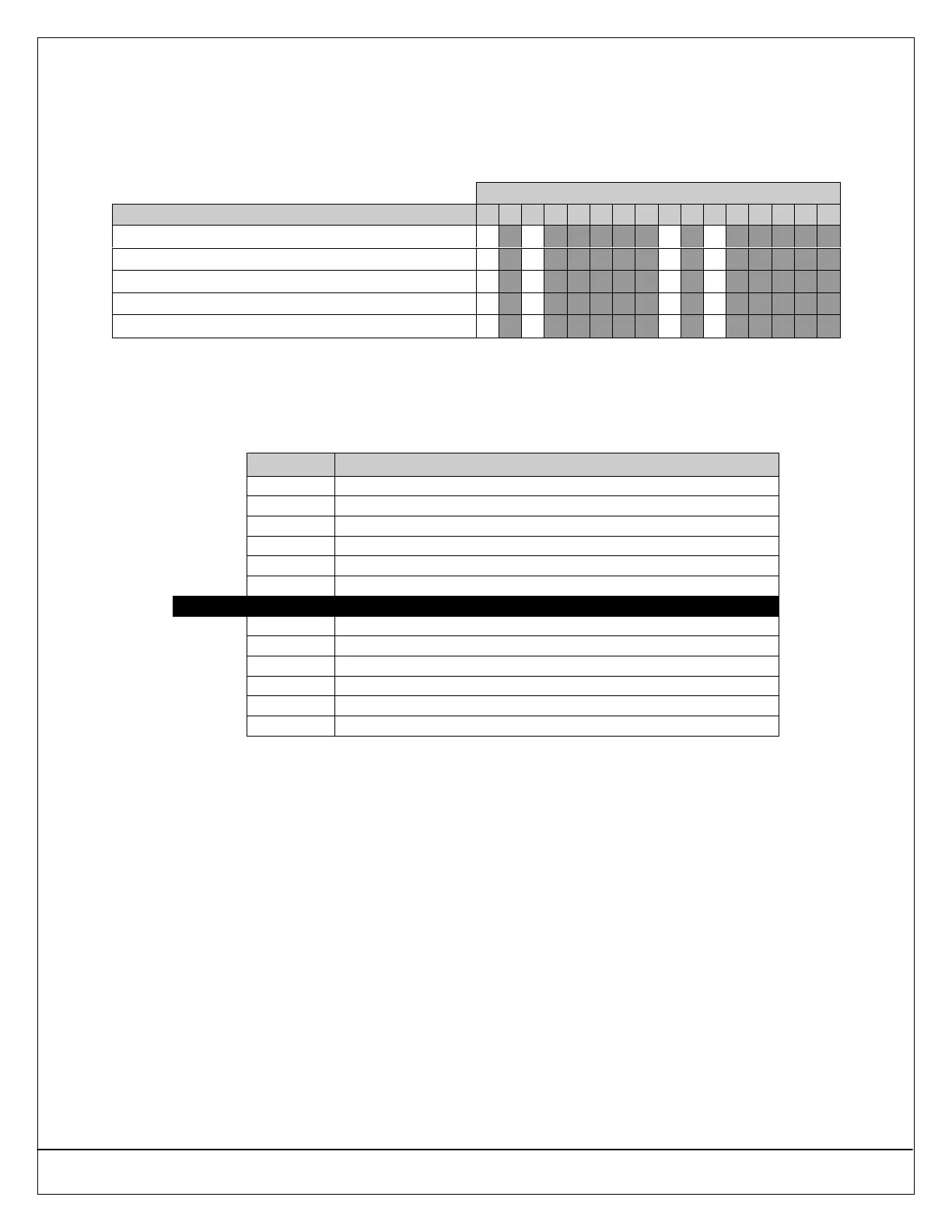
If the 24-hour Tamper type (Selection 4) is entered, use the following table to choose the function type. To program the 24-
hour Tamper zone function:
1. Enter a “4” in the appropriate Location Zone Function address (see Table 20).
2. Enter a value (0, 2, 8, or 10) using the following table in the appropriate Zone Function Options 1 Address 0933 (see
Table 22 on page 93).
Enter This Data Digit to Select Options
24-hour Tamper Input Options 0 1 2 3 4 5 6 7 8 9 10 11 12 13 14 15
No Options Selected
••
Reserved
Voice Verification
•• ••
Reserved
No EOL Required
•• ••
35.2.1.3 Controlled Keyswitch Types
If the Controlled Keyswitch type (Selection 10) is entered, use the following table to choose the function type. Selections 3, 7,
and 11 are reserved for future use. To program the Controlled Keyswitch zone function:
1. Enter a “10” in the appropriate Location Zone Function address (see Table 20).
2. Enter a value using the following table (0-15) in the Keyswitch Zone Function Options 1 address (0981).
Selection Keyswitch Function
0 Maintained, All On, Off from Any
1 Maintained, All On, No Off
2 Maintained, No On, Off from Any
4 Maintained, Perimeter Only, Off from Any
5 Maintained, Perimeter Only, No Off
6 Maintained, No On, Off from Perimter Only or Partial On Arming
Default 8 Momentary, All On, Off from Any
9 Momentary, All On, No Off
10 Momentary, No On, Off from Any
12 Momentary, Perimeter Only, Off from Any
13 Momentary, Perimeter Only, No Off
14 Momentary, No On, Off from Perimeter Only or Partial On Arming
15 Exit Terminator Button
• Momentary Keyswitch: To silence alarms (stop Alarm output), operate the keyswitch. If the area is armed, operating the
keyswitch to silence the alarm also disarms the area. If the area is disarmed, operating a momentary keyswitch to silence the
alarm does not arm the area.
• Maintained Keyswitch: To silence alarms (stop Alarm output) while the area is armed, turn the keyswitch to the disarmed
position. The panel disarms the area and silences alarms. To silence alarms (stop Alarm output) while the area is disarmed,
turn the keyswitch to the armed position (the panel does not arm) and then return to the disarmed position.
• Exit Terminator Button: When the Zone Functions Options 1 parameter (see page 97) is set to 15, the input functions as
an exit terminator button. This zone function activates in the same manner as the momentary keyswitch. When Exit Delay is
active, operating the exit terminator button terminates Exit Delay and immediately arms the panel. If Chime Mode is enabled
and Exit Delay is not active, pressing the exit terminator button activates the chime time and the button functions as a
doorbell.


 To Next Page