12 en | Description NurseCall Main Unit
F.01U.252.699 | V1.1 | 2012.01 User Manual Bosch Security Systems
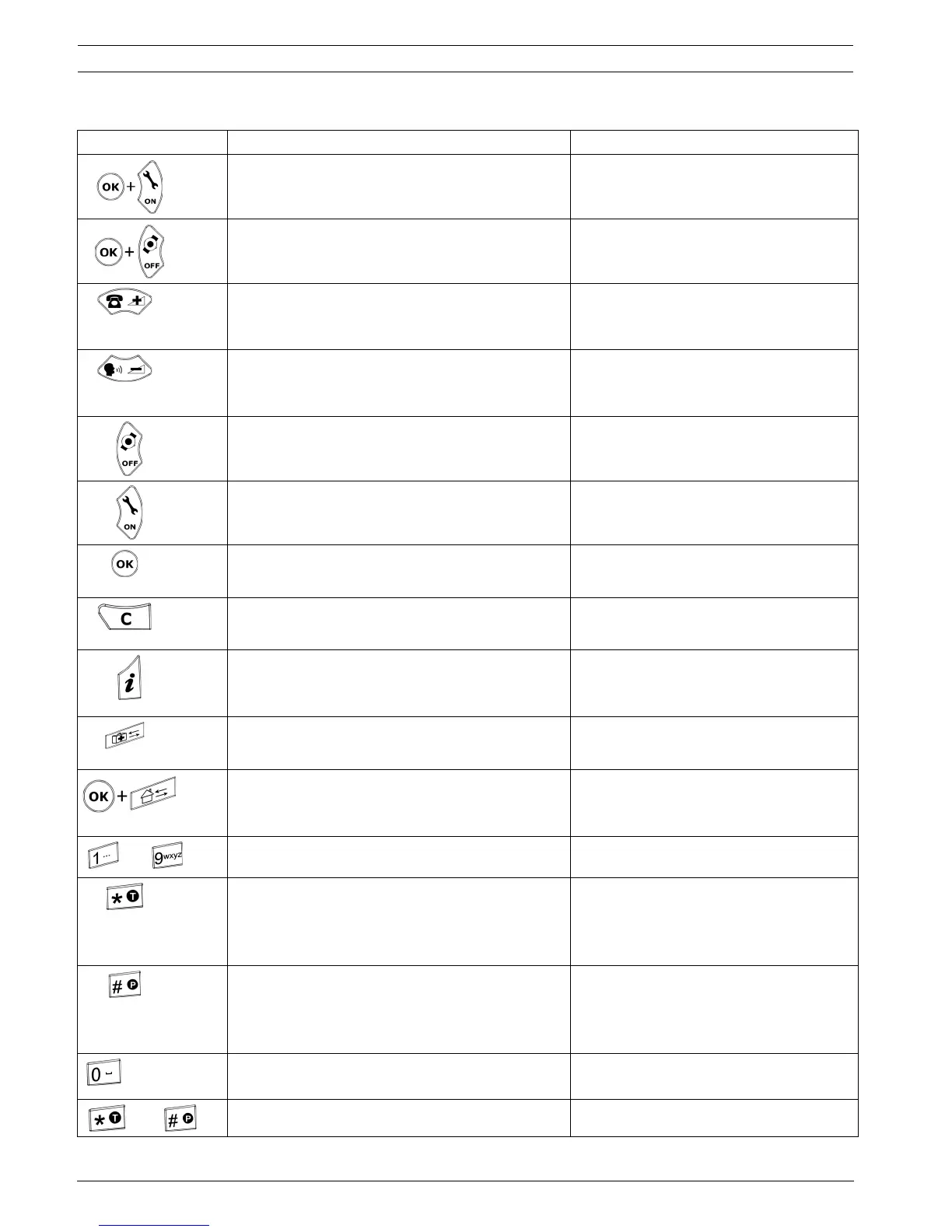
Keys Programming Mode Normal Operation
Access to parameters programming.
See Section 4.3 Parameters, page 25.
Not used.
Access to transmitters programming.
See Section 4.5 Transmitters, page 38.
Not used.
Scroll up to the next parameter. Increase the volume of the loudspeaker.
See Section 5.1 Adjusting the loudspeaker
volume, page 43.
Scroll down to the next parameter. Decrease the volume of the loudspeaker.
See Section 5.1 Adjusting the loudspeaker
volume, page 43.
Set a parameter value to OFF or to go to the
previous programming field.
Scroll down to the previous alarm/event.
Set a parameter value to ON or to go to the next
programming field.
Scroll up to the next alarm/event.
Confirm a value or a command. Not used.
Cancel an entry or a command.
Quit the programming mode.
Not used.
Check the value of a parameter or a transmitter. Check the status of the backup battery.
See Section 7.3 Monitoring the backup
battery, page 47.
Not used. Not used.
NPS programming function. See
Section 4.1.2 Programming with the NPS software,
page 22.
Not used.
to
Enter a value. Not used.
Erase all programmed acknowledgement
transmitters during a specific procedure.
See Section 4.5.8 Erasing all acknowledgement
transmitters, page 42.
Not used.
Disable the beep codes and delete the POS
indication.
See Section 4.3.5 RS-232 output setting, page 27
and Section Example of programming, Page 28.
Not used.
Enter a value or to set the default values.
See Section 4.3.5 RS-232 output setting, page 27.
Launch the event/alarm display mode.
then
No effect. Lock and unlock the keyboard.


 To Next Page
 Loading...

