MY22Z0a - 12_1.0_25.07.2022
166
About these operating instructions
6.18 Using the on-board computer
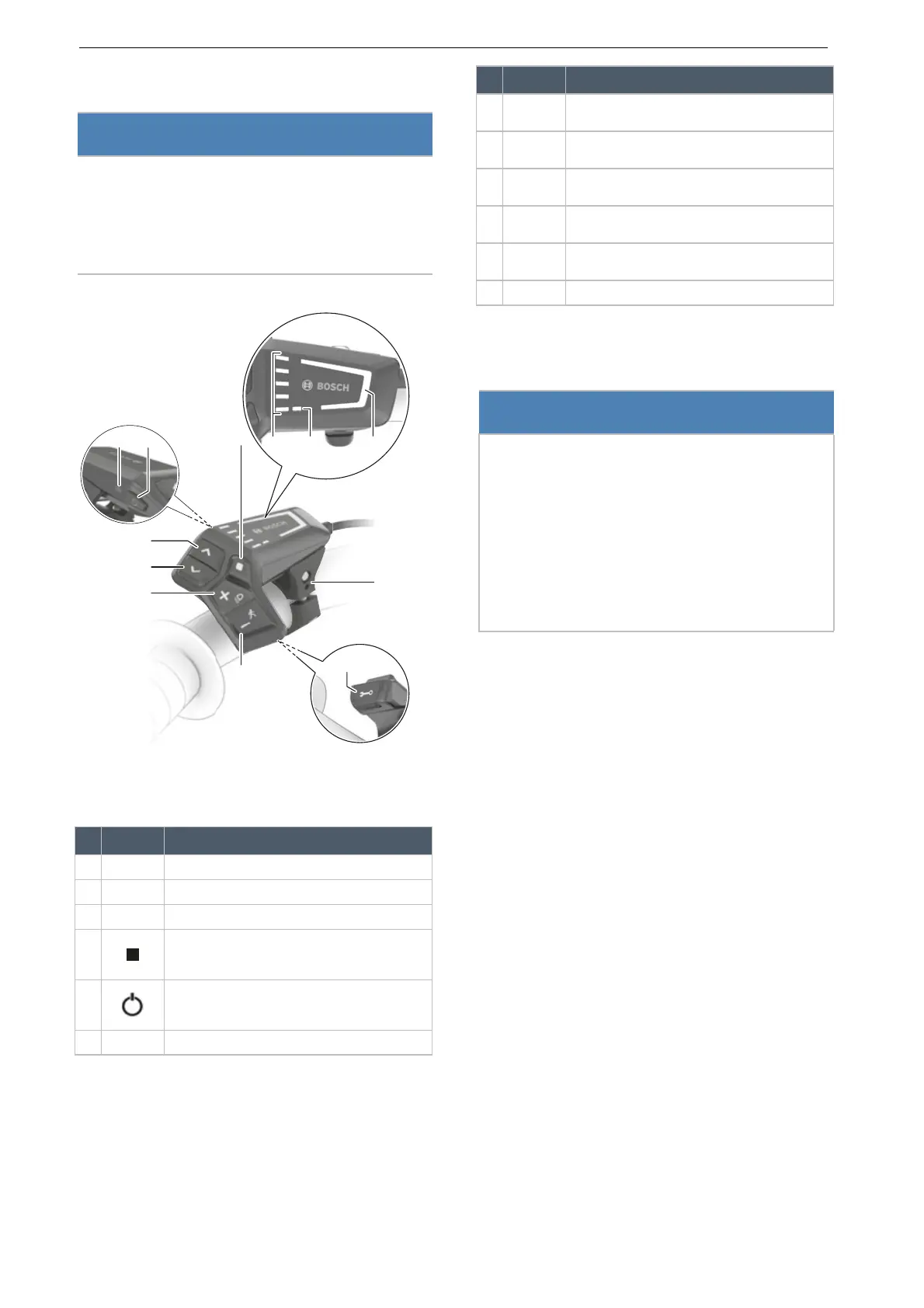
Figure 184: Overview of BOSCH LED Remote control
panel
6.18.1 Using the diagnosis port
The diagnosis connection is only designed for
maintenance purposes and is not suitable for
connecting external devices.
Keep the diagnosis port flap closed at all times
to ensure no dust or moisture can penetrate
through the port.
6.18.2 Charging the control panel battery
If both the charge level in the battery and the
control panel’s internal battery are low, the battery
can be charged via the diagnosis port.
Connect the internal battery to a power bank
or another suitable power source with a
USB type C® cable. (charge voltage: 5 V;
charging current: max. 600 mA).
Notice
Never use on-board computer, the display or
the display mount as a handle. If the on-board
computer, display or display mount are used to
lift the pedelec, components can become
irreparably damaged.
Symbol Designation
1 Selected level of assistance indicator
2 ABS indicator (optional)
3 Battery level indicator (control panel)
4 Select button
5 On-Off button (control panel)
6 Ambient light sensor
Table 49: Overview of control panel
7
>
Increase brightness button/
Forward button
8 < Decrease brightness button/
back button
9 + Plus button/
light button
10 – Minus button/
push assist button
11 Diagnosis connection (for maintenance pur-
poses only)
12 Mount
Notice
A USB connection is not a waterproof plug
connection. Any moisture penetrating through the
USB port may trigger a short circuit in the control
panel.
Never connect an external device.
Regularly check the position of the rubber
cover on the USB port and adjust it as
necessary.
Symbol Designation
Table 49: Overview of control panel




 To Next Page