MY22Z0a - 12_1.0_25.07.2022
55
Description
3.4.2 Control panel
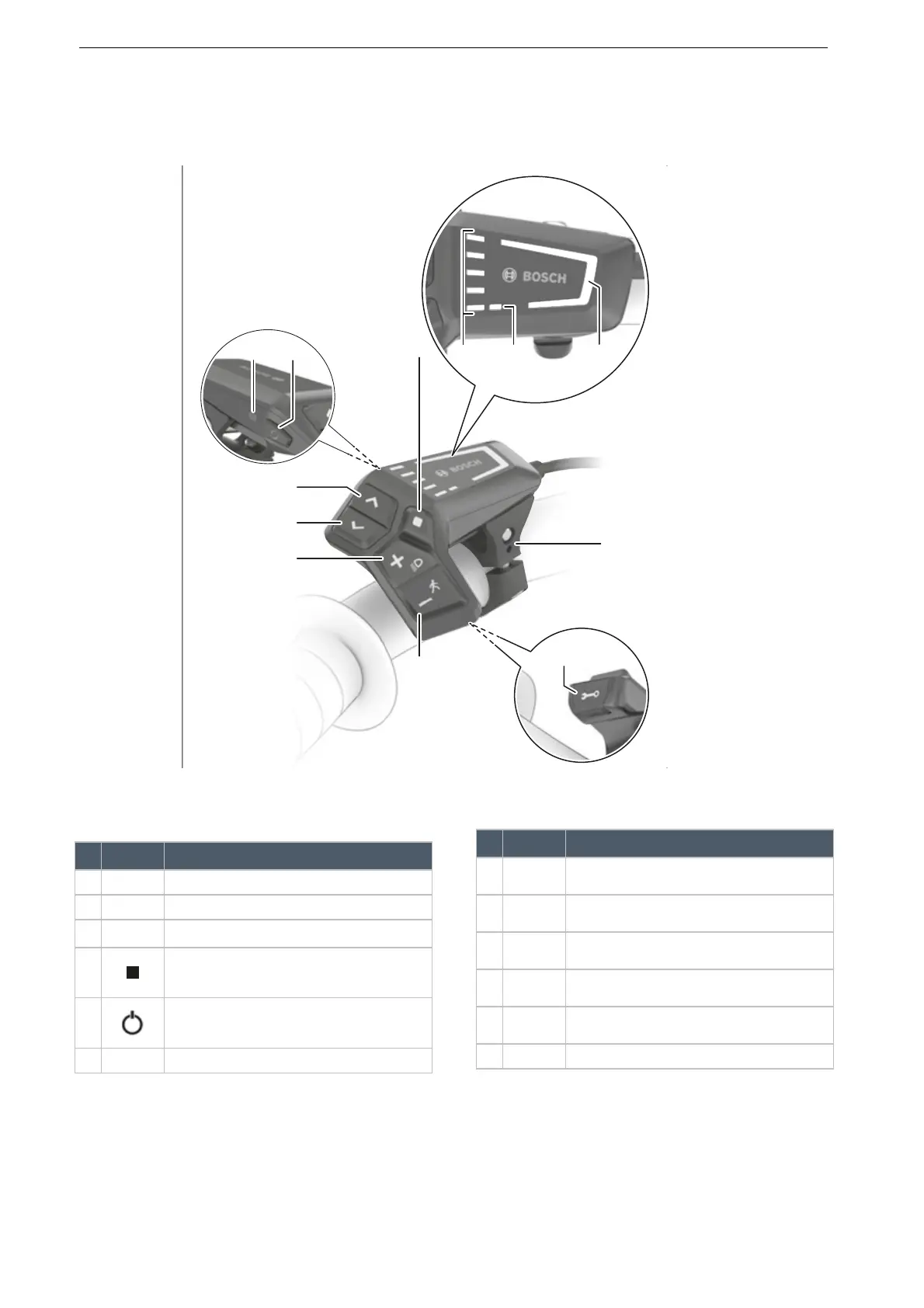
The control panel on the handlebars is the on-board computer. It controls the system and all indicators on
the display screen using six buttons.
Figure 45: Overview of BOSCH LED Remote control panel
Symbol Designation
1 Selected level of assistance indicator
2 ABS indicator (optional)
3 Battery level indicator (control panel)
4 Select button
5 On-Off button (control panel)
6 Ambient light sensor
Table 13: Overview of control panel
7
>
Increase brightness button/
forward button
8 < Decrease brightness button/
back button
9 + Plus button/
light button
10 – Minus button/
push assist button
11 Diagnosis connection (for maintenance
purposes only)
12 Mount
Symbol Designation
Table 13: Overview of control panel




 To Next Page