EasyManua.ls Logo

bq Avant - Book List Mode; Using the Sub-menu

bq Avant
55 pages
Print Icon
To Next Page IconTo Next Page
To Previous Page IconTo Previous Page
Loading...
16
6. Book list mode
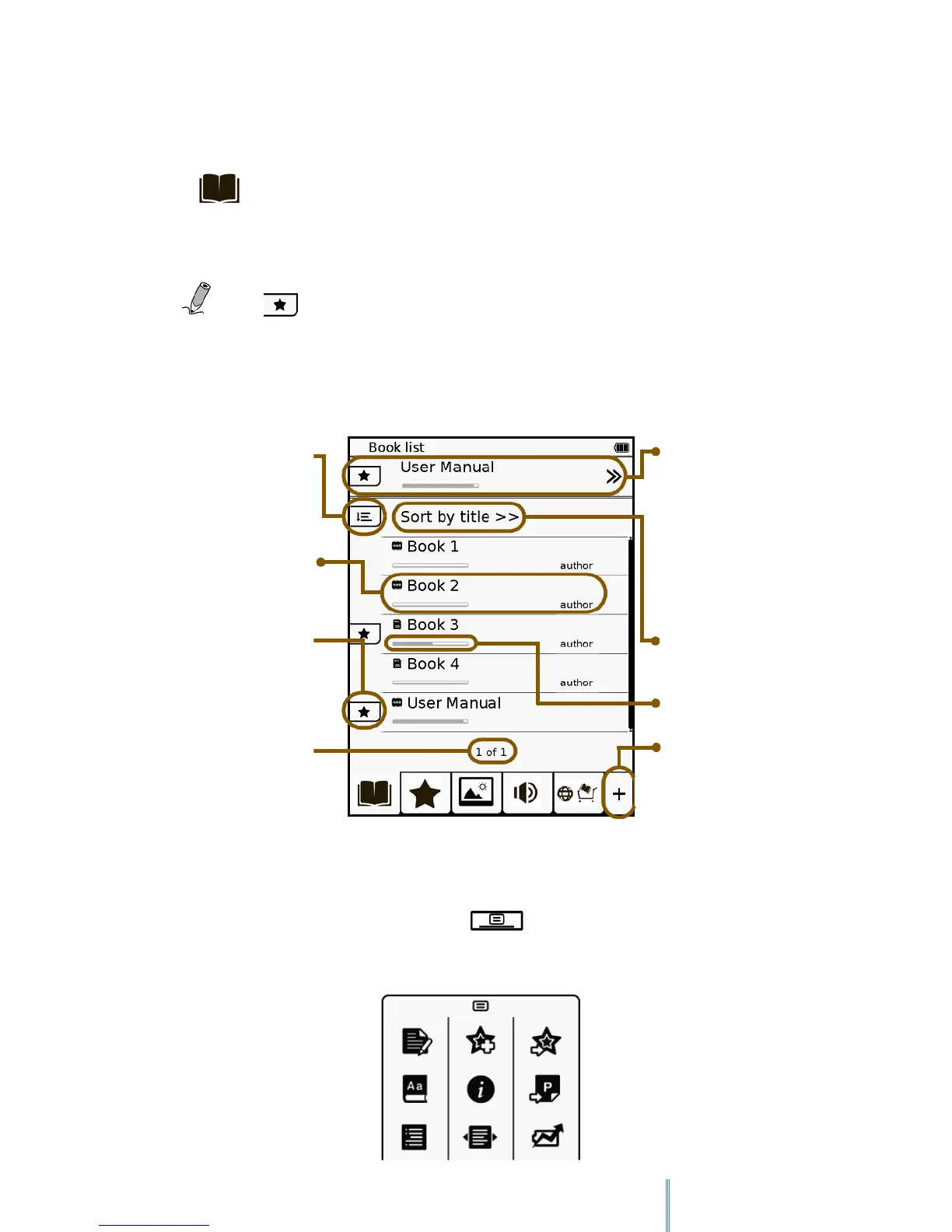
Tap to enter Book list mode and the Book list appears on the screen. The contents
stored in the internal memory as well as on the inserted MicroSD card will both be shown on
the Book list.
. Note: will only appear in the Book list after bookmarks or note are
added.
6.1 Using the sub-menu
When reading a book, press the Menu button to display the sub-menu.
Last read book.
Appears only when one
book is read.
Tap>> to continue
reading.
Current sorting method
Reading status bar
Show/hide the complete
menu
Sorting options
File source, vook name
and author
Appears when the vook
has bookmarks or notes.
Current/total page
number

Table of Contents

Other manuals for bq Avant

Related product manuals